Tabview
<TABVIEW/> : <BOX/>
The TABVIEW widget creates a tab for each page opened by using a unique FRAMEWORK that opens other pages within it instead of a new page in the navigation stack. When you want to have multiple pages that a user can switch between without having to navigate. This can solve a lot of roadblocks that occur with regular navigation, such as if a user needed to go back they would lose the context of the page they were on- with Tabview they can select the previous tab and then go back to the one they were on without either losing their state.
-
TABVIEWoverrides regular navigation andopen()EVENTSwill open the page in a new tab within theTABVIEW. - Having a lot of tabs open will use a lot of system resources.
Attributes :: VisibleWidget (inherited attributes)
| Name | Type | Default | Description | Req |
|---|---|---|---|---|
| datasource (data) | string | The id of the datasource used to build the tabview. This is optional. If used, the first <TAB/> is used as a prototype. |
||
| index | int | 0 | The selected tab index | |
| bar | bool | true | Display the <TABVIEW/> tab selector bar. When false, tab navigation is done programatically using methods described below |
|
| menu | bool | true | Display the <TABVIEW/> navigation menu |
|
| allowback | bool | true | When true, calling back() deletes the current tab if closeable (or nearest closeable <TAB/>). When the tab list is empty or there are no remaining closeable tabs, a subsequent call to back() navigates back to the previous page. If false, back() navigates to the previous page. |
| Name | Description |
|---|---|
| open(identifier) | Where identifier is the id (string) of an existing <TAB/>, the index (int) of the <TAB/> or the url of the tab |
| close(identifier) | Where identifier is the id (string) of an existing <TAB/>, the index (int) of the <TAB/> or the url of the <TAB/>
|
| add(url,title,closeable,icon) | Where url is a valid string url of the TEMPLATE to display, title (string) of the TAB text, icon (string) of the TAB icon (optional), and if the <TAB/> is closeable (bool) |
| next() | Selects/ and displays the next <TAB/> in the tab view (wraps). This can also be accomplished by incrementing the index property. |
| prev() | Selects/ and displays the previous tab in the <TAB/> view (wraps). This can also be accomplished by incrementing the index property. |
| first() | Selects/ and displays the first tab in the <TAB/> view. This can also be accomplished by incrementing the index property. |
| last() | Selects/ and displays the last <TAB/> in the tab view. This can also be accomplished by incrementing the index property. |
<FML>
    <SPLITVIEW width="230">
        <VIEW>
            <TREEVIEW icon="keyboard_arrow_right" expandedicon="keyboard_arrow_down">
                <NODE label="Information Components" expanded="true">
                    <NODE label="Text Attributes" >
                        <NODE label="Demo All Text" onclick="open('/resources/demo/demo-text.xml?title=Text')" />
                        <NODE label="Markdown" onclick="" />
                        <NODE label="Font" onclick="" />
                        <NODE label="Style" onclick="" />
                    </NODE>
                    <NODE label="Tooltip" onclick="open('/resources/demo/demo-tooltip.xml?title=Tooltip')" />
                </NODE>
                <NODE label="Input Types" expanded="true">
                    <NODE label="Input" onclick="open('/resources/demo/demo-input.xml?title=Input')" />
                </NODE>
            </TREEVIEW>
        </VIEW>

        <VIEW>
            <BOX>
                <TABVIEW id="tv" tabbutton="true" tabbar="true" />
            </BOX>
        </VIEW>
    </SPLITVIEW>
</FML>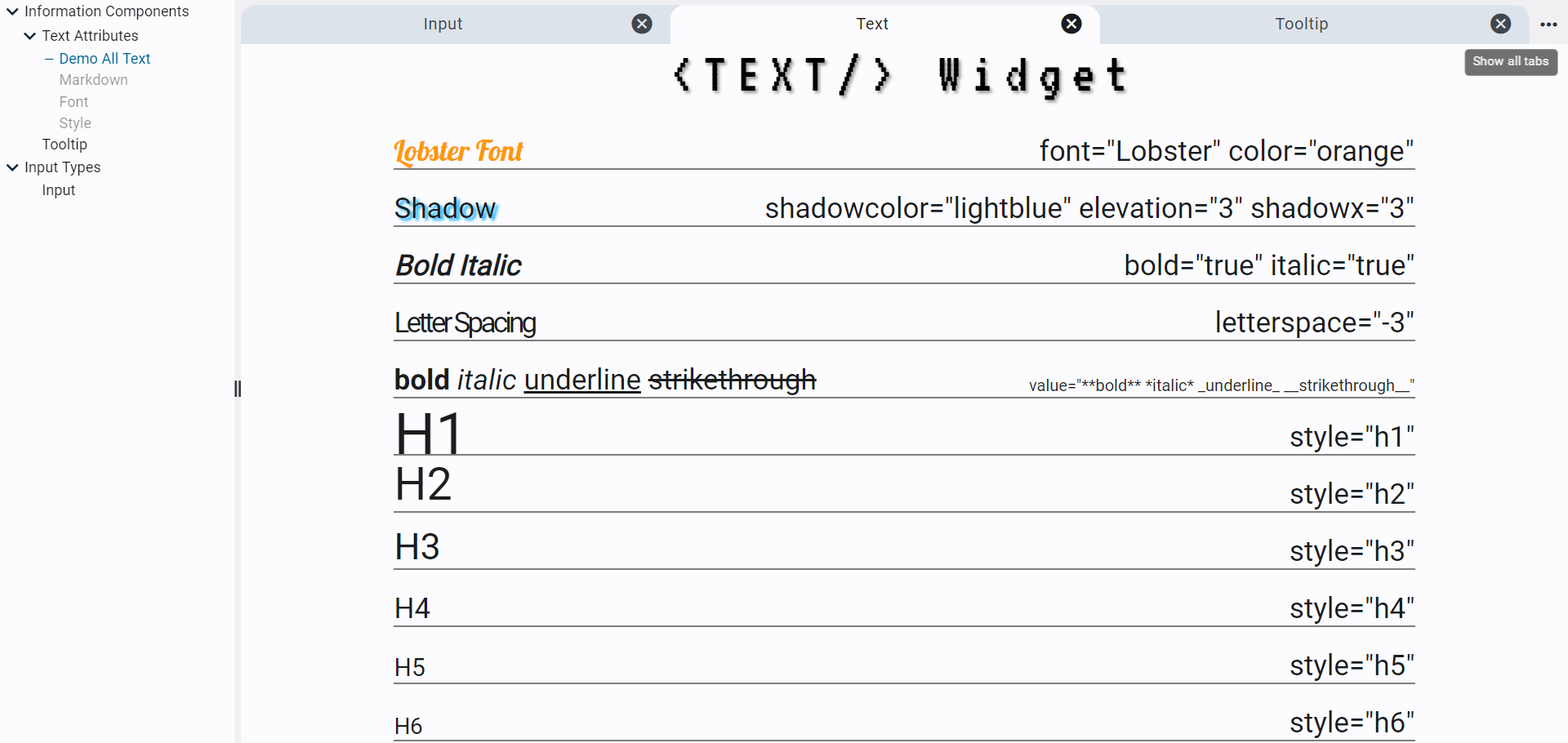

<FML title="TABVIEW (example2)" linkable="true">
	<TESTDATA  id="db1" rows="10"/>
	<TABVIEW id="people" datasource="db1" tabbutton="true" tabbar="true">
		<TAB icon="save" title="{data.first} {data.last}">
			<ICON value="save" size="80"/>
			<ROW>
				<TEXT value="Name" color="gray"/>
				<TEXT value="{data.first} {data.first}" bold="true"/>
			</ROW>
		</TAB>
	</TABVIEW>
</FML> Important Concepts
- Quick Start
- Widget Structure
- Layout Basics
- Config
- Navigation
- Authentication
- Server Configuration
- Offline Use
- Resource Guides
-
<FML/>
- <BOX/>
- <CHART/>
- <COLUMN/>
- <DRAWER/>
- <FOOTER/>
- <FORM/>
- <GRID/>
- <HEADER/>
- <LIST/>
- <MAP/>
- <WINDOW/>
- <PAGER/>
- <ROW/>
- <SCROLLER/>
- <SPLITVIEW/>
- <STACK/>
- <TABLE/>
- <TABVIEW/>
- <TREEVIEW/>
- <WEBVIEW/>