Table Header Group
TG : BOX
The <TD/> table header group widget is used to define the table header groups. Table header groups can contain can contain one or more <TD/> or <TG/> child cells. Table header groups can also contain other widgets for display (typically TEXT and ICON widets.
| Name | Type | Default | Description | Req |
|---|---|---|---|---|
| sortable | bool | All header cells are sortable. Note, indivdual header cells may override this and must have a sort defined |
||
| resizeable | bool | All header cells are resizeable. Note, indivdual header cells may override this | ||
| editable | bool | All header cells are editable. Note, indivdual header cells may override this | ||
| resize | string | normal | Defines how column resizing shares space with adjacent siblings. Possible values are "none", "normal" and "pushpull" | |
| filter | bool | Show column filter inputs for each header cell. Note, indivdual header cells may override this |
This example shows a single header group.
<?xml version="1.0"?>
<FML title="TABLE (example10)" linkable="true" keywords="export tg group">

  <TESTDATA id="ppl" rows="200"/>

  <TABLE id="tbl" data="ppl" paged="false" scrollshadows="true" margin="10">
    <!-- Table Header -->
    <TH>
      <TD>
        <TEXT value="Name"/>
      </TD>
      <TD field="city">
        <TEXT value="City"/>
      </TD>
      <TG>
        <ROW expand="false" center="true">
          <ICON value="manage_accounts_outlined" size="24"/>
          <PAD right="10"/>
          <TEXT value="Employment" size="20"/>
        </ROW>
        <TD field="company">
          <TEXT value="Company"/>
        </TD>
        <TD field="occupation">
          <TEXT value="Occupation"/>
        </TD>
      </TG>
    </TH>
  </TABLE>
</FML>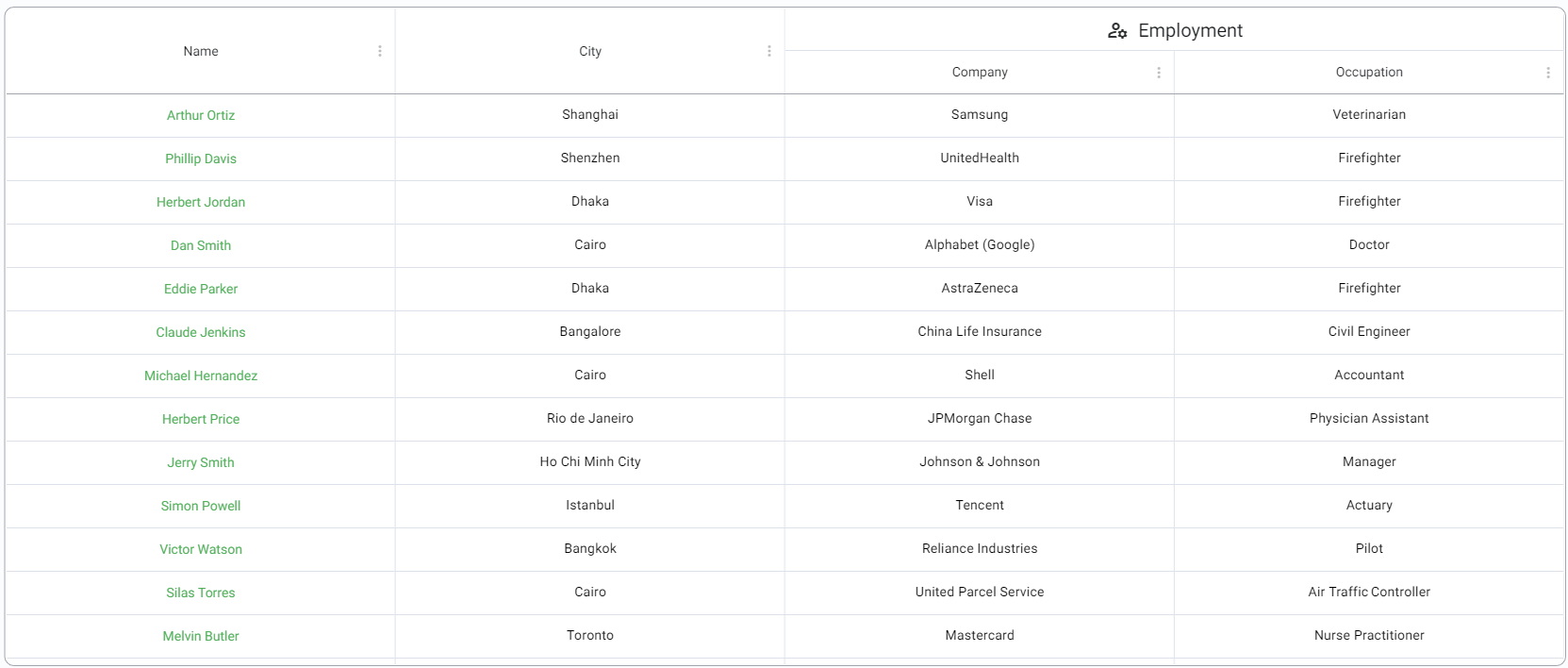

 Important Concepts
- Quick Start
- Widget Structure
- Layout Basics
- Config
- Navigation
- Authentication
- Server Configuration
- Offline Use
- Resource Guides
-
<FML/>
- <BOX/>
- <CHART/>
- <COLUMN/>
- <DRAWER/>
- <FOOTER/>
- <FORM/>
- <GRID/>
- <HEADER/>
- <LIST/>
- <MAP/>
- <WINDOW/>
- <PAGER/>
- <ROW/>
- <SCROLLER/>
- <SPLITVIEW/>
- <STACK/>
- <TABLE/>
- <TABVIEW/>
- <TREEVIEW/>
- <WEBVIEW/>