



Velvet is a beginner-friendly C++ UI library built on top of SFML. It is designed to be simple to use while providing possibilities for complex UI layouts.
| Raw | Styled |
|---|---|
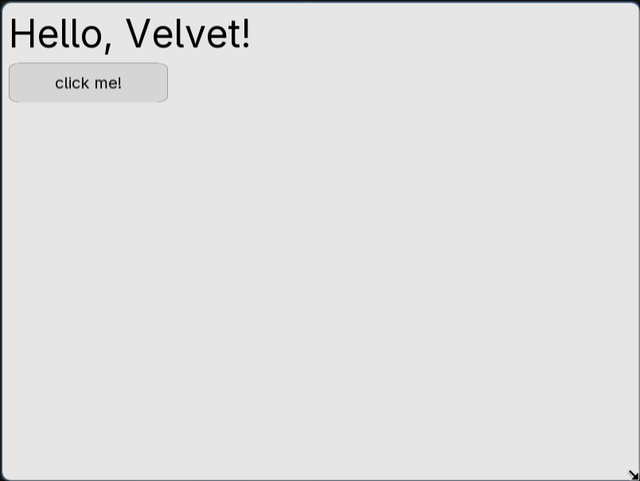 |
 |
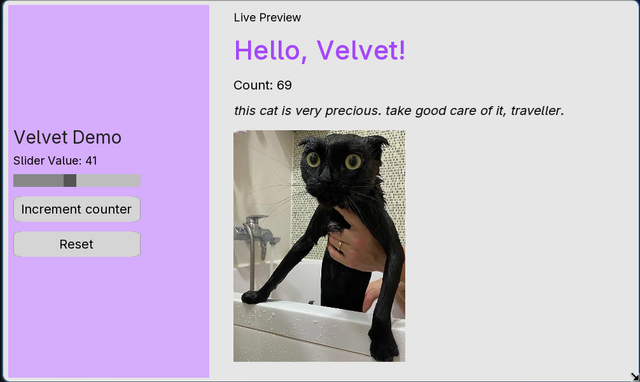
- Widgets - Pre-made widgets for a variety of use cases .
- Stack layouts - The core idea behind Velvet is centered around
Stacks, which can be used to align widgets. - Customization - Most widgets are easy to customize with various styling options.
#include <velvet/core>

int main() {
    Window window(800, 600, "My App");
    VStack root(10);

    Label heading("Hello, Velvet!", {{"fontSize", 48.f}});
    Button btn("Click me!");

    btn.onclick = [] {
        // handle click
    };

    root.add(heading, btn);
    window.add(root);
    window.run();
}
For a fuller example, a demo dashboard program can be seen in examples/DashboardEg.cpp.
Install CMake, Ninja, and SFML for your distro:
Fedora / RHEL
sudo dnf install cmake ninja sfml-develArch
yay -S sfml2 cmake ninjaUbuntu / Debian
sudo apt install cmake ninja-build libsfml-devgit clone https://github.com/rushilkoul/velvet.git
cd velvet
make rebuild # configure & build (run once for first-time setup)
make run # compile & run src/main.cppVSCode users: Install the clangd extension for accurate C++ IntelliSense.
A list and usage guide for all widgets can be found in the documentation's widget guide page.
Some of the widgets accept an optional style map at construction. For example:
Label title("Dashboard", {
    {"fontSize",  28.f},
    {"fillColor", 0x1F1F1FFFu},
    {"fontStyle", "bold"},
});

Button submit("Submit", {
    {"backgroundColor",      0x6C63FFFFu},
    {"hoverBackgroundColor", 0x574FD6FFu},
    {"fontColor",            0xFFFFFFFFu},
    {"width",                200.f},
    {"height",               48.f},
});
Colors are unsigned int RGBA hex values (0xRRGGBBAAu).
VStack and HStack support flex-style layout options:
VStack sidebar(15);
sidebar.setWidth(300);
sidebar.setHeight(600);
sidebar.setPadding(16);
sidebar.setJustifyContent("center");   // "start" | "center" | "end"
sidebar.setAlignItems("start");        // "start" | "center" | "end"
sidebar.setBackgroundColor(sf::Color(30, 30, 30, 200));The hosted documentation for Velvet can be found at: https://rushilkoul.github.io/velvet/.
Install Doxygen:
# Fedora / RHEL
sudo dnf install doxygen
Generate documentation:
make docsDocs are written to build/docs/html/index.html/
-
Thanks to SFML's developers and maintainers for their amazing library.
-
Velvet doxygen docs use very clean CSS from doxygen-awesome-css. Big ups to them!
-
Adwaita is the default font used in Velvet, beautifully created by the folks at The Gnome Foundation.