Home
PowerSTIG is a PowerShell module published to the PowerShell Gallery and updated on a quarterly cadence. It provides PowerShell DSC composite resources for applying DISA STIG security baselines.
When you use PowerSTIG, you work with high-level DSC resources (for example, WindowsClient, DotNetFramework, Edge) instead of manually authoring individual STIG rules.
PowerSTIG is published on PowerShell Gallery.
-
Open PowerShell ISE or a PowerShell prompt as Administrator (PowerShell v5).
-
Install the module:
Install-Module -Name PowerStig
-
If prompted about an untrusted repository, select Yes.
-
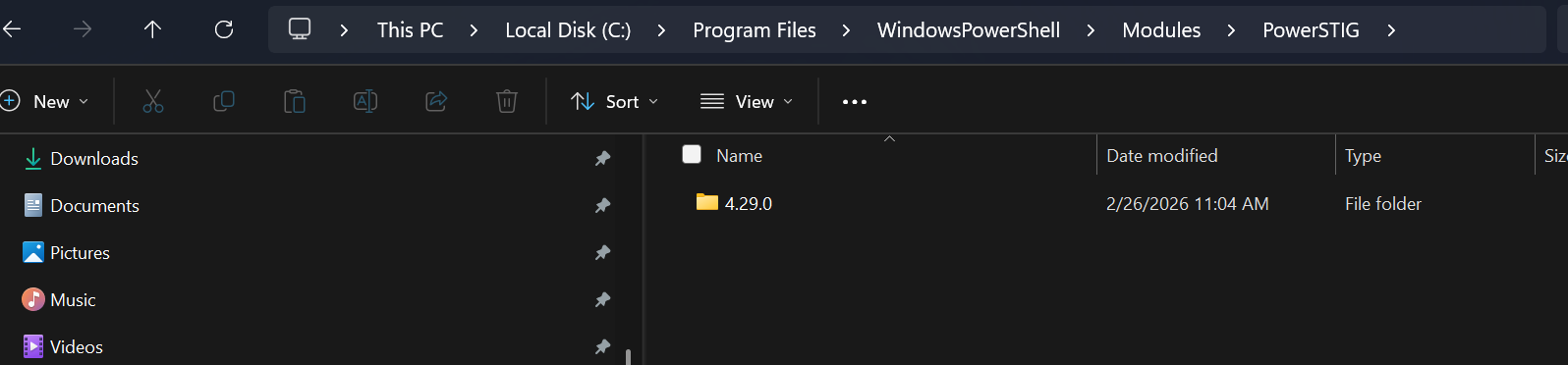
Confirm the install path:
C:\Program Files\WindowsPowerShell\Modules\PowerSTIG -
Validate the install:
Get-DscResource -Module PowerStig
Once installed, you can compile DSC configurations that reference PowerSTIG resources.
Install command example:

Untrusted repository prompt:

Installed module location example:
Validation command output example:

Each supported product in PowerSTIG is represented by a DSC composite resource.
For example, support for the Windows 11 Client STIG is exposed through the WindowsClient resource.
Configuration PowerStig
{
    Import-DscResource -ModuleName PowerStig -ModuleVersion 4.28.0

    WindowsClient 11Baseline
    {
        StigVersion = "2.5"
        OsVersion   = "11"
    }
}

. PowerStig -OutputPath "c:\class\mof"
This compiles a MOF file to the output path. The MOF can then be applied to enforce the selected STIG baseline.
You can include multiple resources in one configuration (for example, WindowsClient + Edge + Adobe).
There is also a .NET UI utility for viewing MOF files created with PowerSTIG.
- GitHub Page: Mof Inspector
- Download: Mof Inspector x64
The executable is not code signed, so it carries Mark of the Web metadata. Windows may show a warning when launching it.
If you want to avoid this warning entirely, compile and publish the solution yourself.
The module version in -ModuleVersion must exist on the machine compiling the configuration.
Import-DscResource -ModuleName PowerSTIG -ModuleVersion 4.28.0If that version is not installed, install it or update your configuration to a version that is present.
The StigVersion for a resource (for example, WindowsClient) must match STIG data available in the installed PowerSTIG module.
For example, with PowerSTIG 4.28.0, inspect:
C:\Program Files\WindowsPowerShell\Modules\PowerSTIG\4.28.0\StigData\Processed\
With each PowerSTIG version, the version directory changes. Next version is 4.29.0 and so on.
If multiple versions of a DSC resource are available (for example, v2.4 and v2.5), use the latest approved version for your environment.
For more information about working With PowerSTIG versions:
Composite resources expose a focused set of properties you populate in your DSC configuration.
To view available technologies and versions:
Import-Module PowerStig
Get-Stig -ListAvailable
Example output for WindowsClient (Windows 11 shown):
Technology        : WindowsClient
TechnologyVersion : 11
TechnologyRole    :
Version           : 2.4
RuleList          : {}

Technology        : WindowsClient
TechnologyVersion : 11
TechnologyRole    :
Version           : 2.5
RuleList          : {}
In your configuration, you would enter either 2.4 or 2.5 When the configuration runs:
- PowerShell compiles the configuration.
- A MOF file is generated (
localhost.mofor<NodeName>.mof). - DSC applies the resulting resource definitions to the target node.
Configuration PowerStig
{
    Import-DscResource -ModuleName PowerStig -ModuleVersion 4.27.0
    Import-DscResource -ModuleName PSDscResources -ModuleVersion 2.12.0.0

    Node localhost
    {
        WindowsClient 11-Baseline
        {
            StigVersion = "2.4"
            OsVersion   = "11"
        }
    }
}

. PowerStig -OutputPath "c:\someFolder"
Two notable items in this example:
-
PSDscResourcesprovides standard DSC resources and is only needed when your configuration uses them. -
Node {}defines the target node and controls MOF naming (localhost.mofor<NodeName>.mof).
PowerSTIG ships with pre-processed STIG XML data files that drive resource generation.
Example path for Windows 11 STIG v2.5 in PowerSTIG 4.28.0:
C:\Program Files\WindowsPowerShell\Modules\PowerSTIG\4.28.0\StigData\Processed\WindowsClient-11-2.5.xml
A rule entry in the processed XML includes a dscresource attribute that indicates which DSC resource implementation will enforce that setting during MOF generation.
Current process:
- DISA releases updated STIG content.
- PowerSTIG converts XCCDF source into DSC-friendly XML.
- Converted XML is added to
StigData\Processedand used during MOF compilation.
For a full list of supported products, see Supported STIGs.
Configuration PowerStig
{
    Import-DscResource -ModuleName PowerStig -ModuleVersion 4.27.0
    Import-DscResource -ModuleName PSDscResources -ModuleVersion 2.12.0.0

    Node localhost
    {
        WindowsClient 11Baseline
        {
            StigVersion = "2.4"
            OsVersion   = "11"
            SkipRule    = 'V-253261', 'V-253445'
        }

        DotNetFramework 4-Baseline
        {
            StigVersion      = "2.7"
            FrameworkVersion = "4"
        }
    }
}

. PowerStig -OutputPath "c:\someFolder"
This produces localhost.mof containing settings for both Windows 11 and .NET baselines.