A responsive status rail and live activity sidebar for Pi.
Pi Atelier replaces Pi's default footer with a calm Status Rail and adds an optional docked sidebar for live agent, turn, tool, context, session, and project information.
Wide terminals use two stable zones: agent state and workspace identity stay left, while readable telemetry is right-aligned. The extension always uses its fixed dark Midnight Spectrum—blue input/context, purple output/menu, cyan cache, amber cost/working, and red danger—regardless of the selected Pi theme.
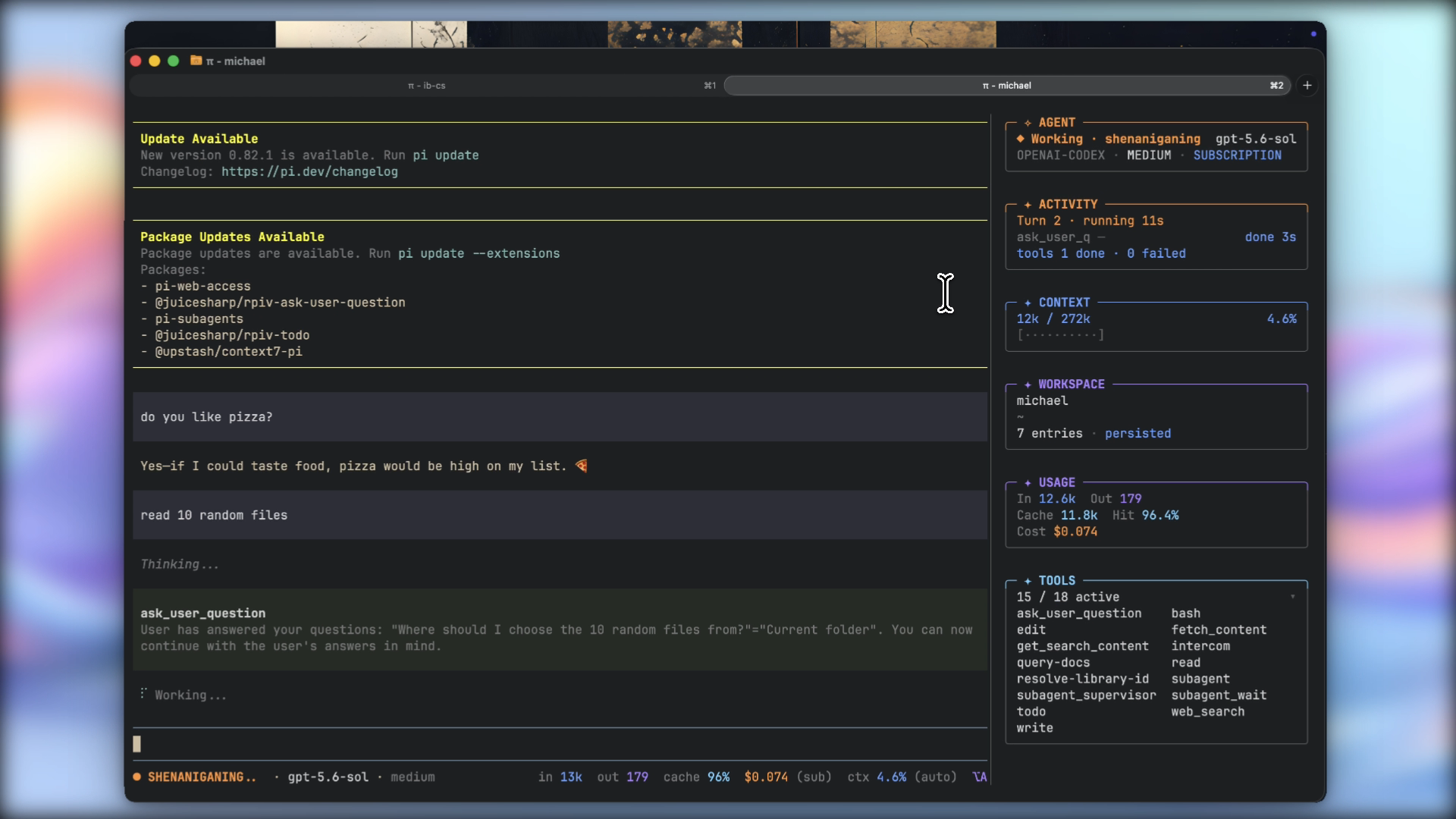
Watch the full-quality 74-second demo — the large video is hosted as a GitHub Release asset so it does not bloat Git clones or the npm package.
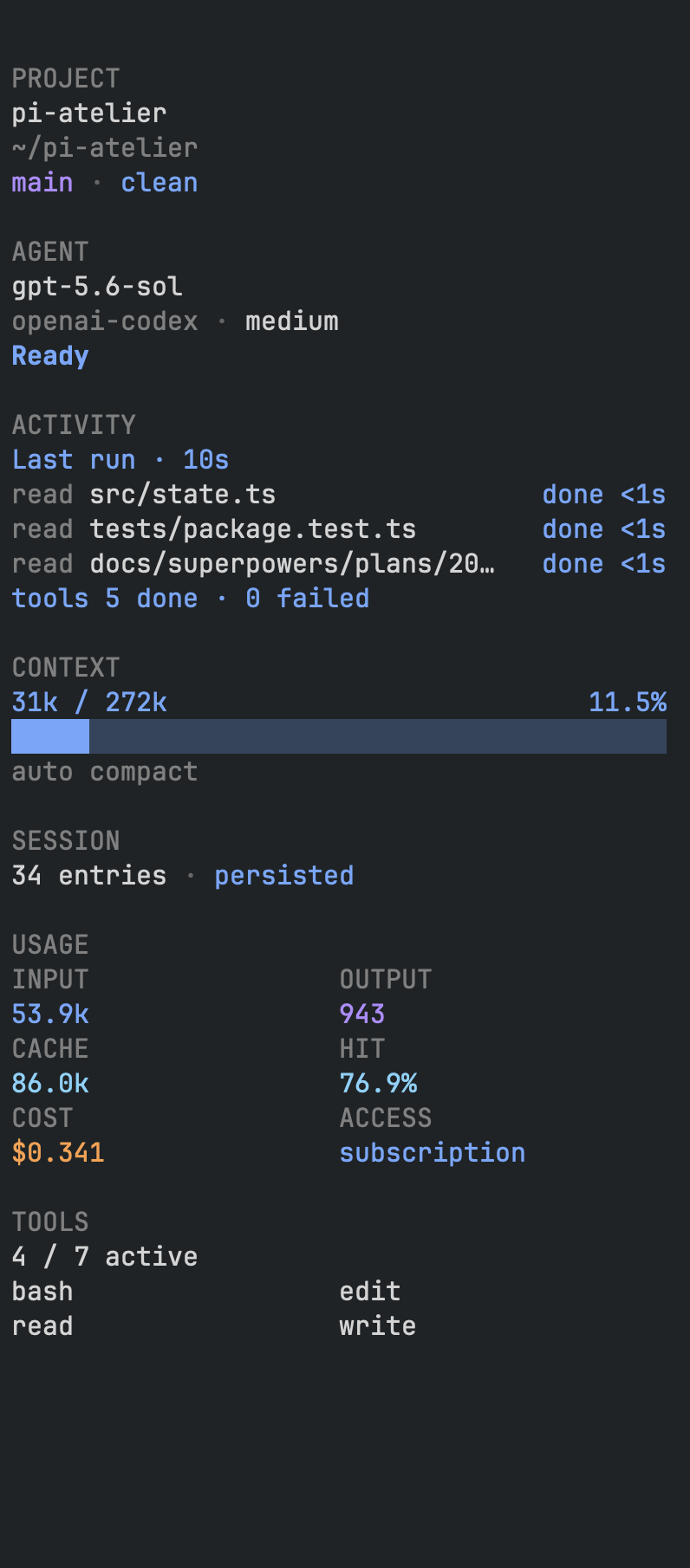
| Status Rail and Atelier menu access | Live Activity Sidebar |
|---|---|
 |
 |
Pi Atelier has one visual palette. Selecting a light, dark, or custom Pi theme does not change the footer's colors: labels, workspace text, metric values, state anchors, warnings, and errors all retain the same dark-style treatment. With NO_COLOR, the footer emits no custom RGB and uses theme-native neutral and semantic roles.
- Preserves cumulative input, output, cache-read, cache-write, cache-hit, cost, subscription, context, and compaction information
- Responsive one-line layout that never wraps
- Model and thinking-level controls
- Searchable tool controls
- Editorial, minimal, and classic display presets
- Session details, renaming, and safe compaction controls
- Default-on, session-scoped, non-capturing docked information rail with live run, turn, tool, response-performance, Workspace Pulse, and TODOS activity
- TODO tracking for compatible
todoresults, including legacy details and the optional@juicesharp/rpiv-todotask format - Completion notifications when a turn settles or Pi explicitly requests user input
- Fixed dark Midnight Spectrum across every selected theme, with a
NO_COLORfallback - User and trusted-project configuration
- No telemetry or external network requests
- Pi
0.80.7or newer - Node.js
22.19.0or newer - Interactive TUI mode
pi install npm:pi-atelierTry a checkout without installing it permanently:
pi -e ./pi-atelierPi packages execute with your full system permissions. Review third-party source before installation.
git clone https://github.com/michaelmjhhhh/pi-atelier.git
cd pi-atelier
npm install
npm run check
npx --no-install pi -e .See CONTRIBUTING.md for setup, validation, and pull request expectations.
incumulative input tokensoutcumulative output tokenscachelatest cache-hit percentage in the editorial presetread,write, andhitdetailed cache telemetry in the classic preset$cumulative estimated cost(sub)OAuth subscription-backed accessTTFTopt-in time to first token for the latest responseTPSopt-in generation throughput, prefixed with~while it is estimatedctxcontext utilization(auto)automatic context compaction*tracked working-tree changes
READY remains fixed when idle. During each work cycle, the working label is selected once from a playful built-in phrase set—such as KNEADING, MOONWALKING, or PONDERING—and remains stable until the cycle ends. When the full activity label fits, its ellipsis shrinks from ... to .. to . every 400 ms. The ellipsis reserves its maximum width so the model and following workspace text remain stationary. Narrower terminals use the compact, static WORKING label.
Open Pi Atelier with:
/atelier
The default shortcut is alt+a. Both entry points open the partitioned Atelier Control Center:
- Settings — the Display Settings Workspace, completion notifications, sidebar tool-list expansion, and Agent panel visibility
- Controls — session-scoped Sidebar visibility, model/thinking selection, and active tools
- Actions — session details, rename, and safe compaction
Open the Display Settings Workspace directly with:
/atelier display
The workspace shows the real Status Rail renderer as a representative preview. Use Up/Down to select, Enter or Space to change a preset, density, or optional Segment, and Shift+Up/Shift+Down to reorder any Segment (including required metrics and context). U performs one-step Undo, R reverts Display Session overrides to the Effective lower-layer baseline, S saves the current Display as the User default, and Escape closes while retaining active Session overrides. Preset application is one atomic mutation, and Save keeps the workspace open so its result or any failure remains visible.
Additional commands:
/atelier disable
/atelier enable
The sidebar starts shown whenever the extension initializes. An explicit off applies only to the current runtime; /reload restores the default shown state. Use these commands to control it explicitly:
/atelier sidebar       # toggle between shown and hidden
/atelier sidebar on    # show it; safe to repeat
/atelier sidebar off   # hide it; safe to repeat
/atelier sidebar tools  # toggle active tool-name details
/atelier sidebar tools on|off
You can also press alt+a to access separate sidebar visibility and tool-detail controls from the menu. When enabled, the session-scoped rail attaches to the top-right, fills the terminal height, and stays visible without taking editor focus.
The Agent panel at the top of the sidebar can be hidden independently through Settings → Agent panel in the Control Center. The panel is shown by default; toggling it off saves immediately to user configuration and removes the agent state and model metadata from the sidebar.
The scan-first hierarchy leads with agent state and model when enabled, followed by a compact segmented context meter and a merged workspace summary. Workspace Pulse summarizes the entire Git worktree containing Pi's current directory: tracked changes, text additions and removals, and count-only untracked files. Binary files, changed submodules, and unresolved conflicts appear only when present; the first inspection, clean, unavailable, stale, and non-repository states remain explicit rather than being inferred from missing data. Pulse refreshes after tool activity, Turn boundaries, and branch changes without polling or watching external editor activity. It does not run tests, read untracked contents, change completion notifications, or add detail to the footer's existing dirty marker.
Below 40 sidebar columns, a unified compact mode stacks Agent metadata when enabled alongside Workspace metadata, uses inline Usage pairs, and collapses tool details so important values remain complete instead of truncating. At wider sizes, paired metrics and tool columns use intrinsic content measurements rather than stretching gaps across the available width. Usage appears only when token or cost data exists. Access type remains visible with the agent metadata. Active tool names are collapsed by default behind the tool count and can be expanded through the command or menu; that preference is saved to user configuration. Expanded names automatically collapse below 40 sidebar columns and reappear when widened. Routine healthy extension statuses stay hidden, while warnings and errors appear as explicit alerts.
Completion notifications are enabled by default and are event-driven rather than time-based. Atelier notifies when Pi reaches agent_settled, meaning no automatic retry, compaction retry, or queued continuation remains. When @juicesharp/rpiv-ask-user-question is installed, Atelier also listens to its stable blocked-state event and notifies only after its questionnaire is actually waiting for an answer. Notifications contain only project, session, and operational status; prompt and assistant-response content is never included.
macOS and Windows receive best-effort native system notifications through osascript or PowerShell. Other platforms do not receive completion notifications. Native notification processes are detached, time-bounded, and fail silently if unavailable; Atelier does not add a Terminal notification or fallback.
On macOS, osascript notifications are attributed to Script Editor. They respect the user's Script Editor notification settings and active Focus modes, so users may need to allow Script Editor notifications or add it to the active Focus mode's allowed apps.
Use /atelier or alt+a to disable or re-enable completion notifications. The preference is saved to user configuration.
The Activity panel always reserves fixed rows for the run summary and response performance. Before a value is available it displays TTFT ~ · TPS ~, so those metrics never shift position or disappear as requests start or terminal height changes. During an agent run, the sidebar also adds information the compact footer intentionally omits: current one-based turn, elapsed run time, active parallel tool calls, the three most recent tool results, per-tool durations, and total done/failed tool counts. TTFT runs from provider request dispatch to the first generated response content. During streaming, TPS updates from Pi's conservative output-token estimate and carries a ~ marker; after the response ends, final output usage replaces the estimate and removes the marker. The footer remains a stable one-line status rail; it shows response-performance metrics only when the opt-in performance segment is enabled and otherwise omits them.
The sidebar uses a non-overlapping split presentation: Pi's workspace reflows into the columns to the left of the rail instead of rendering underneath it. It starts at 44 columns, can be resized between 28 and 72 columns, always preserves at least 64 columns for Pi, and auto-hides below 92 terminal columns.
Press Ctrl+Shift+R to enter temporary Resize mode. The Pi workspace and sidebar resize together continuously. Drag from the divider or either adjacent column and release to accept; clicks elsewhere leave Resize mode active. Use Left/Right for one-column adjustments, Shift+Left/Shift+Right for four-column adjustments, Enter to accept, or Escape to restore the previous width. Mouse reporting is active only during Resize mode, so ordinary terminal text selection is unchanged at all other times.
The split is implemented entirely inside Pi Atelier by wrapping the active TUI renderer at runtime; no Pi files are modified. This is a version-sensitive integration with Pi's current TUI structure and may require compatibility updates when Pi changes its renderer internals. A terminal character divider cannot display Ghostty's native hover resize cursor.
The TODOS panel accepts both legacy Pi todo details (todos items with done booleans) and @juicesharp/rpiv-todo task details (tasks items with pending, in_progress, or completed states). The @juicesharp/rpiv-todo extension is optional and must be installed separately; Pi Atelier neither installs nor requires it. The panel shows done/total progress, status indicators (✓ completed, ◐ in progress, ○ pending), and task IDs.
TODO state follows session-tree branch changes. Valid updates received while the sidebar is hidden remain current, valid empty lists clear the panel, and unknown task states are ignored rather than rendered as pending. With the sidebar visible and showSidebarTodos enabled, successful results containing at least one recognized task collapse in the workspace to a done/total summary; errors and malformed results remain fully visible.
User configuration:
~/.pi/agent/pi-atelier.json
Trusted project configuration:
<project>/.pi/pi-atelier.json
Project settings override user settings only after Pi trusts the project. Most menu changes apply to the current session; Save as user default writes display configuration atomically. Sidebar tool details, Agent visibility, and completion notifications are saved immediately so those preferences survive future sessions. Agent visibility and completion notifications are global user preferences, so project and session configuration cannot override them. Pi Atelier never modifies project configuration from the menu.
Complete example:
{
  "preset": "editorial",
  "shortcut": "alt+a",
  "density": "comfortable",
  "segmentLayout": [
    { "id": "brand", "visible": false },
    { "id": "activity", "visible": true },
    { "id": "metrics", "visible": true },
    { "id": "performance", "visible": false },
    { "id": "context", "visible": true },
    { "id": "model", "visible": true },
    { "id": "git", "visible": true },
    { "id": "statuses", "visible": true },
    { "id": "menu", "visible": true }
  ],
  "contextWarning": 70,
  "contextDanger": 90,
  "currencyDecimals": 3,
  "showSessionActions": true,
  "showSidebarToolNames": false,
  "showSidebarAgent": true,
  "showSidebarTodos": true,
  "completionNotifications": true
}
segmentLayout is ordered and every entry has explicit visibility. Pi Atelier preserves the first valid occurrence of each known ID, appends omitted IDs in Product order, and repairs metrics and context to visible without moving them. Unknown, duplicate, or malformed values produce one de-duplicated warning. Brand and extension Statuses rendering is controlled only by this normalized layout. Performance remains available for TTFT/TPS telemetry but is hidden in all three compatibility templates.
Product defaults are layered with User default, trusted Project override, then Session overrides. The resulting value is the Effective baseline shown by the workspace. Pi Atelier tracks the source of density, preset identity, layout order, and each visibility value; untrusted project configuration is not read. Workspace changes are Session-scoped and immediately update the live rail. Save atomically patches only preset, density, and a cloned segmentLayout into User configuration while preserving unrelated and unknown keys; it never writes Project configuration. Revert clears only Display Session fields, and one-step Undo restores the raw Session snapshot, including after Revert. Any density, order, or visibility combination that does not exactly match a complete template has the custom preset identity; restoring an exact template restores its named identity.
Legacy segments, ornament, and showExtensionStatuses keys remain load-compatible and are translated into a complete normalized layout. A usable segmentLayout is authoritative over those keys in the same layer. Legacy omitted segments remain present but hidden; legacy Brand and Statuses combinations retain their prior visible result. Brand and Statuses have no overlapping runtime gates: normalized segmentLayout is the sole visibility source. New configuration should use segmentLayout.
During streaming, TPS is prefixed with ~ while it is estimated, then replaced with final throughput when the response ends. Each value is dimmed to ~ until it is measured. Visibility toggles retain an entry's position, and reordering includes hidden entries.
showSidebarAgent controls whether the Agent panel renders inside the sidebar. It is a global user-only preference; trusted project and session values are ignored. When set to false, the sidebar still shows but omits the agent state and model metadata section while leaving Activity, TODOS, Context, Workspace, Usage, and Tools unaffected. The preference can also be toggled through Settings → Agent panel in the Control Center and saves immediately.
showSidebarTodos (default true) controls whether the sidebar displays the TODOS panel. Set to false to disable the panel and show complete todo output in the workspace. See Sidebar for supported result formats and TODO output behavior.
- editorial — default Status Rail with activity, workspace identity, cache-hit summary, and telemetry
- minimal — compact activity, metrics, context, model, and menu
- classic — detailed cache telemetry, context, model, Git, and extension statuses
The Status Rail removes optional information by priority as the terminal narrows instead of switching to fixed layouts. Brand and extension statuses are removed first, followed by Git and thinking level, cost, model, input and output totals, response performance, cache, and finally the menu shortcut. Activity and context are retained longest, and the result is truncated safely rather than wrapping when space is exceptionally tight.
Pi Atelier:
- Performs no telemetry, analytics, or external network calls
- Does not store prompts, responses, credentials, or session content
- Never includes prompt or assistant-response content in completion notifications
- Reads structured usage metadata already available inside Pi
- Executes read-only local Git worktree inspection after relevant Pi events to show branch and Workspace Pulse counts; untracked file contents are never read
- Invokes
osascripton macOS or PowerShell on Windows for enabled best-effort system notifications - Reads project configuration only when Pi reports the project as trusted
Pi supports one custom footer at a time. If multiple extensions call setFooter, extension load order determines which footer is visible. Pi Atelier does not wrap undocumented footer internals. Disable it with /atelier disable to restore Pi's built-in footer.
Some terminals or personal keymaps intercept alt+a. Use /atelier, then choose another shortcut in pi-atelier.json and run /reload.
Token and cost metrics are cumulative across the entire session. Context percentage describes only the current model context after compaction.
Pi Atelier intentionally does not install terminal UI in print, JSON, or RPC modes. In TUI mode, check whether another extension replaced the footer later in load order.
Contributors must not publish packages, change release versions, create tags or releases, or edit npm publishing credentials. Maintainers own release verification, merging, releases, and publishing.
Release verification must include:
npm run check
npm pack --dry-run
npm pack
Inspect the tarball before running npm publish.
MIT