Pretty greeter is a lightdm-webkit based animated greeter using a mimicking of the Dock of OS X.
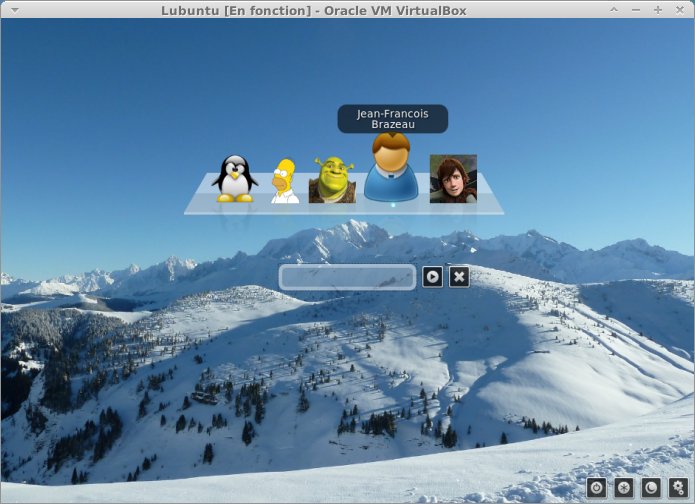

Pretty greeter uses CSS Dock V2.
Pretty greeter is built on top of lightdm-webkit-greeter. So it has to be installed.
For Ubuntu users, if you haven’t already installed it, open a terminal and type:
apt-get install ligthdm-webkit-greeter Enable ligthdm-webkit-greeter by editing /etc/lightdm/lightdm.conf and by setting greeter-session property to lightdm-webkit-greeter :
[SeatDefaults]
#greeter-session=lightdm-gtk-greeter
greeter-session=lightdm-webkit-greeter
user-session=xubuntu- Download pretty greeter
- Unzip it in
https://github.com/jfbrazeau/lightdm-webkit-pretty-greeter/tarball/master - This should create a folder named like
jfbrazeau-lightdm-webkit-pretty-greeter-28c4b13 - Rename this folder to
pretty(so that the complete path becomes/usr/share/lightdm-webkit/themes/pretty) - Edit the resource
/etc/lightdm/lightdm-webkit-greeter.confand setwebkit-themeproperty topretty:
theme-name=Ambiance
#webkit-theme=default
webkit-theme=pretty
font-name=Ubuntu 11
xft-antialias=true
xft-dpi=96
xft-hintstyle=slight
xft-rgba=rgb
Now if you restart your computer (or at least if you restart lightdm), the pretty greeter should be activated.
To uninstall pretty greeter, simply restore the greeter-session property of the /etc/lightdm/lightdm.conf file and restart your computer (or at least lightdm).
You may also want to :
- Remove the folder
prettycreated in/usr/share/lightdm-webkit/themes/ - Restore the
webkit-themeproperty of the/etc/lightdm/lightdm-webkit-greeter.conffile
To change users icons, there are two options :
- Create a
.facefile in the user’s home folder in which you put ajpgorpngresource
Or
- Create a resource named with the user’s login in
/var/lib/AccountsService/icons/ - Edit
/var/lib/AccountsService/users/<userLogin>and add a propertyIcontargeting the icon resource you just created
Pretty greeter works well with 96×96 images.