Releases: gameeapp/gamee-js-construct2
3.0 RC3

3.0 RC2
Installation instructions
This version is not compatible with previous version. If you have standing project with previous version and you want install latest plugin, we suggest to:
- backup previous plugin you have (officialy released plugins are still available in this repository)
- clone/copy and backup your project
- in your project, make comments in event sheets where you use 'GAMEE Connector' plugin
- remove GAMEE Connector plugin from your project completly
- close C2
For everyone we suggest to:
- navigate to
C:\Program Files\Construct 2\exporters\html5\plugins(64bit system) and remove gamee-connector folder (this is for those who just copy/pasted plugin into this folder) - navigate to
C:\Users\entit\AppData\Roaming\Construct2\pluginsand remove gamee-connector folder, notice that in C2 manual there was mentions just AppData folder, but in my case it was different, (this is for those who installed .c2addon before) - run C2 and install latest addon gamee-connector.c2addon
- restart C2
Fixes
closes #5 - If nothing was saved before "" will be returned.
Changes & Additions
IMPORTANT
Current version require putting one instance of the GAMEEConnector object into the layout.
Plugin moved back to 'single global'. Use Handshake action instead, which is more intuitive.
Actions
- new action
Handshake, this will contact GAMEE platform and handles initial data. After calling this method,On handshakewill be triggered.
3.0 Ghost mode RC
Installation instructions
This version is not compatible with previous version. If you have standing project with previous version and you want install latest plugin, we suggest to:
- backup previous plugin you have (officialy released plugins are still available in this repository)
- clone/copy and backup your project
- in your project, make comments in event sheets where you use 'GAMEE Connector' plugin
- remove GAMEE Connector plugin from your project completly
- close C2
For everyone we suggest to:
- navigate to
C:\Program Files\Construct 2\exporters\html5\plugins(64bit system) and remove gamee-connector folder (this is for those who just copy/pasted plugin into this folder) - navigate to
C:\Users\entit\AppData\Roaming\Construct2\pluginsand remove gamee-connector folder, notice that in C2 manual there was mentions just AppData folder, but in my case it was different, (this is for those who installed .c2addon before) - run C2 and install latest addon gamee-connector.c2addon
- restart C2
Fixes
- renamed (fixed typo)
InitalSound=>InitialSound
Changes & Additions
IMPORTANT
Current version require putting one instance of the GAMEEConnector object into the layout.
Texts, categories and descriptions were updated for most of ACE. Also some ACE has been renamed, which will make your previous projects not compatible.
Actions
- renamed
Save state=>Save - renamed
Request social=>Load social data - changed
Game over, has one optional parameter now
Conditions
- removed
Receive saved data, new conditionOn handshakeinstead - renamed
Receive social data=>On social data loaded - new condition
On handshake, after this condition is met, multiple expressions are available - changed
Start, has three modes (normal, replay, ghost)
Expressions
- renamed
Save state=>SaveState, is available afterOn handshake - renamed
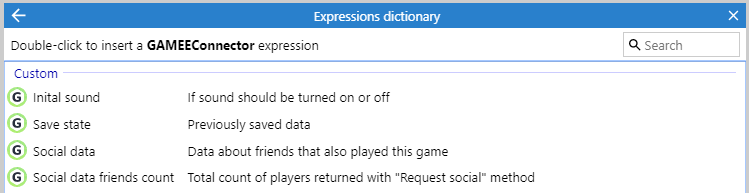
Social data=>SocialData - renamed
Social data friends count=>SocialDataFriendsCount - new expression
RecordedData, is available afterOn handshake - changed
InitialSound, is available afterOn handshake
New template
Template.capx contains basic configuration for GAMEE Connector addon, including sound, start, update score, pause and game over.
Replay and Ghost mode
New functionality is available now. When calling 'Game over', you may fill one optional parameter record [string]. This will be stored for later usage and considered as a record of the game. This functionality is not mandatory and not applicable on every game.
Then players might browse in GAMEE application and trigger play 'Replay' or play 'Ghost mode'. In both cases game will obtain previously saved record.
Then for 'Replay' it is expected player will just observe some replay of previous game.
Then for 'Ghost mode' it is expected player will play game and compete with another player.
Request Social
2.0
Note this is version 2.0 and is not backward compatible with previous version.
uses gamee-js 2.0.6 instead of 2.0.4
Fixes
#1 Handshake after game is ready
Cross compatible changes
You have to place one and one only instance into inital layout now.
You must not put more than one instance in the project even if you have more layouts.
You can use ACE in any event sheet (even if first layout is not active)