Isolated dev environments that boot in seconds, not minutes.
Self-hosted Kata Containers sandboxes with K8s orchestration.

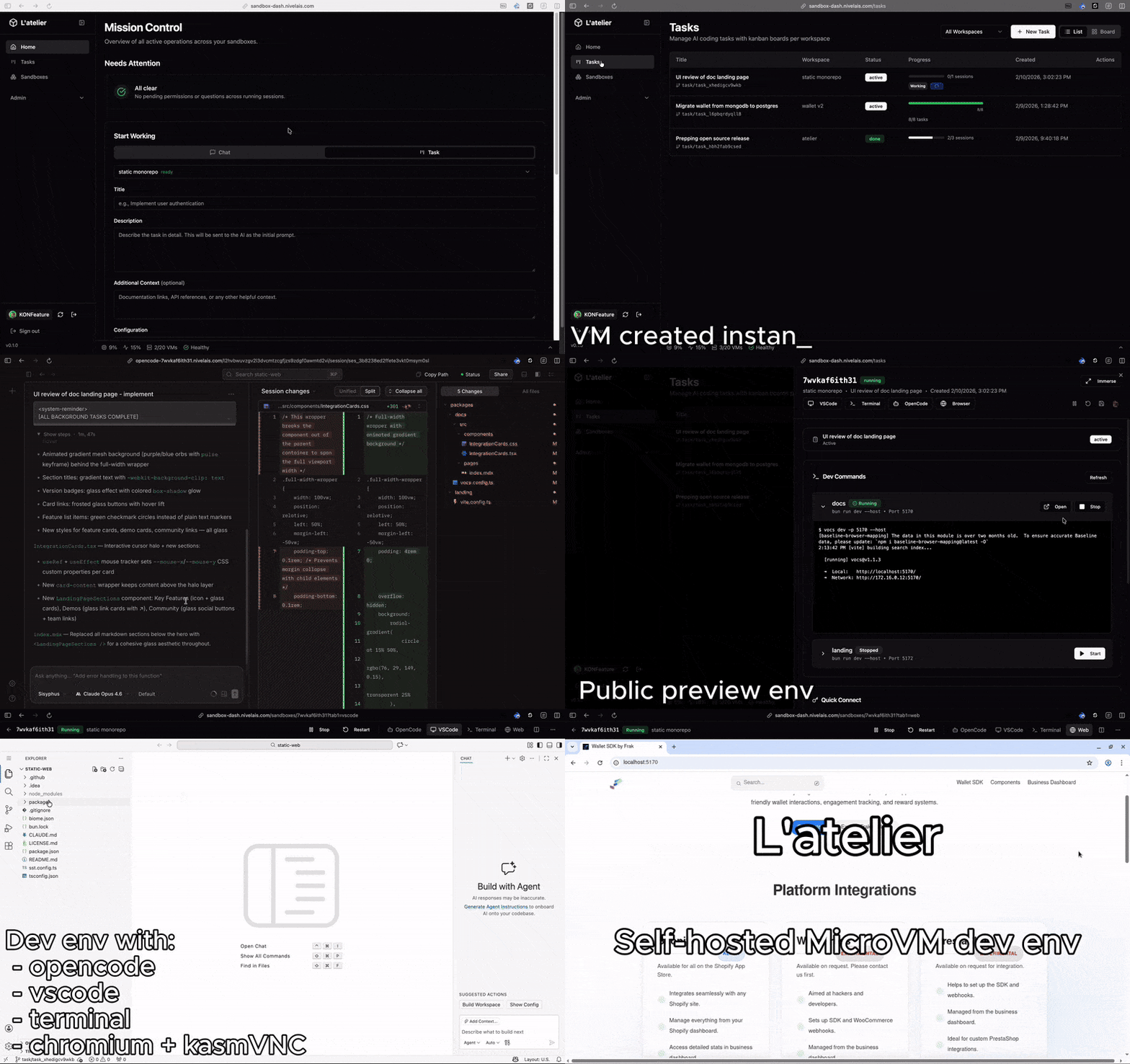
Each sandbox is a complete development environment — VS Code, AI agent, and browser, accessible from any device.
- code-server — VS Code in the browser, zero local setup
- OpenCode — AI coding agent, launch tasks and review results from anywhere
- Chromium via KasmVNC — full browser inside your sandbox for previewing, testing, debugging
- CLIProxyAPI — multi-provider AI model proxy (Claude, Gemini, Codex) with management UI
- Verdaccio — private npm registry shared across all sandboxes
Spawn a sandbox, push a task to OpenCode, close your laptop. Review the results from your phone on the ski lift — or wherever you happen to be.
- Task dispatch — create coding tasks from the dashboard or Slack. Atelier spawns a sandbox, creates a git branch, launches OpenCode with your prompt, and tracks progress. An AI task queue for your team
- Session templates — 4 built-in AI workflows (Implementation, Best Practices Review, Security Review, Simplification) with customizable models, effort levels, and prompt templates per workspace
- Dashboard — mission control for all your sandboxes: real-time task progress, running dev servers, and an attention feed aggregating OpenCode permission and question requests across every session
- Prebuilds — run expensive setup (git clone, dependency install, build) once and snapshot it. Subsequent sandboxes clone from the snapshot instantly via copy-on-write
- Dev commands with auto HTTPS — define dev commands in your workspace config (e.g.
npm run devon port 3000) and get a publichttps://dev-{name}-{id}.your-domain.comURL with streaming logs - Two base images out of the box —
dev-baseships with Node 22 and Bun;dev-cloudextends it with AWS CLI, Google Cloud SDK, kubectl, and Pulumi - Base image builds from dashboard — build and publish base images via Kaniko directly from the UI, no local Docker needed
- Workspace definitions — configure git repos to clone, init commands, dev commands, exposed ports, secrets, and resource limits per workspace
- OpenCode config replication — define OpenCode configuration globally or per workspace, automatically replicated to every sandbox
- Auth synchronization — OAuth tokens are synced across all running sandboxes so you authenticate once and every instance just works
- Package cache — Verdaccio runs as a shared npm registry, caching packages for npm, bun, pnpm, and yarn across all sandboxes
- SSH access — use your regular workflow: SSH, VS Code Remote SSH, JetBrains remote. sshpiper provides username-based routing so
ssh sandbox-{id}@host -p 2222just works - MCP server — AI agents can orchestrate sandboxes, tasks, workspaces, and dev commands programmatically via the Model Context Protocol
- Slack integration — dispatch tasks and receive attention alerts (permission requests, agent questions) directly in Slack
- GitHub App integration — connect your GitHub account for repository discovery and branch listing
- Multi-dev per sandbox — nothing stops multiple developers from working in the same sandbox simultaneously
- Config file sync — manage global and per-workspace config files, automatically synced to sandboxes
Atelier runs isolated development sandboxes on Kubernetes with Kata Containers.
- VM isolation — each sandbox is a real virtual machine, not a container namespace
- Instant cloning — CSI VolumeSnapshots via TopoLVM clone a full environment in under a second via copy-on-write
- Prebuilds — run expensive setup once, snapshot the filesystem, spawn instantly from there
- Simple operations — Kubernetes-native workflows with Helm deployment
- x86_64 CPU with virtualization enabled
- Bare-metal server with KVM (
/dev/kvmpresent) - apt-based Linux distro (Debian, Ubuntu) with systemd
| Dependency | Purpose |
|---|---|
| k3s | Lightweight Kubernetes distribution |
| Helm | Chart-based deployment |
| cert-manager | Automated TLS certificates |
| kata-deploy | Kata Containers runtime (Cloud Hypervisor) |
| Docker | Building manager and agent images |
| TopoLVM (optional) | CSI driver for PVC snapshots — required for prebuilds |
- A domain with wildcard DNS (
*.your-domain.com→ server IP) - Ports
80and443open for HTTPS - Port
2222open for SSH proxy access
# k3s
curl -sfL https://get.k3s.io | sh -

# Helm
curl -fsSL https://raw.githubusercontent.com/helm/helm/main/scripts/get-helm-3 | bash

# cert-manager
helm repo add jetstack https://charts.jetstack.io
helm install cert-manager jetstack/cert-manager \
  --namespace cert-manager --create-namespace --set crds.enabled=true

# Kata Containers
git clone --depth 1 https://github.com/kata-containers/kata-containers.git /tmp/kata-src
helm install kata-deploy /tmp/kata-src/tools/packaging/kata-deploy/helm-chart/kata-deploy \
  --set k8sDistribution=k3s \
  --set env.createRuntimeClasses=true \
--set env.createDefaultRuntimeClass=true# values.production.yaml
domain:
baseDomain: "example.com"
tls:
email: "admin@example.com"
auth:
github:
clientId: "your-github-client-id"
clientSecret: "your-github-client-secret"
allowedOrg: "your-github-org" # optional
certManager:
enabled: true
cloudflare:
apiToken: "your-cloudflare-api-token"Set the Authorization callback URL in your GitHub OAuth App to https://sandbox.example.com/auth/callback.
helm install atelier charts/atelier/ \
  --namespace atelier-system --create-namespace \
  --values values.production.yaml
Or use the deploy script (builds images, pushes to GHCR, deploys via SSH):
VALUES_FILE=./values.production.yaml ./scripts/deploy-k8s.shkubectl -n atelier-system get pods
kubectl -n atelier-system logs -f deploy/atelier-manager -c managerYour dashboard is at https://sandbox.example.com.
The chart deploys these components into your cluster:
| Component | Purpose |
|---|---|
| Manager | Sandbox orchestration API (ElysiaJS/Bun) |
| Dashboard | Admin web interface (React SPA via nginx sidecar) |
| Zot | Lightweight OCI registry for base images |
| Verdaccio | npm package cache shared across sandboxes |
| CLIProxyAPI | AI model proxy with multi-provider OAuth |
| sshpiper | SSH proxy with username-based routing to sandboxes |
| Shared binaries | Job that downloads code-server + OpenCode into a shared PVC |
Sandbox pods are created dynamically in the atelier-sandboxes namespace with the kata-clh runtime class.
# Domain & TLS
domain:
  baseDomain: ""           # REQUIRED — e.g. "example.com"
  dashboard: ""            # defaults to "sandbox.{baseDomain}"

# Authentication (required for production)
auth:
  github:
    clientId: ""
    clientSecret: ""
  jwtSecret: ""            # auto-generated if empty
  allowedOrg: ""           # restrict to a GitHub org
  allowedUsers: []         # or specific usernames

# Server
server:
  port: 4000
  maxSandboxes: 20
  maxActiveTasks: 10
  mcpToken: ""             # bearer token for MCP server auth

# Kubernetes
kubernetes:
  namespace: atelier-sandboxes
  runtimeClass: kata-clh
  storageClass: ""         # cluster default
  volumeSnapshotClass: ""  # for prebuilds
  defaultVolumeSize: "10Gi"

# Integrations
integrations:
  slack:
    enabled: false
    botToken: ""
    signingSecret: ""

# Sub-components (each can be disabled)
zot:
  enabled: true
  persistence:
    size: 20Gi

verdaccio:
  enabled: true
  persistence:
    size: 10Gi

cliproxy:
  enabled: true

sshpiper:
  enabled: true
  nodePort: 30022          # external SSH port

certManager:
  enabled: true
See charts/atelier/values.yaml for all options.
No server or KVM needed — the manager runs in mock mode:
bun install
ATELIER_SERVER_MODE=mock bun run dev
# API:       http://localhost:4000
# Swagger:   http://localhost:4000/swagger
# Dashboard: http://localhost:5173- Setup Guide — installation and configuration
- Architecture — system design, components, and diagrams
- Infrastructure — networking, storage, domains, and deployment
- Constraints — critical gotchas that will save you hours
- Code Patterns — conventions for contributors
See CONTRIBUTING.md for development setup and guidelines.
See SECURITY.md for vulnerability reporting.