Offline Activities
- Introduction
- Currently available traces files
Offline Activities form a new set of educational activities designed to be conducted and tracked offline. The data of the offline activity is uploaded to the Analytics Server by the teacher through the Analytics Frontend. The goal is to have a system that can parse multiple files from different hetereogeneous sources and be able to interpret the different formats in order to be analysed by our system.
Apart from offline activities, information from games can be collected using the available trackers.
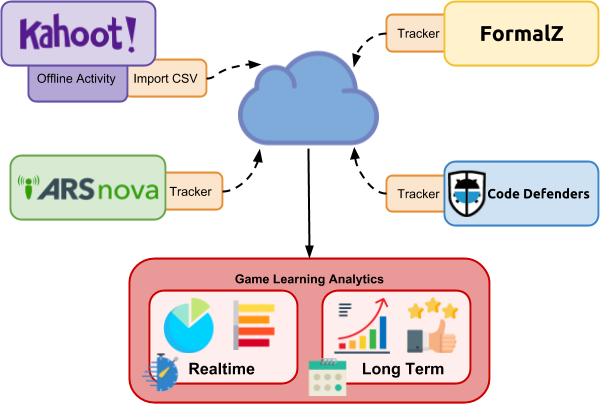
Figure 1.: Example of our Analytics system interpreting multiple formats from different sources.
Currently, the Analytics System is able to receive and analyze CSV and Kahoot! formats.
The uploaded data is packed in a single file that collects the data in CSV format (comma separated values) of all the interactions of all the students that occurred during the offline activity.
The content of the data file is a simplified version of the xAPI-SG tracking model, containing only Alternative and Completable events. GameObject and Accessible events are not supported in offline activities because we want to give support only to the core events of the xAPI serious games model in order to simplify the creation of the data file (see Figure 2).
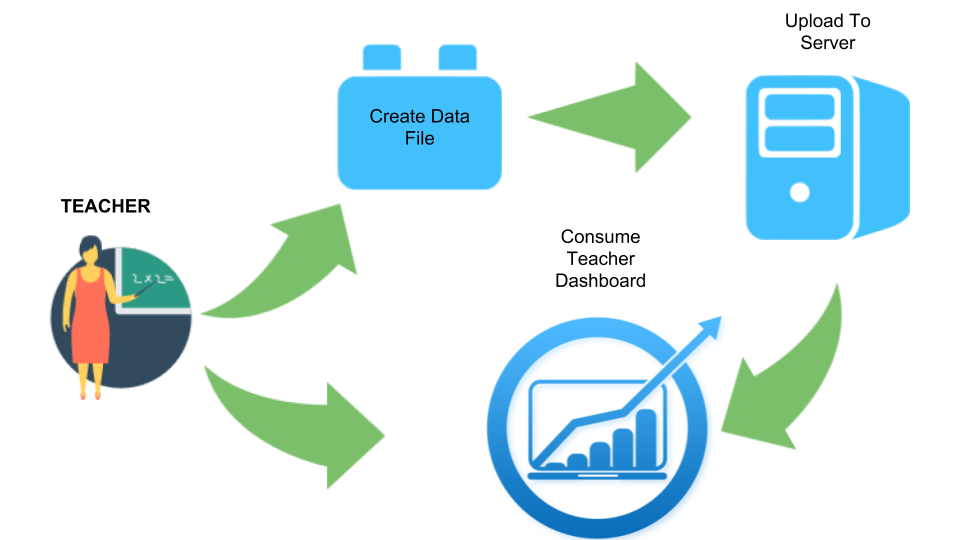
Figure 2.: The lifecycle of the Offline Analytics from the data file uploaded to the server to the teacher dashboard.
The data file is formatted as a csv file with interactions about Alternative and Completable events. The first column is the username of the user that performed the interaction. The following columns are the same columns in the same order provided by the Tracker when saving data locally in CSV format, typically starting by the timestamp, event (xAPI-SG verb), target (xAPI-SG object) and additional identifiers and extensions (see an example csv file in Figure 3).
BBBB,1523611957500,progressed,serious-game,mygame,progress,0.5
AAAA,1523611957623,selected,alternative,C,success,true,response,soycorrecta,target,madrid
BBBB,1523611957655,selected,alternative,B,success,true,response,soycorrecta,target,lisboa
AAAA,1523611057623,selected,alternative,A,success,true,response,soycorrecta
BBBB,1523611057655,selected,alternative,B,success,false,response,soyfalsa
AAAA,1523611057499,progressed,serious-game,mygame,progress,0.5
BBBB,1523611057500,progressed,serious-game,mygame,progress,0.2
AAAA,1523611057499,completed,level,A
BBBB,1523611057500,completed,level,A
AAAA,1523611957499,completed,level,B,score,1
BBBB,1523611957500,completed,level,B,score,0.5
AAAA,1523611957500,completed,game,pokego,time,36536
AAAA,1523611957623,selected,question,capitalespana,success,true,response,madrid,target,capitalespana
BBBB,1523611957623,selected,question,capitalespana,success,false,response,lisboca,target,capitalespana
BBBB,1523618957623,selected,question,capitalportugal,success,true,response,lisboa,target,capitalportugal
Figure 3.: Data file in CSV format.
The available visualizations that will display information regarding Offline Activities in the teacher dashboard are the available visualizations for the Alternative and Completable events in the teacher dashboard: Alternative Selected Correct Incorrect Per Question Id, Completable Completed Times, Total Session Players, Videos Seen Skipped, Completables Average Progress Over Time, Games Started Completed, Max Completable Scores Per Player, All Game Progress Per Player (Max Progress), Alternative Selected Question Counter Per Target Ids, Alternative Selected Correct Incorrect, and the Time Picker to select the time window segmentation of the dashboard. The teacher will be able to see what trace-files has been uploaded.
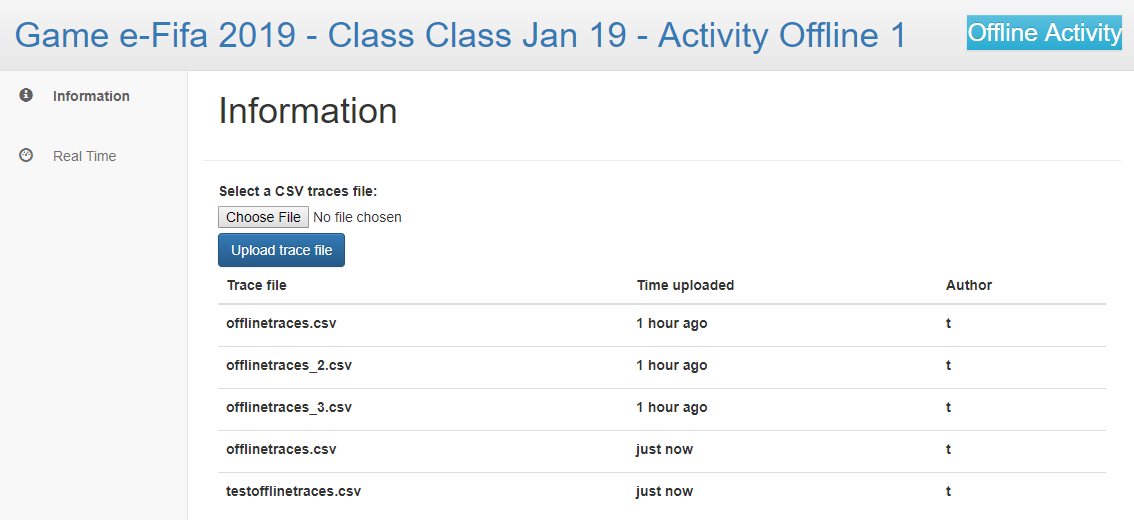
Figure 4.: UI displaying the file selector to upload a file and the previously uploaded CSV trace files.
If you have used Kahoot!, you already know that the system has an "export results" functionality by giving the teacher the possibility of downloading all the results of a Kahoot! session in a results file (usually named "results.xlsx").
You can see an example file of the default format of a Kahoot! results file in the following file, with the example of an activity of two players answering three questions:
File 1.: Kahoot! example "results.xlsx" file
We have implemented in our system a parser from the Kahoot! results file to traces that can be interpreted by our analytics server, therefore, you can directly upload your Kahoot! file in our system. In order to upload the file, you must select the Kahoot! exported results file (usually named results.xlsx) and chose "Upload Kahoot! trace file" in our system. A list of uploaded Kahoot! files will be displayed in our system (see Figure 5 below).
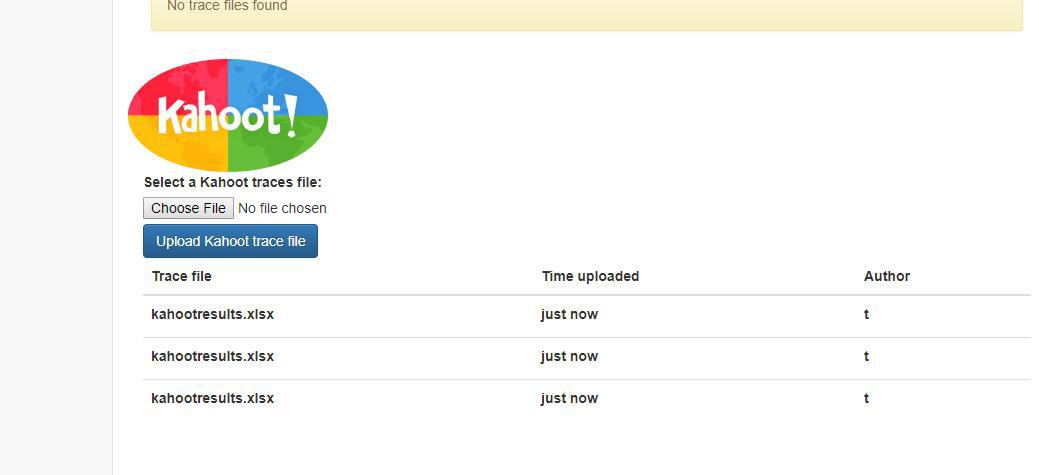
Figure 5.: Kahoot! results files uploaded to an Activity.
When uploaded in our system the Kahoot! results file will be interpreted and parsed to a CSV trace format. The algorithm parsing the Kahoot! file can be found here: Backend Kahoot! To CSV.
Given the example Kahoot! results traces file presented above, the resulting CSV traces from the file, by applying the described algorithm are the following:
[ 'nick1[asd11],1548944122449,selected,alternative,La primera pregunta,success,true,response,La respuesta 1 (correct),score,978',
  'nick2[asdasd2],1548944152449,selected,alternative,La primera pregunta,success,false,response,La respuesta 2,score,0',
  'nick1[asd11],1548944182449,selected,alternative,La pregunta 2,success,false,response,La respueta 2.2,score,978',
  'nick2[asdasd2],1548944211449,selected,alternative,La pregunta 2,success,false,response,La respuesta 2.3,score,0',
  'nick1[asd11],1548944212449,selected,alternative,Question3 avocado!,success,false,response,q3 answer2,score,978',
  'nick2[asdasd2],1548944227449,selected,alternative,Question3 avocado!,success,true,response,q3 answer3,score,968' ]
Figure 6.: Example of Kahoot! results file to CSV trace format.
Note that the algorithm exports an ARRAY of CSV STRINGS, one per each new trace, with a specific order (as it can be seen in the algorithm) that can be used and interpreted by our system in order to be converted to a valid xAPI-seriousgames format.