


Run VS Code on HPC compute nodes over secure Microsoft Dev Tunnels. Pick an HPC and resources, and CS Bridge submits the SLURM job and attaches VS Code to it.

- Hosts from
~/.ssh/config— every cluster you already SSH into, listed and connectable in one click. - SLURM without scripts — set partition, CPUs, memory, GPUs, and walltime in a form; CS Bridge writes and submits the batch script.
- Session memory — restart an expired job with its previous resource selection in one click.
- No inbound ports — a Microsoft Dev Tunnel carries the transport; the cluster opens nothing new.
- OS-native SSH — uses your system
sshbinary and its own ControlMaster pool, not a bundled SSH client. - A full VS Code window on the compute node — your editor, debugger, extensions, and keybindings, running where the code runs.
New to HPC terms? HPC cluster = a shared pool of compute nodes. SLURM = the scheduler that hands you a node. Compute node = where your code actually runs (versus the login node you SSH into). Dev Tunnel = Microsoft's encrypted relay, so no firewall changes are needed.
- Install from the VS Code Marketplace (or search
CS Bridgein Extensions). - Click the CS Bridge icon in the activity bar and sign in with a Microsoft account (used only to authenticate the Dev Tunnel).
- Pick a host from your
~/.ssh/config. - Fill the resource form: partition, CPUs, memory, GPUs, walltime.
- Click Launch, then Connect — a new VS Code window opens on the compute node.
Requires: VS Code 1.98+, a SLURM cluster reachable in your ~/.ssh/config, and a free Microsoft account. Building from source? See CONTRIBUTING.md.
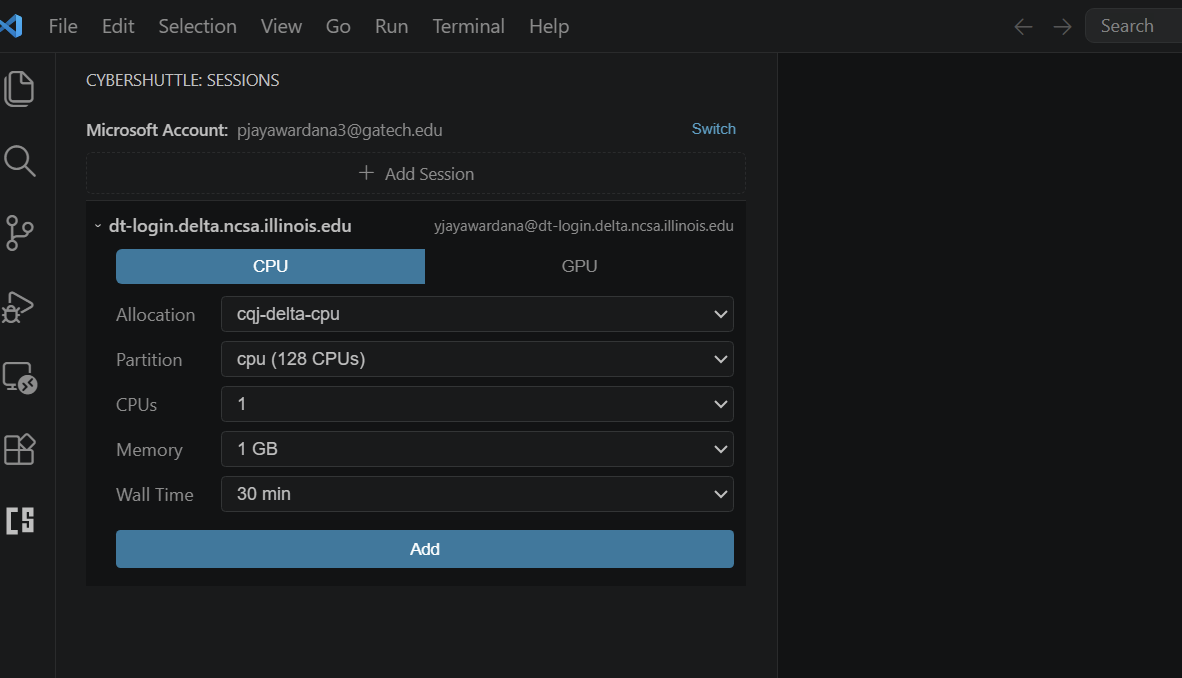
CS Bridge queries HPC partitions/accounts/limits. You can pick the configuration you need, and save it as a reusable session.
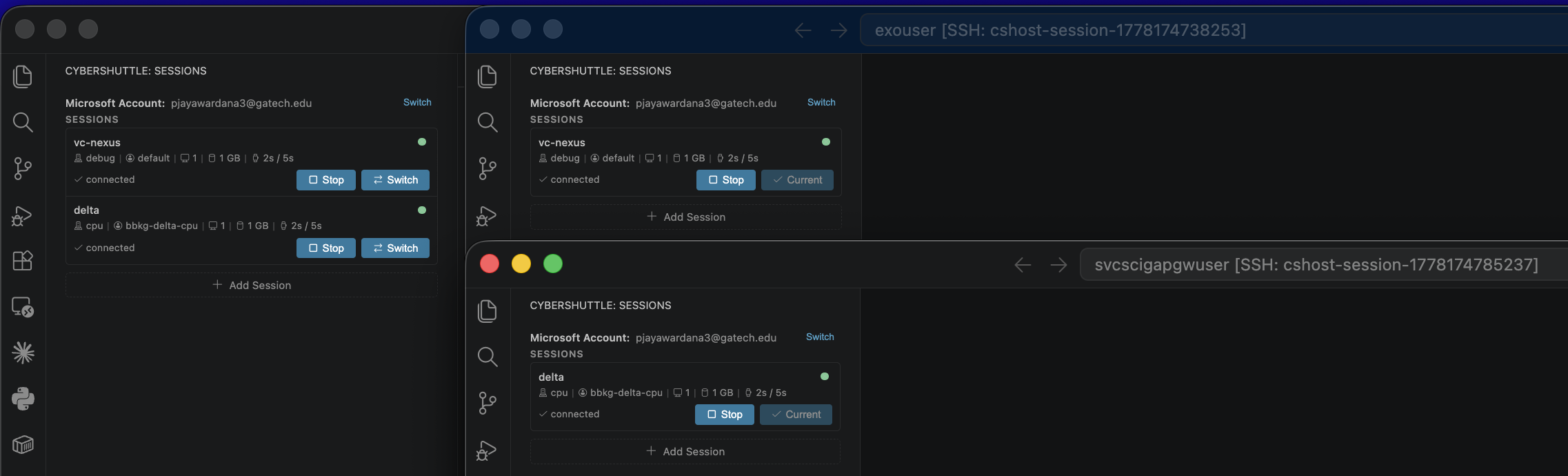
CS-Bridge shows the live status of each session. Start, Stop, and Connect from there:
When you click Start:
- CS Bridge generates a SLURM batch script and submits it with
sbatch. The script runslinkspanon the allocated compute node. - CS Bridge polls
sacctfor job status and waits forlinkspanto come live. linkspanstarts a REST API and an SSH server on the compute node, exposing both over a Dev Tunnel.- CS Bridge reaches
linkspanand the SSH server through the Microsoft Dev Tunnels SDK and relays the SSH server to localhost. - CS Bridge opens a new window with URI
vscode-remote://ssh-remote+cshost-<sessionId>/{HOME}. - VS Code's remote-SSH plugin intercepts this window, connects to the relayed SSH server via the OS-native
sshclient, installs VS Code Server, and attaches the window to the compute node.
Full architecture in CONTRIBUTING.md.
Training a model on a GPU cluster. Click + to add session, pick the GPU cluster, choose a GPU partition and walltime, then Start -> Connect. The Python and Jupyter extensions behave as they do locally; torch.cuda.is_available() returns True.
Resuming after walltime expiry. The expired session is flagged in the sidebar. Click Restart -> CS Bridge resubmits with the same partition, account, and resources. Files on the shared filesystem are untouched.
Several clusters at once. Each cluster is a separate entry, and sessions on different clusters run side by side. Switch between them with a click -> no extra terminals, no SSH alias juggling.
Local: ~/.cybershuttle/sessions.json (session metadata, shared across VS Code windows)
~/.cybershuttle/ssh_config, ~/.cybershuttle/ssh_keys/, ~/.cybershuttle/ssh_control/ (generated SSH config, per-session keys, ControlMaster sockets).
CS Bridge prepends Include ~/.cybershuttle/ssh_config to your ~/.ssh/config so OS-native ssh picks up the per-session aliases.
The Microsoft account token is held by VS Code's built-in authentication provider (OS keychain).
Remote: ~/.cybershuttle/bin/linkspan (downloaded on first connect).
~/.cybershuttle/logs/linkspan-session-<jobid>.{out,err} (linkspan output CS Bridge tails to find the tunnel).
To reset, remove both ~/.cybershuttle/ directories and the Include line in ~/.ssh/config.
- No hosts listed.
~/.ssh/configis empty or unreadable. Add aHostblock withHostName,User, andIdentityFile, then refresh. - Microsoft sign-in fails. Your network may block
login.microsoftonline.comor*.devtunnels.ms. Allowlist both the Dev Tunnel is the only supported transport today. - Job stuck in
PENDING. Cluster busy or request too large. Try smaller resources, or runsqueue -u $USERon the cluster for the reason. - Session fails with "Slurm is not available". The selected host has no
sinfoonPATH. CS Bridge requires SLURM for now - see the Roadmap. - Connect window disconnects immediately. Tunnel blocked or compute node lost network. Click Restart; check
View -> Output -> CS Bridgefor the failing step. - Session stuck in
deploying_agent. linkspan is downloading on first use. Wait, then check~/.cybershuttle/logs/on the remote. If it never moves, Stop and Launch again. - Permission denied on the remote linkspan binary. Run
chmod +x ~/.cybershuttle/bin/linkspanon the remote, then Restart.
- Do I install anything on the remote? No. CS Bridge uploads
linkspanto~/.cybershuttle/bin/automatically on first connect. - Does it work without SLURM? Not yet. The launch path runs
sinfoand fails if SLURM is missing. Plain-SSH support is on the Roadmap. - Are my local files copied? No. You work against the cluster's filesystem directly. Local-workspace mounting is on the Roadmap.
- Walltime expired mid-work? Click Restart to resubmit with the same selection, then Connect.
- Does CS Bridge require the Remote-SSH extension? Not as a hard dependency, but the final attach uses VS Code's
vscode-remote://ssh-remote+...URI, which Remote-SSH (or any compatible provider) handles via your OSsshbinary. - VS Code Insiders, Cursor, or other forks? CS Bridge targets VS Code 1.98+. Forks with compatible remote-SSH support and Marketplace access usually work but aren't officially tested.
- Where do tokens and state live? Tokens are held by VS Code's built-in Microsoft authentication provider (OS keychain). Session metadata lives in
~/.cybershuttle/sessions.json. - Does my institution see what I'm doing? No more than before. CS Bridge uses your existing SSH credentials and the Microsoft account you sign in with; tunnel traffic is encrypted end to end.
- Does the cluster session survive closing my laptop? Yes. The SLURM job and your remote processes run until walltime ends. Reopen and Connect to reattach.
- Windows, macOS, Linux? Yes on the local side, wherever VS Code and OpenSSH run. The remote needs a Unix-like environment with SSH and SLURM.
- First time on a cluster? Follow the Quick Start. If you don't have an account yet, ask your advisor or research-computing team.
Microsoft's Remote-SSH attaches a VS Code window to a static SSH host. CS Bridge handles everything around that - the SLURM job, the compute-node allocation, the Dev Tunnel, the per-session SSH config - then opens a vscode-remote://ssh-remote+... URI so Remote-SSH (or any compatible provider) attaches the window using your OS ssh binary.
Remote-SSH alone is enough when you SSH into a static dev box. CS Bridge is for when there's a scheduler between you and the compute, a login node in the way, or a firewall blocking inbound SSH.
These items are planned and may change.
- UI for adding SSH config entries — direct users to the Remote-SSH extension UI to create new
~/.ssh/configentries. - UI to report issues — file an issue from inside the extension with a typed description and an auto-captured stack trace.
- UI for queue visibility — show queued jobs, queue positions, and estimated start times.
- Opt-in anonymous usage metrics — explicit consent flow, reporting telemetry to a central endpoint.
- Login to non-SLURM hosts — connect directly to lab workstations or dev VMs with no scheduler.
- Login with a Nexus account — an alternative to Microsoft sign-in that tunnels over FRP instead of MS Dev Tunnels.
- Self-hosted FRP relay — an alternative to MS Dev Tunnels for institutions that disallow them.
- Local-workspace mounting — expose your local files to the remote VS Code window via FUSE + sshfs.
- Pilot follow-up — get pilot testers reporting issues on GitHub.
Have a feature request or found a bug? Open an issue.
If CyberShuttle supports your research, please cite:
@software{cybershuttle,
  title  = {CyberShuttle: Remote HPC Development from VS Code},
  author = {{ARTISAN Research Group, Georgia Institute of Technology}},
  year   = {2026},
  url    = {https://github.com/cyber-shuttle/CS-Bridge}
}CS Bridge collects no usage metrics today. Authentication runs through VS Code's built-in Microsoft authentication provider; SSH credentials and tunnel traffic stay between you, your remote host, and Microsoft Dev Tunnels. An opt-in anonymous metrics flow is on the Roadmap.
Issues and PRs are welcome, especially from researchers running CS Bridge on real workloads. See CONTRIBUTING.md for architecture, source layout, and dev setup. Bug reports and cluster-specific quirks go in the issue tracker.
Built and maintained by the ARTISAN research group at Georgia Tech, on top of linkspan, Microsoft Dev Tunnels, OpenSSH, and the Apache Airavata ecosystem.