First-party Visual Studio Code support for the Blade build system.



Install: Visual Studio Marketplace
· or run code --install-extension blade-build.vscode-blade
Jump to a target and its BUILD declaration, then build, test, and debug it — without leaving the editor:
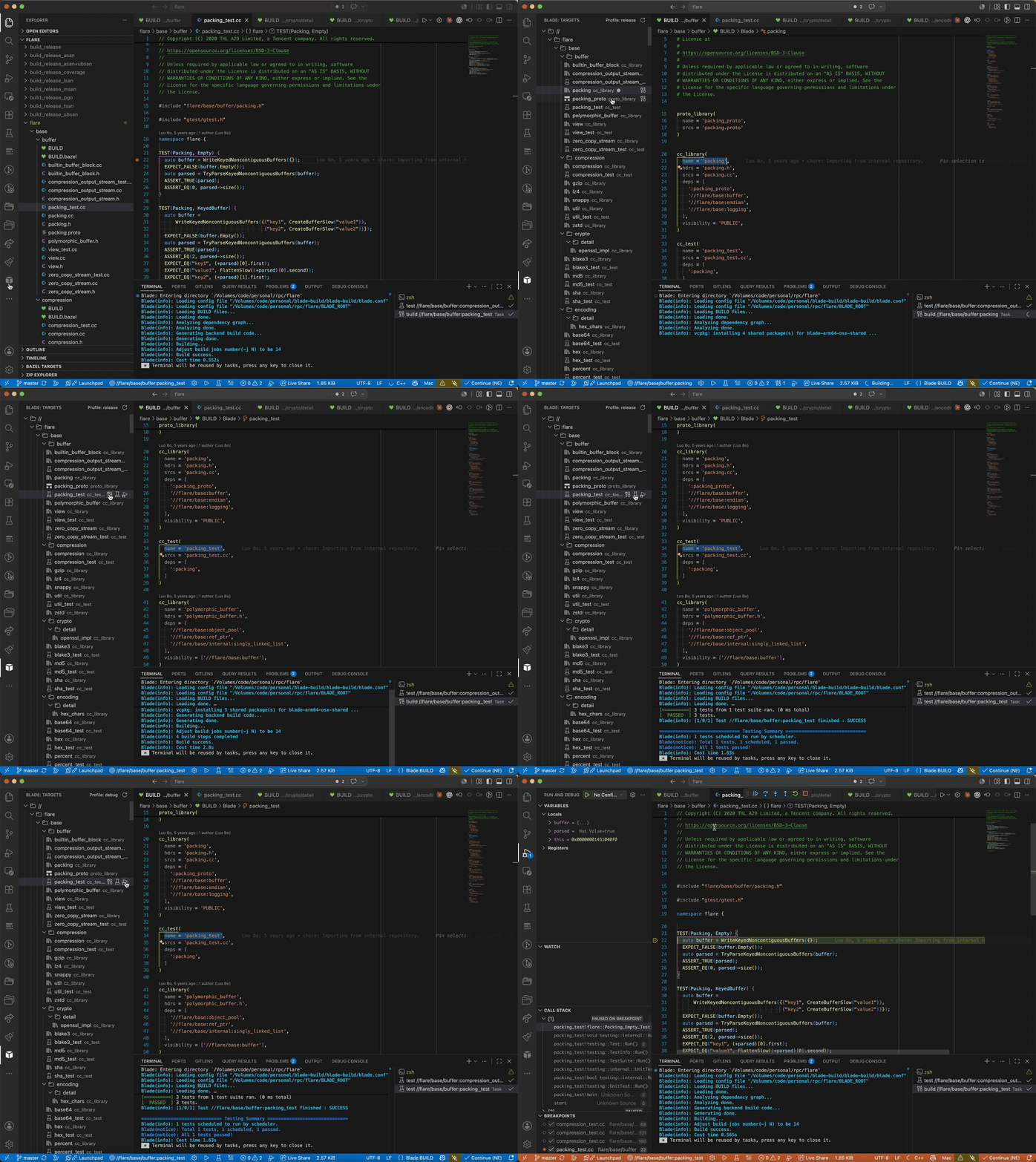
- Targets explorer — every target in the workspace, laid out as a directory
tree with inline build / run / test / debug actions. Hover a directory
(or the
//root) to build / test it recursively (//path/...). Expand / collapse state is remembered across sessions; synthetic external libraries (#pthread, …) are hidden. - Build, run, test, clean from the status bar, the command palette, or the
explorer — executed through the VS Code Tasks API, so compiler errors land
in the Problems panel and a failed build never silently runs a stale binary.
Pass extra flags per action with
blade.buildArgs/testArgs/runArgs. - Build profile — a release / debug selector in the targets view title
injects
-p <profile>into every build / run / test / debug (defaultrelease, remembered per workspace). - Multi-root — every
BLADE_ROOTin the window is discovered and shown as its own top-level node; targets, tasks, navigation and diagnostics are each routed to the workspace that owns them. - BUILD-file language support — syntax highlighting, an outline of targets,
go-to-definition on dependency labels (
//path:name,:name), completion of rule types / attributes / dependency labels, hover, and warnings for dependencies that don't resolve to a known target. - C/C++ IntelliSense — one click generates
compile_commands.json(blade dump --compdb) for use with clangd.
Targets are always read from Blade itself (blade dump --targets), never by
scraping BUILD files — so every rule kind (C++, Java, Scala, Python, proto, …)
is understood accurately.
- Blade installed and on your
PATH(or setblade.executable). - A workspace containing a
BLADE_ROOTfile.
- Open a Blade workspace (a folder with a
BLADE_ROOT). - The Blade view appears in the Activity Bar with your targets.
- Pick an active target from the status bar, then Build / Run / Test.
- Run Blade: Generate compile_commands.json and install clangd for C/C++ IntelliSense.
| Setting | Default | Description |
|---|---|---|
blade.executable |
blade |
Path to the blade executable. |
blade.jobs |
0 |
Parallel jobs (-j); 0 lets blade auto-detect CPUs. |
blade.commandPrefix |
[] |
Tokens prepended to every blade command (e.g. a wrapper). |
blade.buildArgs |
[] |
Extra options for blade build (e.g. ["-p", "debug"]). |
blade.testArgs |
[] |
Extra options for blade test (e.g. ["--full-test"]). |
blade.runArgs |
[] |
Extra options for blade run (e.g. ["-p", "release"]). |
blade.environment |
{} |
Extra environment variables for blade tasks. |
blade.generateCompdbOnRefresh |
true |
Regenerate compile_commands.json on refresh. |
blade.recommendClangd |
true |
Suggest installing clangd for C/C++ IntelliSense. |
Blade: Refresh Targets, Select Active Target, Build / Run / Test Active Target, Clean, Generate compile_commands.json.
Inspired by, and superseding, the community extension
dhwang.blade
by @wangdh15 (MIT). This is a clean-room
reimplementation; see NOTICE.