Log and view all Slack messages.
PR is welcome!!
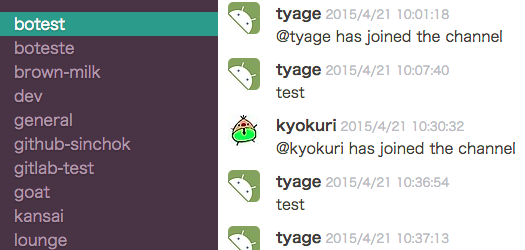
- Log slack messages, channels, users in MongoDB.
- Also, you can import all data with backup file.
- View these data in web browser.
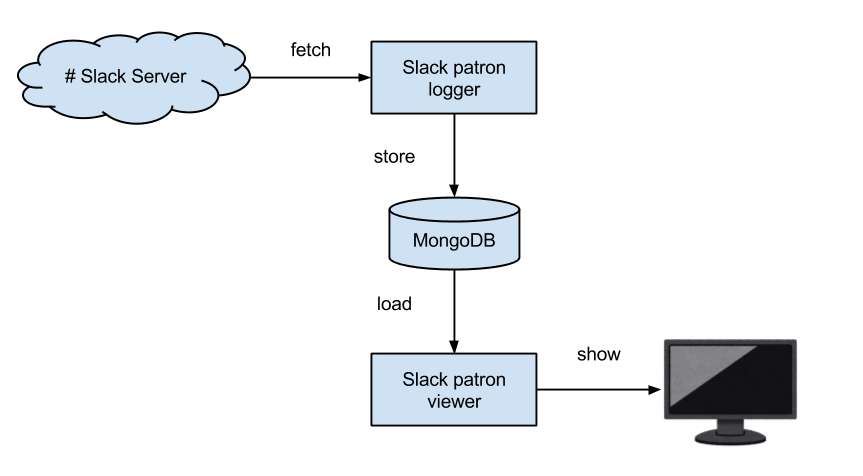
This app needs access token from Slack.
Get access token from here (or use test token).
Then, generate config.yml with this command:
$ ruby ./bin/init.rb --token=YOUR_ACCESS_TOKENYou can edit config.yml for more configuration.
To deploy with docker, just run these commands!
$ docker-compose up -d
$ open http://localhost:9292 # open http://localhost:9292 in your browserYou should edit config.yml and specify the location of mongo.
- ruby: 2.7.2
- mongo db: v3.2.11
- node.js: v14.15.3
$ mongod # you need to start mongo db server
$ bundle install$ bundle exec ruby ./logger/logger.rb$ ./viewer/setup.sh
$ bundle exec rackup ./viewer/config.ru
$ open http://localhost:9292 # open http://localhost:9292 in your browserImport dialog will appear when you click team name in viewer.
The size of Slack backup file is big and sometimes it is difficult to upload it with viewer.
You can import Slack backup file with this command.
$ bundle exec ruby ./bin/import.rb PATH_TO_BACKUP_FILE