Everyone has that one friend. You know them. That crazy cat person (if you don’t know them, is it possibly you?). CatBook is an internet community where you can share your love of cats through your daily thoughts, read about other cats (don’t worry, your cat is not jealous and doesn’t care since it doesn’t love you anyways), and follow other cat lovers.
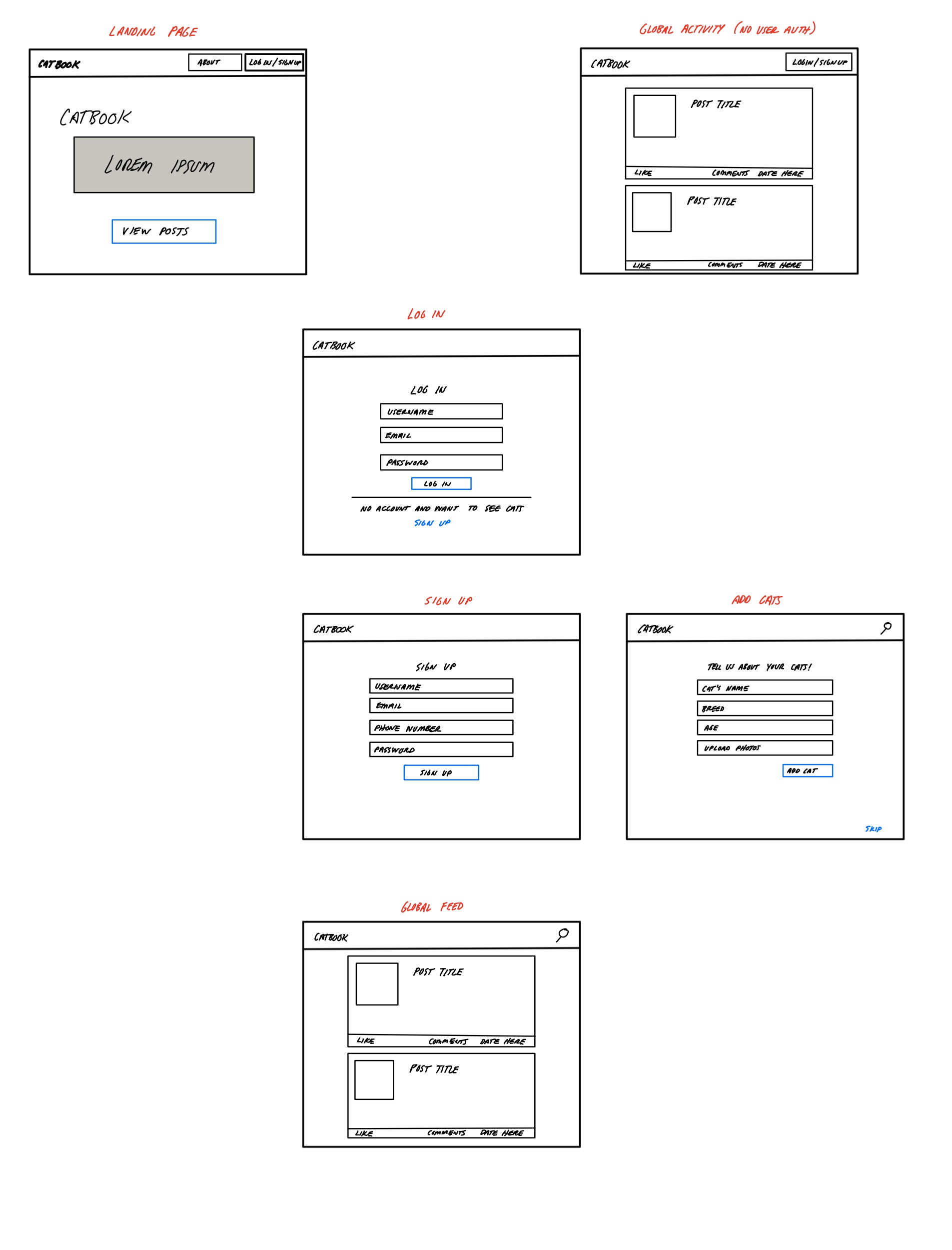
Landing page shows information about CatBook with a link to view the global feed. Users will not be able to post/comment/like while on the global feed until they sign up. The landing page will have links for the users to log in or sign up for Catbook.
Users will be taken to the Login page with email, username, and password fields. If they are not a CatBook user they can click on the sign up link that will redirect them to the sign up page. The sign up page will have a form requiring name, email, username, password, and phone number.
Before being taken to the Global Feed page, Users will be able to add their cat or cats to their profile page. This is all optional with a skip button on the screen. Users will be able to add their cats name, breed, age, and photos.
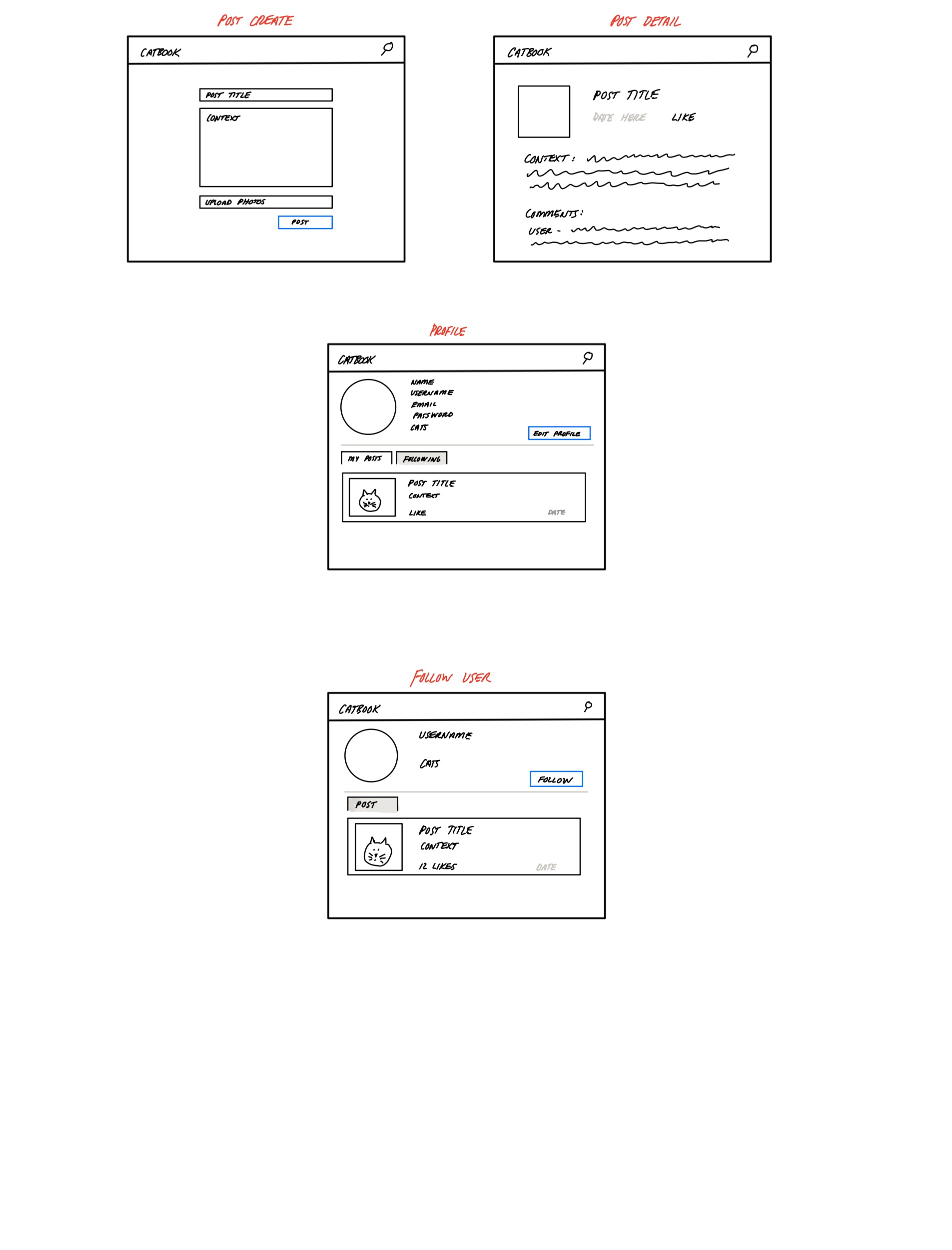
Users will be able to see their own post on the “personal post” tab and see (1)post from people they followed (2)post they commented on (3) post they liked ,on the “activity” tab, sorted by latest. In the “personal post tab”, Users can click on each post which will direct them to the post detail page where they can delete or edit a post. Users will also be able to click the create button which will direct them to the create post page to create a post. Users will also be able to click on the profile edit button and direct to the profile edit page to update their information. When users view another user’s profile, they will be able to see their “personal post” only.
Users will be able to see the global page containing all the posts. Each post will have a main section ( what it is, the date, and the title of the post); a like button (to show how many likes); and a comment section (to show many times the post has been commented on. If a user clicks on the main section of the post the user will be redirected to a detailed post page. If a User clicks on the like the button it will update the amount of likes on the post and will update the amount on the page. If a user clicks on the comment section, the user will be redirected to a post detail page with a comment form section to add a comment.
At the top of the global feed will be a nav bar that has a button to create a post and to search. If a User clicks on the button to create a post, the user will be redirected to a form to create a post. If a User types in the search bar and submits a query to search for, the global feed will re-render the page with only posts and users that match the query.
The global feed by default will be sorted by relevance meaning the first post will be which post has been most recently commented on.
Users will be able to create posts using a form. Users will enter a title, context, and be able to upload an image with the post. A date timestamp is added by default, and a like count starts at 0.
After Users click on the post on global, profile-personal post and profile-activity, they will be redirected to the post detail page. If the users click on others' posts, they will be able to comment or like only. If the users click on their own post, they will also be able to edit and delete.
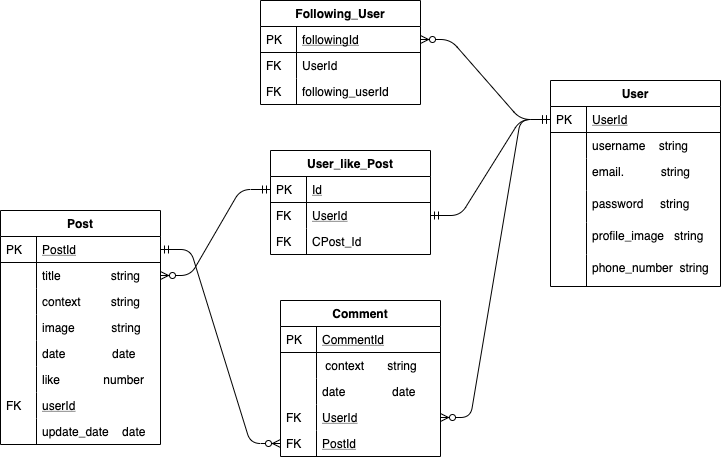
- User can create many posts (One to Many)
- User can like many posts (One to Many)
- User can follow many users ( One to Many)
- User can leave many comments on a post (One to One)
- A post can have many comments (One to Many)
- A comment must have a user (One to One)
- A post must have a user (One to One)
- Wednesday
- Post CRUD(1), personalpost_view
- account
- Landing Page
- liked Post Function
- global_view + global search
- Thursday
- Post CRUD(2)
- image upload
- activity_view + activity search
- Friday
- Comment CRUD
- text and email verification
- John
- Post_list(personal post first), PostForm, CommentForm (1.5)
- Post_create, Post_Detail(comment_create) (1.5)
- google login (0.5)
- Pages: Post_create, Post_detail,
- Shelly
- log in sign up (0.5)
- image upload(profile, post)(2)
- text, email(verify and password change)(1.5)
- Pages: profile_edit, profile_view, landing page, login, signup, catform
- Kenneth
- likes (0.5)
- search (global search, activity search) (1.5-2)
- activity_view (show following user's post, liked post, commented post) (1.5-2)
- Pages: global view, activity view
- S - Markets(Payment)
- K - Real time messaging
- K - lazy registration
- J - google login