
Yujie Wei1, Shiwei Zhang2*, Hangjie Yuan3, Yujin Han4, Zhekai Chen4,5, Jiayu Wang2, Difan Zou4, Xihui Liu4,5, Yingya Zhang2, Yu Liu2, Hongming Shan1†
(*Project Leader, †Corresponding Author)
1Fudan University 2Tongyi Lab, Alibaba Group 3Zhejiang University 4The University of Hong Kong 5MMLab
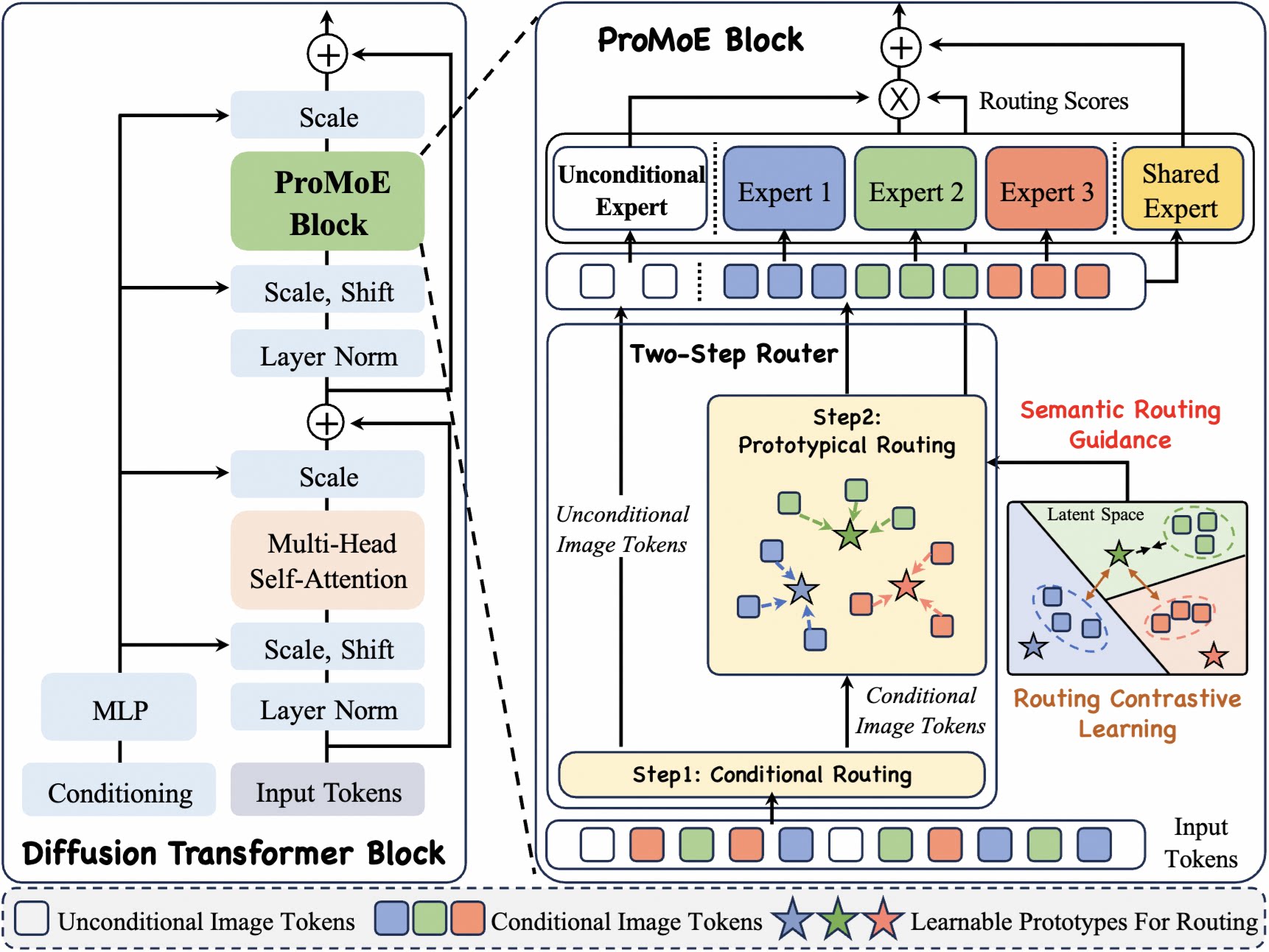
ProMoE is an MoE framework that employs a two-step router with explicit routing guidance to promote expert specialization for scaling Diffusion Transformers.
This codebase supports:
- Baselines: Dense-DiT, TC-DiT, EC-DiT, DiffMoE, and their variants.
- Proposed Models: ProMoE variants (S, B, L, XL) with Token-Choice (TC) and Expert-Choice (EC) routing.
- VAE Latent Preprocessing: Pre-encode raw images into latents and cache them for faster training; supports multi-GPU parallel processing.
- Sampling and Metric Evaluation: Image sampling, Inception feature extraction, and calculation of FID, IS, sFID, Precision, and Recall; supports multi-GPU parallel processing.
- [2026.03]: Release the model weights, generated 50K images, and evaluation results on both Hugging Face and ModelScope!
- [2026.02]: Release the training, sampling, and evaluation code of ProMoE.
- [2026.01]: 🎉 Our paper has been accepted by ICLR 2026!
- [2025.10]: Release the paper of ProMoE.
We have released the model weights, generated 50K images, and corresponding evaluation results on both Hugging Face and ModelScope.
| Model | Platform | Weights | 50K Images | Eval Results (CFG=1.0) | Eval Results (CFG=1.5) |
|---|---|---|---|---|---|
| ProMoE-B-Flow (500K) |
Hugging Face ModelScope |
Link Link |
cfg=1.0, cfg=1.5 cfg=1.0, cfg=1.5 |
FID 24.44, IS 60.38 FID 24.44, IS 60.38 |
FID 6.39, IS 154.21 FID 6.39, IS 154.21 |
| ProMoE-L-Flow (500K) |
Hugging Face ModelScope |
Link Link |
cfg=1.0, cfg=1.5 cfg=1.0, cfg=1.5 |
FID 11.61, IS 100.82 FID 11.61, IS 100.82 |
FID 2.79, IS 244.21 FID 2.79, IS 244.21 |
| ProMoE-XL-Flow (500K) |
Hugging Face ModelScope |
Link Link |
cfg=1.0, cfg=1.5 cfg=1.0, cfg=1.5 |
FID 9.44, IS 114.94 FID 9.44, IS 114.94 |
FID 2.59, IS 265.62 FID 2.59, IS 265.62 |
conda create -n promoe python=3.10 -y
conda activate promoe
pip install -r requirements.txtDownload ImageNet dataset, and modify cfg.data_path in config.py.
For faster training and more efficient GPU usage, you can precompute VAE latents and train with cfg.use_pre_latents=True.
Run latent preprocessing:
# bash
ImageNet_path=/path/to/ImageNet

CUDA_VISIBLE_DEVICES=0,1,2,3,4,5,6,7 python preprocess/preprocess_vae.py --latent_save_root "$ImageNet_path/sd-vae-ft-mse_Latents_256img_npz"Training is launched via train.py with a YAML config:
python train.py --config configs/004_ProMoE_L.yamlNotes:
- This repository currently supports Rectified Flow with Logit-Normal sampling (following SD3). For the DDPM implementation, please refer to this repository.
- By default, ProMoE utilizes Token-Choice routing. However, for DDPM-based training, we recommend using Expert-Choice in
models/models_ProMoE_EC.py. - Configuration files for all baseline models are provided in the
configsdirectory. - All results reported in the paper are obtained with
qk_norm=False. For extended training steps (>2M steps), we suggest enablingqk_norm=Trueto ensure training stability.
Image generation is performed via the sample.py script, utilizing the same YAML configuration file used for training.
# use default setting
CUDA_VISIBLE_DEVICES=0 python sample.py --config configs/004_ProMoE_L.yaml

# use custom setting
CUDA_VISIBLE_DEVICES=0 python sample.py \
  --config configs/004_ProMoE_L.yaml \
  --step_list_for_sample 200000,300000 \
  --guide_scale_list 1.0,1.5,4.0 \
  --num_fid_samples 10000
Notes:
- By default, the script loads the checkpoint at 500k steps and generates 50,000 images using a single GPU, sweeping across guidance scales (CFG) of 1.0 and 1.5.
- To use multiple GPUs for sampling, specify the devices using
CUDA_VISIBLE_DEVICESor by addingsample_gpu_idsin the configuration file. Please be aware that multi-GPU inference produces a globally different random sequence (e.g., class labels) compared to single-GPU inference. - Generated images are saved as PNG files in the
sample/directory within the same parent directory as the checkpoint folder. Filenames include both the sample index and class label. - If you only want to calculate FID, you can set
cfg.save_inception_features=Trueto save Inception features and reducecfg.save_img_num.
We follow the standard evaluation protocol outlined in openai's guided-diffusion. All relevant code is located in the evaluation directory.
Since the evaluation pipeline relies on TensorFlow, we strongly recommend creating a dedicated environment to avoid dependency conflicts.
conda create -n promoe_eval python=3.9 -y
conda activate promoe_eval
cd evaluation
pip install -r requirements.txt
conda install -c conda-forge cudatoolkit=11.2 cudnn=8.1.0Download the reference statistics file VIRTUAL_imagenet256_labeled.npz (for 256x256 images) and place it in the evaluation directory.
To calculate the metrics, run the evaluation script by specifying the path to your folder of generated images.
CUDA_VISIBLE_DEVICES=0 python run_eval.py /path/to/generated/imagesThis code is built on top of DiffMoE, DiT, and guided-diffusion. We thank the authors for their great work.
If you find this code useful for your research, please cite our paper:
@inproceedings{wei2026promoe,
  title={Routing Matters in MoE: Scaling Diffusion Transformers with Explicit Routing Guidance},
  author={Wei, Yujie and Zhang, Shiwei and Yuan, Hangjie and Han, Yujin and Chen, Zhekai and Wang, Jiayu and Zou, Difan and Liu, Xihui and Zhang, Yingya and Liu, Yu and others},
  booktitle={International Conference on Learning Representations},
  year={2026}
}