VS Code Cucumber (Gherkin) Language Support + Format + Steps/PageObjects Autocomplete
This extension adds rich language support for the Cucumber (Gherkin) language to VS Code, including:
- Syntax highlight
- Basic Snippets support
- Auto-parsing of feature steps from paths, provided in settings.json
- Autocompletion of steps
- Ontype validation for all the steps
- Definitions support for all the steps parts
- Document format support, including tables formatting
- Supporting many spoken languages
- Gherkin page objects native support
- Multiple programming languages, JS, TS, Python, Ruby, Kotlin etc.
Important extension goal is to improve step suggestions list and minimize user edits after step insertion:
- Sort step suggestions by their usage count
- Option to filter step completions depending on words used in their definition
- Option to automatically change all step parts, that require some user action, by snippets
- Option to show several different completion variants for step with 'or' RegEx parts (like
(a|b))
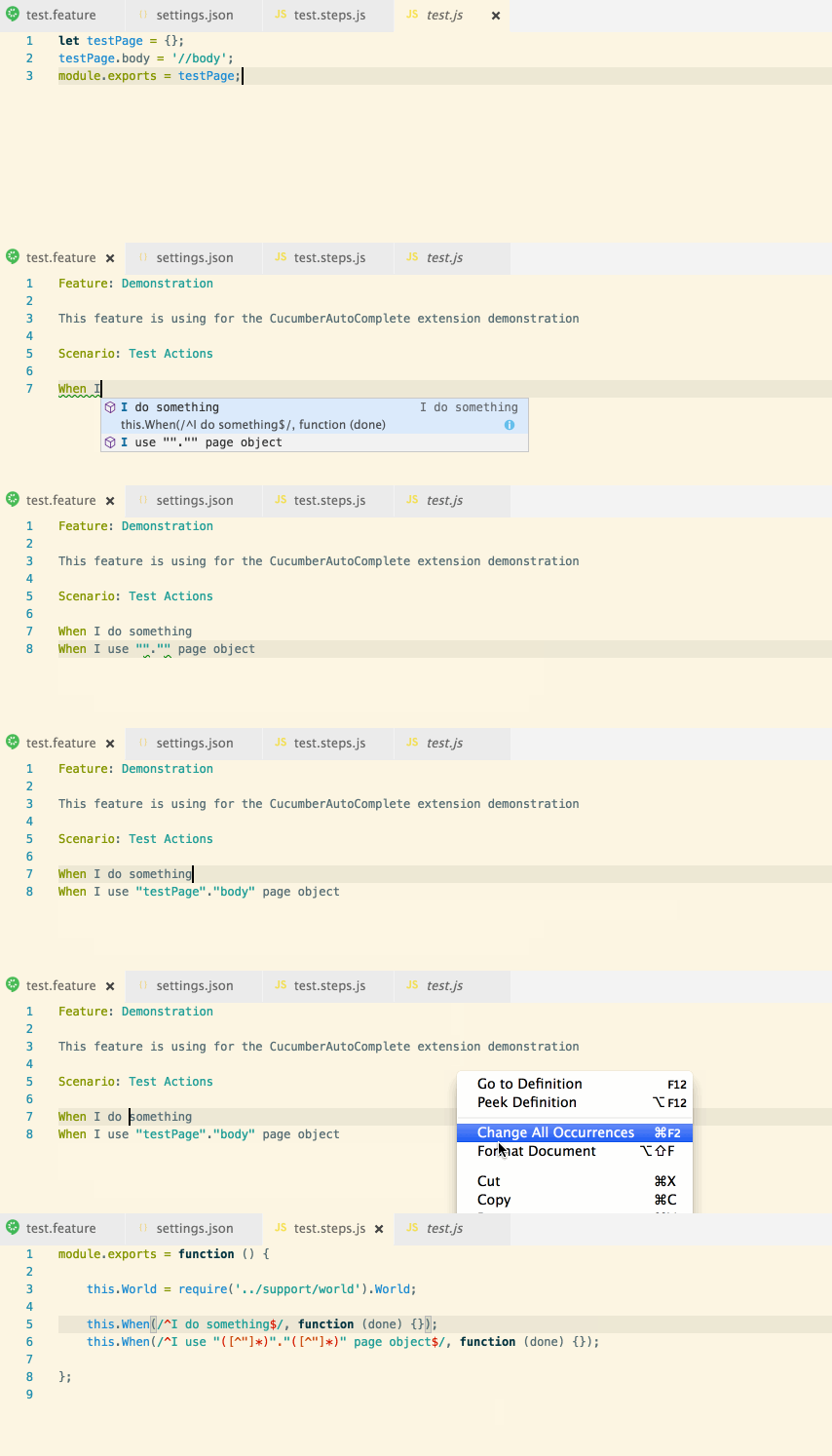
- Open your app in VS Code
- Install
cucumberautocompleteextension - In the opened app root create (if absent) .vscode folder with settings.json file or just run
mkdir .vscode && touch .vscode/settings.json - Add all needed settings to the settings.json file
- Reload the app to apply all extension changes
- To get autocomplete working,
stringsvar ofeditor.quickSuggestionssetting should be set to true (because by defaultstringsuggestions will not appear)
{
    "cucumberautocomplete.steps": [
        "test/features/step_definitions/*.js",
        "node_modules/qa-lib/src/step_definitions/*.js"
    ],
    "cucumberautocomplete.strictGherkinCompletion": true
}cucumberautocomplete.steps - Glob-style path or array of glob-style paths to the gherkin step definition files.
All the files, that match path provided, will be handled by the extension. So, ideally, this path should be as strict as possible (for ex. test/features/step_definitions/*.steps.js is better than test/**/*.steps.js and much better than **/*.steps.js).
The Node will watch steps files for change and will automatically update steps in them.
All the paths are relative to the app root.
cucumberautocomplete.syncfeatures - Will get steps using count from the glob-style path.
Same as for the steps setting - this path should be as strict as possible.
cucumberautocomplete.strictGherkinCompletion - Strict comparing of declaration function and gherkin word.
For ex. if step definition is When(/I do something/) - in case of strictGherkinCompletion is true - after typing Given I this step will not be shown in the suggestion list.
In case of some non-gherkin step definition usage (for ex. new Step('I do something')) strictGherkinCompletion should be set to false - no steps suggestions will be shown otherwise.
cucumberautocomplete.strictGherkinValidation - Compare step body and gherkin word during steps validation.
Sometimes, it's useful to suggest only steps that are strictly equal to gherkin word, but show no error in case if gherkin word is used inproperly, so this option was separated from the strictGherkinCompletion.
cucumberautocomplete.smartSnippets - Extension will try to change all the steps parts, that requires some user input (for ex. .*, ([a-z]+), \w{1,3}) to snippets.
This option could speed up adding new steps up to several times. Try it ;)
cucumberautocomplete.stepsInvariants - Show all the 'or' step parts as separate suggestions (for ex. show I use a and I use b step suggestions for the Given(/I use (a|b)/) step. It could also help to speed up new steps addition.
cucumberautocomplete.customParameters - Change some steps RegEx parts depending on array of 'parameter' - 'value' key pairs. Parameter could be string or regular expression. Whether 'parameter' is interpreted as a string or a regular expression is
controlled by 'isRegex' option.
This setting will be be applied before getting the steps.
For ex. to get step from the py expression @given(u'I do something') we could use the next parameters:
"cucumberautocomplete.customParameters": [
        {
            "parameter":"(u'",
            "value":"('"
        }
    ],
After this, the current expression will be handled as @given('I do something'), so the extension would be able to get 'I do something' step.
cucumberautocomplete.pages - Object, which consists of 'page name' => 'page object file path' pairs.
It is allowing to handle some very specific cases of page objects usage in the gherkin steps.
cucumberautocomplete.skipDocStringsFormat - Skip format of strings, that was placed between ''' or """.
cucumberautocomplete.formatConfOverride - Override some formatting via format conf strings = {[key: String]: num | 'relative' | 'relativeUp' }, where key - beggining of the string, num - numeric value of indents, 'relative' (same indent value as the next line), or 'relativeUp' (same as the previous line).
Example:
"cucumberautocomplete.formatConfOverride": {
        "And": 3,
        "But": "relative",
    },
Also, some new words (in the case of non-English languages using) could be added. Example:
"cucumberautocomplete.formatConfOverride": {
        "Característica": 3,
        "Cuando": "relative",
    },
Default format conf is:
{
    'Ability': 0,
    'Business Need': 0,
    'Feature:': 0,
    'Scenario:': 1,
    'Background:': 1,
    'Scenario Outline:': 1,
    'Examples:': 2,
    'Given': 2,
    'When': 2,
    'Then': 2,
    'And': 2,
    'But': 2,
    '*': 2,
    '|': 3,
    '"""': 3,
    '#': 'relative',
    '@': 'relative',
};
cucumberautocomplete.onTypeFormat - Enable ontype formattings (activation after pressing space, @ and : keys)"
cucumberautocomplete.gherkinDefinitionPart - Provide step definition name part of RegEx (for ex. '@(given|when|then|step)\(' in case of python-like steps.
All 'definition' words (usually they are gherkin words, but some other words also could be used) should be wrapped in braces.
cucumberautocomplete.stepRegExSymbol - Provide step RegEx symbol. For ex. it could be "'" for When('I do something') definition.
By default, all the ' ' " symbols will be used to define the start and the end of RegEx. But sometimes we need to use some other symbol (ex. \\) or we should exclude some default symbol (for ex. use ' only).
cucumberautocomplete.pureTextSteps - Some frameworks are using gherkin steps as a text and only support cucumber expressions instead of RegEx. This differs from the default extension behaviour, example:
When('I give 5$ and * items') step would be handled as /I give 5$ and * items/ RegEx without this option enabled and as /^I give 5\$ and \* items$/ RegEx with it (^ and $ symbols were added to the RegEx and also all the special RegEx symbols were handled as regular text symbols).
{
    "cucumberautocomplete.steps": [
        "test/features/step_definitions/*.js",
        "node_modules/qa-lib/src/step_definitions/*.js"
    ],
    "cucumberautocomplete.syncfeatures": "test/features/*feature",
    "cucumberautocomplete.strictGherkinCompletion": true,
    "cucumberautocomplete.strictGherkinValidation": true,
    "cucumberautocomplete.smartSnippets": true,
    "cucumberautocomplete.stepsInvariants": true,
    "cucumberautocomplete.customParameters": [
        {
            "parameter":"{ab}",
            "value":"(a|b)"
        },
        {
            "parameter":"\\{a.*\\}",
            "value":"a",
            "isRegex": true,
            "flags": "gi",
        },
    ],
    "cucumberautocomplete.pages": {
        "users": "test/features/page_objects/users.storage.js",
        "pathes": "test/features/page_objects/pathes.storage.js",
        "main": "test/features/support/page_objects/main.page.js"
    },
    "cucumberautocomplete.skipDocStringsFormat": true,
    "cucumberautocomplete.formatConfOverride": {
        "And": 3,
        "But": "relative",
    },
    "cucumberautocomplete.onTypeFormat": true,
    "editor.quickSuggestions": {
        "comments": false,
        "strings": true,
        "other": true
    },
    "cucumberautocomplete.gherkinDefinitionPart": "(Given|When|Then)\\(",
    "cucumberautocomplete.stepRegExSymbol": "'",
    "cucumberautocomplete.pureTextSteps": true
}Feel free to create app issues on GitHub
If this plugin was helpful for you, you could give it a ★ Star on GitHub