


DUE Friday, March 11, 2016
My name: Yusuf Mulyo
In this first part project, I played around with the simple-qr library. It was a great start learning to install outside packages/libraries than the default given when downloading Racket. With this library, I was able to create QR code images that are saved in my computer when a procedure is run. The QR code consist of writtings that can just be plain text or a web link that could be scan by your devices and redirect you to the link written in the QR code. I made three QR code where one is just saying Hello World! while the other two are links.
Here are the pictures of the QR codes produced: https://github.com/oplS16projects/FP1/tree/25a05ee46accb3f39ed3f81f35764cddb7f5e9cb
#lang racket
(require simple-qr)
(qr-code "Hello World!" "hello.png")
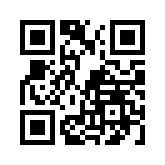
(qr-code "www.uml.edu" "uml.png")

(qr-code "https://github.com/YusufSM/FP1" "github.png" #:module_width 9)

Each procedure call (qr-code) is followed by a string that you want the code to have and followed by the name and file type you want the code to be saved as in one string (for example "name.type").