
A tiny Wayland keyboard visualizer.
Shows your last keystrokes as floating bubbles anchored to the bottom of the screen — see shortcuts, modifiers, and typed text at a glance, without breaking your flow.
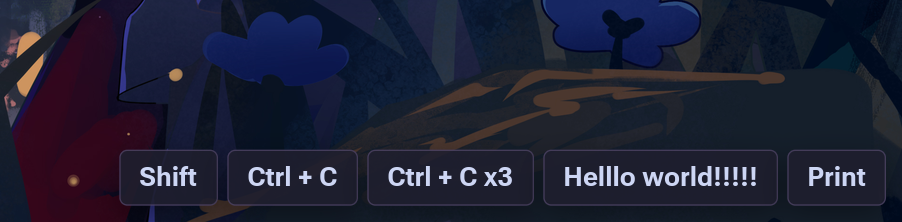


Seekey is a keyboard visualizer for Linux Wayland. It listens to your keyboard (and optionally your mouse) and draws the last few keys as little rounded bubbles anchored to the bottom edge of the screen.
Great for streaming & recording, live tutorials, or just catching your own accidental modifier presses and typos.
It is not a keylogger — it only displays the most recent few keys
temporarily, reads input straight from the kernel (/dev/input/event*), and
never claims keyboard focus. The overlay is click-through, so it never
gets in the way of whatever is underneath.
yay -S seekey             # install stable version
yay -S seekey-git # install main branch versionmake # build
./seekey --init-config # drop a starter ./seekey.ini (optional)
./seekey --config-gui # open the graphical settings menu
./seekey --config-tui # tweak settings in a terminal UI (optional)
./seekey # runPress some keys — bubbles appear at the bottom of the screen. That's it.
⚠️ No bubbles on first run? You need read access to/dev/input/event*. The easiest fix is./install.sh, which installs an active-session udev ACL. Systems withoutuaccesscan use the explicit--input-groupfallback. See Troubleshooting.
Keyboard and mouse event nodes are watched at runtime. Reconnecting a USB keyboard, switching a dock, or replacing an input device does not require restarting Seekey. If no readable keyboard exists at launch, the placeholder stays visible while Seekey retries after hotplug or permission changes.
| 🖥️ Works on every Wayland compositor | Reads input via libevdev, not the Wayland keyboard protocol — no per-compositor glue needed. |
| 📌 Anchors out of your way | Uses gtk4-layer-shell on niri / Hyprland / Sway / river / Wayfire / labwc to pin to the bottom edge and stay put across workspaces. Remembers which monitor it was on. |
| 🪟 Falls back gracefully | On GNOME / KDE it runs as a transparent window and tells you exactly which settings have no effect. |
| 🖱️ Click-through | Clicks pass straight through to whatever is underneath. Keyboard focus is never stolen. |
| 🎨 Looks nice out of the box | Seven built-in themes (default, nord, dracula, catppuccin, monokai, light, matugen) + custom colors + custom key icons. |
| 🖼️ Matugen-aware | Pick Matugen from the GUI/TUI or reference @matugen:<role> directly; colors follow your wallpaper with safe static fallbacks. |
| ⚙️ Real fuzzel menu | The settings menu runs as a real fuzzel session and inherits your fuzzel theme; a built-in GTK menu takes over when fuzzel is absent. |
| ⌨️ TUI config editor | Browse, change, and save every setting with an on-screen overlay. |
| 🔒 Typed-text privacy | Keep normal typing, replace each typing burst with one fixed label, or hide typed characters while shortcuts remain visible. |
The easiest path is the bundled installer — it detects your distro, installs
build deps, builds, installs to ~/.local/bin, and sets up input permissions:
./install.sh                # user install (default)
./install.sh --system       # system install to /usr/local (sudo)
./install.sh --uninstall    # reverse it
Installation also adds a Seekey desktop entry. On its first launch, choose
whether future application-menu launches open the settings menu or start the
key overlay directly. seekey --config-gui always opens settings.
The settings menu is driven by a real fuzzel
session (fuzzel ≥ 1.11), so it looks and behaves exactly like your launcher and
follows your fuzzel.ini — including Matugen colors written there. Fuzzel is an
optional runtime dependency: when it is missing, too old, or misconfigured,
Seekey falls back to a built-in GTK menu with the same pages and a live preview.
When ~/.cache/matugen/colors.json is available, the GUI root menu also
offers Use Matugen colors for the key overlay itself. A custom
--matugen <path> is preserved by the live preview and by overlays launched
from the GUI.
The editors keep at most one key-rendering surface visible. If the real input overlay is already running, it remains on screen and the sample preview is suppressed. Otherwise, the editor starts the live sample preview. Stopping the real overlay from the GUI immediately switches to the sample preview; starting the real overlay removes the sample first.
For password prompts or other sensitive input, set typing-display in the
GUI/TUI or configuration file:
[general]
typing-display=masked  # full, masked, or off
masked displays one fixed <Some Characters> bubble without exposing the
text or its length. off suppresses ordinary typed characters while keeping
shortcuts and non-text keys visible. Privacy modes also suppress ordinary
character lines from --debug-input output.
Typed-character grouping currently uses a built-in US evdev key map. Named keys and shortcuts still work on other layouts, but grouped text can differ from text produced by an active non-US layout or IME; see Troubleshooting.
Prefer building manually? See Build from source in the wiki.
The README stays short on purpose. Everything else lives in the 📖 Wiki:
Getting started
- Installation —
install.shoptions, distro dependencies, input permissions - Build from Source — manual build, dependencies per distro, Makefile targets
- Configuration — the config file, lookup order, common settings
- Configuration Reference — every key, its type, range, and default
- GUI Editor — graphical menu and desktop-launch behavior
- TUI Editor — keybindings for
--config-tui
Behaviour & compatibility
- Compositor Compatibility — layer-shell vs fallback per desktop
- Window Position — anchoring, multi-monitor, click-through, GNOME/KDE pinning
- Autostart — start seekey with your compositor
Looks
- Themes and Icons — presets, custom colors, custom key glyphs
- Matugen Integration — wallpaper-driven colors
For contributors
- Architecture — how the source is laid out (start here if the code confuses you)
- Testing — running and understanding the unit tests
- Translations — adding a new language
Reference
- Troubleshooting — input permissions, fallback mode, no bubbles, etc.
MIT — see LICENSE.