
A specialized script for creating and managing Managed SSH sessions with Oracle Cloud Infrastructure (OCI) bastion services.
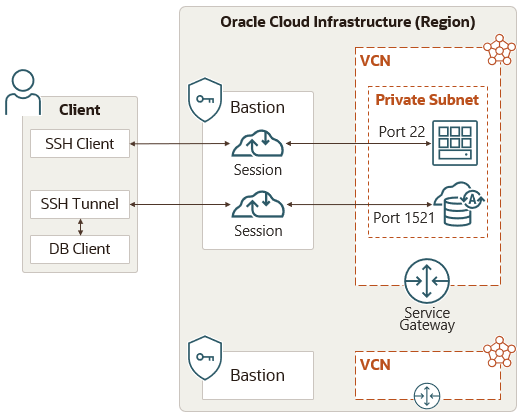
OCI Bastions provide secure and restricted access to resources in private subnets that don't have public endpoints. This tool allows you to create and manage different types of bastion sessions, list existing bastions, and view detailed information about bastions and sessions.
The script streamlines the process of establishing secure SSH connections to private resources through OCI bastions, providing features such as:
- 🔐 Secure SSH session management with automatic key handling
- 🗂️ Organized SSH configuration generation for easy access
- 🔧 Automatic SSH config management - dynamically updates
~/.ssh/configwith host aliases and ProxyJump configurations - 📁 Modular SSH config files - creates individual config files in
~/.ssh/config.d/for each session - 🏷️ Host aliasing system - generates easy-to-remember aliases like
target-12345678for direct SSH access - 🧹 Automatic cleanup of expired session configurations and stale SSH entries
- 📊 Comprehensive listing and monitoring of bastions and sessions
- 🔍 Detailed information display for troubleshooting and management
SSH Configuration Features:
- Automatically adds
Includedirectives to main SSH config - Creates individual host entries with ProxyJump configuration
- Manages SSH identity files and connection parameters
- Provides seamless SSH experience without complex command memorization
🐳 Environment Integration: This script is designed to run within the containerized environment provided by OCI.docker-environment, ensuring consistent tooling and dependencies for OCI infrastructure management.
- 📝 Description
- 🔧 Prerequisites
- 📦 Installation
- 🚀 Quick Start
- 📖 Usage
- 💡 Examples
- ⚙️ Configuration
- 🔍 SSH Config Integration
- 🐛 Troubleshooting
- 📝 Features in this Version
- 🔗 Links of Interest
Before using this script, ensure you have:
- ✅ OCI CLI installed and configured
- ✅ jq command-line JSON processor
- ✅ Valid OCI authentication configuration at
~/.oci/config - ✅ SSH key pair for bastion access
- ✅ Appropriate OCI permissions for bastion management
- ✅ Target instance configuration:
- The bastion plugin is enabled on the target Compute instance
- For plugin management details, see Managing Plugins with Oracle Cloud Agent
-
Download the script:
curl -O https://your-repo/bastion_session_manager.sh
-
Make it executable:
chmod +x bastion_session_manager.sh
-
Verify prerequisites:
# Check OCI CLI
oci --version

# Check jq
jq --version

# Verify OCI authentication
oci iam region list
Create your first managed SSH session:
./bastion_session_manager.sh create session-ssh \
  -b ocid1.bastion.oc1.region.your-bastion-id \
  -n "my-first-session" \
--target-id ocid1.instance.oc1.region.your-instance-id| Verb | Object | Description |
|---|---|---|
create |
session-ssh |
🔨 Create a new managed SSH session |
list |
bastion |
📋 List all bastions in a compartment |
list |
session |
📋 List all sessions for a bastion |
show |
bastion |
🔍 Show detailed bastion information |
show |
session |
🔍 Show detailed session information |
help |
<command> |
❓ Show help for specific commands |
./bastion_session_manager.sh <verb> <object> [options]Common Parameters:
-r, --region REGION- Specify OCI Region-p, --profile PROFILE- Specify OCI Profile (default: DEFAULT)--debug- Enable debug mode-h, --help- Show help information
$ ./bastion_session_manager.sh show bastion -b ocid1.bastion.oc1.sa-santiago-1.anzwgljrb4w7ojacpcovxr7zm7llulu5464z3twive5bept7bn3w7fc6swaq

Retrieving details for bastion: ocid1.bastion.oc1.sa-santiago-1.anzwgljrb4w7ojacpcovxr7zm7llulu5464z3twive5bept7bn3w7fc6swaq
========================================
Bastion Details
========================================
Name: bastion01
State: ACTIVE
OCID: ocid1.bastion.oc1.sa-santiago-1.anzwgljrb4w7ojacpcovxr7zm7llulu5464z3twive5bept7bn3w7fc6swaq
Compartment: ocid1.compartment.oc1..aaaaaaaajzeqkclqbyj7pwwl5wjqefwmwttctrmzzrzfadci7anrwwqtgcvq
Created: 2025-01-15T10:30:45.123000+00:00
Target Subnet: ocid1.subnet.oc1.sa-santiago-1.aaaaaaaaxgdlro2hsj5h3t6ikzo7fs7behz63jhwxpvvejhhle5qcpfjrb2a
Type: standard
Max Session TTL: 10800 seconds (3.00 hours)
DNS Proxy Status: DISABLED

Client CIDR Blocks:
  - 0.0.0.0/0
  - 10.0.0.0/8

Defined Tags:
{
  "Operations": {
    "CostCenter": "IT-Infrastructure",
    "Environment": "Production"
  }
}

Freeform Tags:
{
  "CreatedBy": "terraform",
  "Project": "bastion-management"
}

========================================
For session management, use:
./bastion_session_manager.sh list session -b ocid1.bastion.oc1.sa-santiago-1.anzwgljrb4w7...
./bastion_session_manager.sh create session -b ocid1.bastion.oc1.sa-santiago-1.anzwgljrb4w7... -n SESSION_NAME -t TARGET_IP
========================================$ ./bastion_session_manager.sh show session -b ocid1.bastion.oc1.sa-santiago-1.anzwgljrb4w7ojacpcovxr7zm7llulu5464z3twive5bept7bn3w7fc6swaq -s "my-db-session"
Retrieving session 'my-db-session' from bastion: ocid1.bastion.oc1.sa-santiago-1.anzwgljrb4w7ojacpcovxr7zm7llulu5464z3twive5bept7bn3w7fc6swaq
========================================
Session Details
========================================
Name: my-db-session
ID: ocid1.bastionsession.oc1.sa-santiago-1.anzwgljrb4w7ojacpcovxr7zm7llulu5464z3twive5bept7bn3w7fc6swaq
State: ACTIVE
Created: 2025-01-21T14:25:30.456000+00:00
Type: MANAGED_SSH
TTL: 10800 seconds (3.00 hours)
Target Resource: database-server-01
Target IP: 10.0.1.243
Target Port: 22
========================================
SSH Command:
ssh -i ~/.ssh/carlmira -o ProxyCommand="ssh -i ~/.ssh/carlmira -W %h:%p ocid1.bastionsession.oc1.sa-santiago-1.anzwgljrb4w7ojacpcovxr7zm7llulu5464z3twive5bept7bn3w7fc6swaq@host.bastion.sa-santiago-1.oci.oraclecloud.com" opc@10.0.1.243
Would you like to setup SSH config for easy access? (y/n): y
Setting up SSH config...
SSH config created: /home/user/.ssh/config.d/oci_bastion_6fc6swaq
You can connect directly using: ssh target-6fc6swaq
================ SSH CONFIG CREATED ================
You can now connect directly using: ssh target-6fc6swaq
=====================================================$ ./bastion_session_manager.sh create session-ssh -b ocid1.bastion.oc1.sa-santiago-1.anzwgljrb4w7ojacpcovxr7zm7llulu5464z3twive5bept7bn3w7fc6swaq -n "prod-maintenance" --target-id ocid1.instance.oc1.sa-santiago-1.anzwgljrb4w7ojacpcovxr7zm7llulu5464z3twive5bept7bn3w7fc6swaq
Cleaned up 0 stale SSH config(s) older than 3 hours:
Verifying OCI CLI authentication...
Verifying bastion status...
Creating SSH session with the following configuration:
Name: prod-maintenance
Bastion OCID: ocid1.bastion.oc1.sa-santiago-1.anzwgljrb4w7ojacpcovxr7zm7llulu5464z3twive5bept7bn3w7fc6swaq
Session Type: SSH
Session TTL: 1800 seconds
Target Resource OCID: ocid1.instance.oc1.sa-santiago-1.anzwgljrb4w7ojacpcovxr7zm7llulu5464z3twive5bept7bn3w7fc6swaq
Target OS Username: opc
Key Type: PUB
Public Key File: ~/.ssh/carlmira.pub
OCI Profile: DEFAULT
Region: sa-santiago-1
Continue with session creation? (y/n): y
Creating SSH session...
Session creation initiated.
Session OCID: ocid1.bastionsession.oc1.sa-santiago-1.aaaaaaaabbbbccccddddeeeeffffgggghhhhiiiijjjjkkkkllllmmmmnnnnoooopppp
Waiting for session to become active...
Current state: CREATING. Waiting 10 more seconds...
Current state: CREATING. Waiting 10 more seconds...
Session is now ACTIVE.
========================================
Session created successfully!
========================================
Name: prod-maintenance
OCID: ocid1.bastionsession.oc1.sa-santiago-1.aaaaaaaabbbbccccddddeeeeffffgggghhhhiiiijjjjkkkkllllmmmmnnnnoooopppp
State: ACTIVE
TTL: 1800 seconds (expires in ~30 minutes)
========================================
SSH Command:
ssh -i ~/.ssh/carlmira -o ProxyCommand="ssh -i ~/.ssh/carlmira -W %h:%p ocid1.bastionsession.oc1.sa-santiago-1.aaaaaaaabbbbccccddddeeeeffffgggghhhhiiiijjjjkkkkllllmmmmnnnnoooopppp@host.bastion.sa-santiago-1.oci.oraclecloud.com" opc@10.0.1.243
Setting up SSH config...
SSH config created: /home/user/.ssh/config.d/oci_bastion_oooopppp
You can connect directly using: ssh target-oooopppp
================ SSH CONFIG CREATED ================
You can now connect directly using: ssh target-oooopppp
=====================================================
========================================$ ./bastion_session_manager.sh create session-ssh \
-b ocid1.bastion.oc1.sa-santiago-1.anzwgljrb4w7ojacpcovxr7zm7llulu5464z3twive5bept7bn3w7fc6swaq \
-n "database-backup-session" \
--target-id ocid1.instance.oc1.sa-santiago-1.xxxxxxxxxxxxxxxxxxxxxxxxxxxxxxxxxxxxx \
--target-user ubuntu \
--ttl 7200 \
--key-file ~/.ssh/my-custom-key.pub
Cleaned up 1 stale SSH config(s) older than 3 hours:
- oci_bastion_abcd1234
Verifying OCI CLI authentication...
Verifying bastion status...
Creating SSH session with the following configuration:
Name: database-backup-session
Bastion OCID: ocid1.bastion.oc1.sa-santiago-1.anzwgljrb4w7ojacpcovxr7zm7llulu5464z3twive5bept7bn3w7fc6swaq
Session Type: SSH
Session TTL: 7200 seconds
Target Resource OCID: ocid1.instance.oc1.sa-santiago-1.xxxxxxxxxxxxxxxxxxxxxxxxxxxxxxxxxxxxx
Target OS Username: ubuntu
Key Type: PUB
Public Key File: ~/.ssh/my-custom-key.pub
OCI Profile: DEFAULT
Region: sa-santiago-1
Continue with session creation? (y/n): y
Creating SSH session...
Session creation initiated.
Session OCID: ocid1.bastionsession.oc1.sa-santiago-1.yyyyyyyyzzzzzzzzaaaaaaaabbbbbbbbccccccccddddddddeeeeeeeeffffffffgggg
Waiting for session to become active...
Session is now ACTIVE.
========================================
Session created successfully!
========================================
Name: database-backup-session
OCID: ocid1.bastionsession.oc1.sa-santiago-1.yyyyyyyyzzzzzzzzaaaaaaaabbbbbbbbccccccccddddddddeeeeeeeeffffffffgggg
State: ACTIVE
TTL: 7200 seconds (expires in ~120 minutes)
========================================
SSH Command:
ssh -i ~/.ssh/my-custom-key -o ProxyCommand="ssh -i ~/.ssh/my-custom-key -W %h:%p ocid1.bastionsession.oc1.sa-santiago-1.yyyyyyyyzzzzzzzzaaaaaaaabbbbbbbbccccccccddddddddeeeeeeeeffffffffgggg@host.bastion.sa-santiago-1.oci.oraclecloud.com" ubuntu@10.0.2.150
Setting up SSH config...
SSH config created: /home/user/.ssh/config.d/oci_bastion_ffffgggg
You can connect directly using: ssh target-ffffgggg
================ SSH CONFIG CREATED ================
You can now connect directly using: ssh target-ffffgggg
=====================================================
========================================The script includes predefined global variables that can be customized for your environment:
# OCI Configuration
OCI_REGION="sa-santiago-1"
OCI_PROFILE="DEFAULT"

# Default Compartment and Bastion Settings
COMPARTMENT_OCID="ocid1.compartment.oc1..aaaaaaaajzeqkclqbyj7pwwl5wjqefwmwttctrmzzrzfadci7anrwwqtgcvq"
TARGET_SUBNET_OCID="ocid1.subnet.oc1.sa-santiago-1.aaaaaaaaxgdlro2hsj5h3t6ikzo7fs7behz63jhwxpvvejhhle5qcpfjrb2a"

# Session Defaults
SESSION_TTL=1800  # 30 minutes
MAX_SESSION_TTL=10800  # 3 hours
TARGET_OS_USER="opc"
PUBLIC_KEY_FILE="~/.ssh/carlmira.pub"

# SSH Config Settings
SSH_CONFIG_DIR="$HOME/.ssh/config.d"
SSH_IDENTITY_FILE="$HOME/.ssh/carlmira"
SSH_CONFIG_ENABLED=true| Parameter | Description | Default |
|---|---|---|
-b, --bastion-id |
🆔 Bastion OCID (required) | - |
-n, --name |
📝 Session display name (required) | - |
--target-id |
🎯 Target compute instance OCID (required) | - |
--target-user |
👤 Target OS username | opc |
--ttl |
⏱️ Session time-to-live in seconds | 1800 |
--key-type |
🔑 Key type (PUB or PEM) | PUB |
--key-file |
📁 Public key file path | ~/.ssh/carlmira.pub |
The script automatically generates SSH configuration files to simplify connection to your bastion sessions, eliminating the need to remember complex SSH commands.
- ✨ Automatic SSH config generation for each session
- 🗂️ Organized config files in
~/.ssh/config.d/ - 🧹 Automatic cleanup of stale configurations
- 🔗 ProxyJump configuration for seamless access
- 🏷️ Easy-to-remember aliases like
target-12345678
| Parameter | Description | Default |
|---|---|---|
--ssh-config-dir |
📂 SSH config directory | ~/.ssh/config.d |
--ssh-identity-file |
🔐 SSH identity file | ~/.ssh/carlmira |
--ssh-config-enabled |
✅ Enable SSH config generation | true |
--ssh-config-disabled |
❌ Disable SSH config generation | - |
Once you create a session, the script automatically configures SSH for easy access:
# After creating a session, instead of using the complex command:
ssh -i ~/.ssh/carlmira -o ProxyCommand="ssh -i ~/.ssh/carlmira -W %h:%p ocid1.bastionsession.oc1.sa-santiago-1.aaaaaaaabbbb@host.bastion.sa-santiago-1.oci.oraclecloud.com" opc@10.0.1.243

# You can simply use the generated alias:
ssh target-bbbbcccc

# The SSH config automatically handles:
# - ProxyJump through the bastion
# - Identity file management
# - Host key checking settings
# - Keep-alive configuration
Generated SSH Config Structure:
~/.ssh/config.d/oci_bastion_bbbbcccc
├── Host bastion-bbbbcccc      # Bastion connection config
└── Host target-bbbbcccc       # Target server config with ProxyJump
The script also automatically updates your main ~/.ssh/config file with Include directives to load these configurations.
Error: OCI CLI authentication failedSolution: Verify your ~/.oci/config file and ensure proper authentication setup.
Error: jq is required for this script. Please install it.Solution: Install jq using your package manager:
# Ubuntu/Debian
sudo apt-get install jq

# CentOS/RHEL
sudo yum install jq

# macOS
brew install jqError: Public key file '~/.ssh/nonexistent.pub' not found.Solution: Ensure your SSH public key exists or specify the correct path with --key-file.
Warning: Timed out waiting for session to become active.Solution: Check bastion status and OCI service health. The session may still become active after the timeout.
- ✅ Managed SSH session creation
- ✅ Bastion and session listing
- ✅ Detailed information display
- ✅ SSH config integration
- ✅ Automatic cleanup of stale configurations
- ✅ Debug mode support
- ✅ Interactive and non-interactive modes
- 🔄 Port forwarding sessions (
session-forwarding) - 🔄 SOCKS proxy sessions (
session-socks) - 🔄 Batch session management
- 🔄 Session templates and profiles
- 📚 Oracle Cloud Infrastructure Bastion Service - Complete OCI Bastion documentation
- 🛠️ Simplify Secure Access to Oracle Workloads Using Bastions - Oracle A-Team best practices guide
- 🐳 OCI.docker-environment - Containerized OCI infrastructure management environment
Note: This project is not an official Oracle product. Oracle Cloud Infrastructure and other Oracle product names are registered trademarks of Oracle Corporation.
Made with ❤️ for OCI infrastructure management