Trying to persist Window Size and position #1610


|
I've got a Window that opens and can save win.Frame.X, win.Frame.Y, win.Frame.Width and win.Frame.Height as strings into a text file. I use these values to create the Window size and that mostly works. Also in the Application.Resized event I change the Window Width and Height and that corrects the border. I.e. it matches the terminal window. But when I load the saved values on the next run after resizing, the border is wrong. I've used Application.Refresh() but that doesn't make a difference. So am I just doing the wrong thing? Is there a better way to persist Window size and position? |

Replies: 5 comments 10 replies

|
If your window is There are 2 layouts Ideally you would want to pass off persistence to a serialization library like JSON or YAML. I looked into what happens when you pass |

|
For the rest of the application I'd be happy to serialize state- I usually use JSON but for the top level Window, all I need are absolute positions and size. Why is it so hard to do? |

|
Lets take a step back a second. To make a var fullWindow = new Window("Test Window")
{
Width = Dim.Fill(),
Height = Dim.Fill(),
};
var smallWindow = new Window("Test Window")
{
X = Pos.Percent(25),
Y = Pos.Percent(25),
Height = Dim.Percent(50),
Width = Dim.Percent(50),
}; |
|
Am I right in thinking there's no way to control the Terminal Window size? I put in a Resized method and used Dim.Fill() to set Window after a resize and that worked but setting the terminal size in code doesn't seem possible. |

|
If you are talking about resizing the console window based on a saved state, that only possible if you didn't closed the console window yet and loading another toplevel with the |
|
When my application starts, before creating the main Window, it looks for the file with the previous values and if present reads those. It then creates the Window using the Width and Height using those. That worked fine except you get the situation as the image above shows. |
|
You only need to set the Width to
You are right that a terminal process cannot resize the terminal window itself. That window (e.g. powershell) is under the control of the OS (e.g. Windows) not the hosted application. Any solution would be platform specific (e.g. sending windows messages to the Powershell window). |
|
Sorry, I wasn't clear- the Resize method is the event handler that is run when the Terminal is manually resized. In it I set Width and Height to Dim.Fill() and that puts the Border in the correct place. |
|
Are you able to share your current code? |
|
It's currently about 100 lines long. and I'm just trying to put together a basic skeleton. The main things were the Load and Save of the main Window. But those don't work. Anyway I've uploaded it in a zip file. |
|
Thanks for sharing the code. I have cut out the load and save and shown how to make a I don't understand why you are loading and saving the window coordinates when they are auto computed by the system already (when using using System;
using System.Collections.Generic;
using System.Linq;
using System.Text;
using System.Threading.Tasks;
using Terminal.Gui;
namespace CTL
{
internal class Lib
{
static Window? win = null;
public static void Main(string[] args)
{
Application.Init();
var menu = new MenuBar(new MenuBarItem[] {
new MenuBarItem ("_File", new MenuItem [] {
new MenuItem ("_Quit", "", () => {
Application.RequestStop ();
})
})
});
win = new Window("test")
{
X = 0,
Y = 1,
Width = Dim.Fill(),
Height = Dim.Fill(1)
};
win.ColorScheme = Colors.TopLevel;
Application.Top.Add(menu, win);
Application.Run();
Application.Shutdown();
}
}
}
|
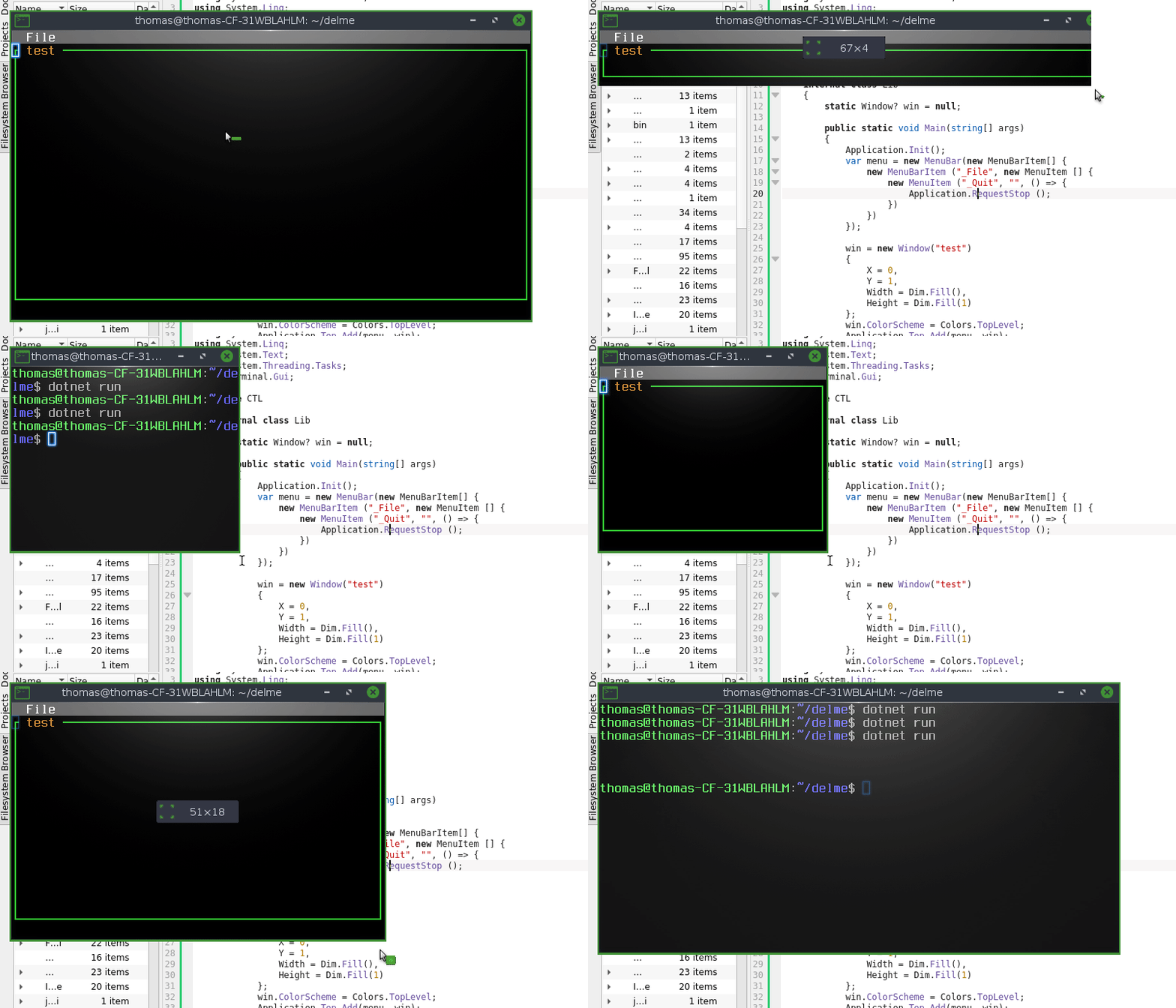
|
I think its my lack of experience with gui.cs. I'm glad that these discussions exist. Interesting, I see you are using dotnet run on Linux?. When I run this on Windows in Visual Studio (2022) or in a command line it doesn't save position or size. |
|
Because the Visual Studio is always opening a new console window. If you open on a console (cmd, powershell or terminal windows) and do a dotnet run, do a resize, close the app and do again dotnet run. You will see it will respect the console window size. |
|
Yes, just tried it and confirm that it derives its size from the console window. That's sorted then! Thank you. |

|
Love seeing the community interaction and the help. This is what makes open source amazing. |


It's currently about 100 lines long. and I'm just trying to put together a basic skeleton. The main things were the Load and Save of the main Window. But those don't work. Anyway I've uploaded it in a zip file.
Lib.zip