Repository navigation
Expand file tree
/
Copy pathllms-full.txt
More file actions
586 lines (402 loc) · 21.8 KB
/
Copy pathllms-full.txt
File metadata and controls
586 lines (402 loc) · 21.8 KB
1
2
3
4
5
6
7
8
9
10
11
12
13
14
15
16
17
18
19
20
21
22
23
24
25
26
27
28
29
30
31
32
33
34
35
36
37
38
39
40
41
42
43
44
45
46
47
48
49
50
51
52
53
54
55
56
57
58
59
60
61
62
63
64
65
66
67
68
69
70
71
72
73
74
75
76
77
78
79
80
81
82
83
84
85
86
87
88
89
90
91
92
93
94
95
96
97
98
99
100
101
102
103
104
105
106
107
108
109
110
111
112
113
114
115
116
117
118
119
120
121
122
123
124
125
126
127
128
129
130
131
132
133
134
135
136
137
138
139
140
141
142
143
144
145
146
147
148
149
150
151
152
153
154
155
156
157
158
159
160
161
162
163
164
165
166
167
168
169
170
171
172
173
174
175
176
177
178
179
180
181
182
183
184
185
186
187
188
189
190
191
192
193
194
195
196
197
198
199
200
201
202
203
204
205
206
207
208
209
210
211
212
213
214
215
216
217
218
219
220
221
222
223
224
225
226
227
228
229
230
231
232
233
234
235
236
237
238
239
240
241
242
243
244
245
246
247
248
249
250
251
252
253
254
255
256
257
258
259
260
261
262
263
264
265
266
267
268
269
270
271
272
273
274
275
276
277
278
279
280
281
282
283
284
285
286
287
288
289
290
291
292
293
294
295
296
297
298
299
300
301
302
303
304
305
306
307
308
309
310
311
312
313
314
315
316
317
318
319
320
321
322
323
324
325
326
327
328
329
330
331
332
333
334
335
336
337
338
339
340
341
342
343
344
345
346
347
348
349
350
351
352
353
354
355
356
357
358
359
360
361
362
363
364
365
366
367
368
369
370
371
372
373
374
375
376
377
378
379
380
381
382
383
384
385
386
387
388
389
390
391
392
393
394
395
396
397
398
399
400
401
402
403
404
405
406
407
408
409
410
411
412
413
414
415
416
417
418
419
420
421
422
423
424
425
426
427
428
429
430
431
432
433
434
435
436
437
438
439
440
441
442
443
444
445
446
447
448
449
450
451
452
453
454
455
456
457
458
459
460
461
462
463
464
465
466
467
468
469
470
471
472
473
474
475
476
477
478
479
480
481
482
483
484
485
486
487
488
489
490
491
492
493
494
495
496
497
498
499
500
501
502
503
504
505
506
507
508
509
510
511
512
513
514
515
516
517
518
519
520
521
522
523
524
525
526
527
528
529
530
531
532
533
534
535
536
537
538
539
540
541
542
543
544
545
546
547
548
549
550
551
552
553
554
555
556
557
558
559
560
561
562
563
564
565
566
567
568
569
570
571
572
573
574
575
576
577
578
579
580
581
582
583
584
585
586
# Electrum Plugins — full site content
> Directory of plugins for the Electrum Bitcoin wallet — utility plugins, hardware-wallet integrations, and community extensions — plus a developer guide for building and distributing your own plugins.
This file concatenates the full text of every page on plugins.electrum.org as Markdown, for LLMs and coding agents that want complete context in a single fetch. A concise index lives at https://plugins.electrum.org/llms.txt.
## About
This site lists plugins for the Electrum Bitcoin wallet (enabled via Tools → Plugins) across desktop (Qt), Android (QML), and command-line/daemon interfaces, including hardware-wallet integrations, and documents how to build, package, and distribute your own plugin. Plugins marked "Internal" ship with Electrum; all others are third-party and are not reviewed or endorsed by the Electrum developers.
## Enabling Plugins in Electrum
1. **Open Electrum** and go to **Tools → Plugins**.
2. **Internal plugins** are listed in the dialog. Toggle the checkbox to enable or disable them.
3. **External plugins** can be imported from `.zip` files by clicking the **Add** button in the plugins dialog.
4. Some plugins (hardware wallets) are automatically enabled when you create or restore a hardware wallet.
> **First-time setup:** When loading an external plugin for the first time, Electrum will ask you to set a **plugin password**. This password is independent of your wallet and can be reset if forgotten. To verify plugin authenticity on subsequent startups without re-entering the password, Electrum requires you to store a public key string with root permissions. The root permissions prevent malware from modifying the key.
## Plugin directory
Plugins marked Internal ship with Electrum and are enabled from Tools → Plugins. All other plugins are third-party: they are not reviewed or endorsed by the Electrum developers, so verify the source before installing.
### Graphical User Interface
#### Audio MODEM
Provides support for air-gapped transaction signing using sound waves between devices.
- Platforms: Desktop
- Distribution: Internal (bundled with Electrum)
- Page: https://plugins.electrum.org/plugins.html#audio-modem
#### LabelSync
Save and synchronize wallet labels across multiple devices. Labels, transaction IDs, and addresses are encrypted before being sent to the remote server.
- Platforms: Desktop, Android, CLI
- Distribution: Internal (bundled with Electrum)
- Page: https://plugins.electrum.org/plugins.html#labelsync
#### Nostr Cosigner
Multi-signature transaction coordination using Nostr relays. Allows cosigners to exchange partially signed transactions over the Nostr network.
- Platforms: Desktop, Android
- Distribution: Internal (bundled with Electrum)
- Page: https://plugins.electrum.org/plugins.html#nostr-cosigner
#### Nostr Wallet Connect
Remote control of Lightning wallets via Nostr protocol (NIP-47). Enables third-party apps to interact with your Lightning node.
- Platforms: Desktop, CLI
- Distribution: Internal (bundled with Electrum)
- Page: https://plugins.electrum.org/plugins.html#nostr-wallet-connect
#### Revealer
Create visually encrypted backups of your wallet seed and secrets. Print the encrypted backup and use the Revealer overlay to decode it.
- Platforms: Desktop
- Distribution: Internal (bundled with Electrum)
- Page: https://plugins.electrum.org/plugins.html#revealer
#### Timelock Recovery
Create Timelock Recovery Plans for your wallet. Enables inheritance planning by setting up time-locked transactions that activate after a specified period.
- Platforms: Desktop
- Distribution: Internal (bundled with Electrum)
- Page: https://plugins.electrum.org/plugins.html#timelock-recovery
#### Two Factor Authentication
Add two-factor authentication to your wallet using TrustedCoin. Creates a 2-of-3 multisig wallet where TrustedCoin holds one key and cosigns after 2FA verification.
- Platforms: Desktop, Android
- Distribution: Internal (bundled with Electrum)
- Page: https://plugins.electrum.org/plugins.html#two-factor-authentication
#### Bitcoin After Life
Decentralized inheritance planning through time-locked transactions. Sign transactions and send them to Will-Executors who broadcast them at specified dates.
- Platforms: Desktop
- Distribution: External (third-party)
- Page: https://plugins.electrum.org/plugins.html#bitcoin-after-life
- View Website: https://bitcoin-after.life
#### Guardian
Physical coercion resistance for your wallet. Provides mechanisms to protect against forced disclosure of wallet contents.
- Platforms: Desktop
- Distribution: External (third-party)
- Page: https://plugins.electrum.org/plugins.html#guardian
- View Repository: https://github.com/bitcoinguardian/electrum/tree/master/electrum/plugins/guardian
#### Joinstr
Collaborative transactions coordinated via Nostr relays for enhanced transaction privacy.
- Platforms: Desktop
- Distribution: External (third-party)
- Page: https://plugins.electrum.org/plugins.html#joinstr
- View Website: https://joinstr.xyz/
#### LN Graph Visualizer
Visualize the Lightning Network graph of nodes and channels directly within Electrum.
- Platforms: Desktop
- Distribution: External (third-party)
- Page: https://plugins.electrum.org/plugins.html#ln-graph-visualizer
- View Repository: https://github.com/f321x/electrum-lightning-graph-visualizer
#### CLINK Plugin
Generate CLINK noffers. Leverages NOSTR to automatically generate lightning invoices without opening ports or manual intervention. Similar to LNURL.
- Platforms: Desktop
- Distribution: External (third-party)
- Page: https://plugins.electrum.org/plugins.html#clink
- View Repository: https://github.com/BareBits/electrum_clink/
#### Silent Payments Sender
Send BIP352 Silent Payments from standard single-signature software wallets through Electrum's Send tab.
- Platforms: Desktop
- Distribution: External (third-party)
- Page: https://plugins.electrum.org/plugins.html#silent-payments-sender
- View Repository: https://github.com/ZenulAbidin/electrum-silent-payments-sender
#### Electrum Personal Server
Connect Electrum to your own Bitcoin Core full node. Provides full node security and privacy without revealing your addresses to any third party.
- Platforms: Desktop
- Distribution: External (third-party)
- Page: https://plugins.electrum.org/plugins.html#electrum-personal-server
- View Repository: https://github.com/svanstaa/electrum-eps-plugin
#### SwapServer GUI
Manage Electrum's built-in submarine swap server from a graphical tab. Configure fees, ports and nostr relays, toggle the server at runtime, and monitor liquidity, swap history and earnings.
- Platforms: Desktop
- Distribution: External (third-party)
- Page: https://plugins.electrum.org/plugins.html#swapserver-gui
- View Repository: https://github.com/nothing-stops-this-train/electrum_swapgui
#### joinmarket-ng
Send payments as collaborative transactions with makers from the joinmarket-ng network, connecting over Tor. No separate JoinMarket daemon needed.
- Platforms: Desktop, CLI
- Distribution: External (third-party)
- Page: https://plugins.electrum.org/plugins.html#joinmarket-ng
- View Repository: https://gitlab.com/1440000bytes/electrum-joinmarket-plugin
### Daemon only
#### SwapServer
Offer submarine swaps to other Electrum users, enabling trustless exchanges between on-chain and Lightning in both directions.
- Platforms: CLI
- Distribution: Internal (bundled with Electrum)
- Page: https://plugins.electrum.org/plugins.html#swapserver
- Documentation: https://electrum.readthedocs.io/en/latest/swapserver.html
#### Watchtower
Monitor Lightning channels and broadcast penalty transactions if a counterparty attempts to cheat by publishing a revoked commitment transaction.
- Platforms: CLI
- Distribution: Internal (bundled with Electrum)
- Page: https://plugins.electrum.org/plugins.html#watchtower
#### LNURL Server
Receive Lightning Network payments through a static URL. Implements the LNURL protocol to provide a reusable payment endpoint.
- Platforms: CLI
- Distribution: External (third-party)
- Page: https://plugins.electrum.org/plugins.html#lnurl-server
- View Repository: https://github.com/f321x/electrum-lnurl-server
#### Notary
Proof-of-burn for Nostr events. Create a provable cost for the creation of Nostr events.
- Platforms: CLI
- Distribution: External (third-party)
- Page: https://plugins.electrum.org/plugins.html#notary
- View Repository: https://github.com/spesmilo/notary
#### PayServer
HTTP server for receiving Bitcoin payments. Provides a self-hosted payment processing endpoint for merchants and services.
- Platforms: CLI
- Distribution: External (third-party)
- Page: https://plugins.electrum.org/plugins.html#payserver
- View Repository: https://github.com/spesmilo/electrum-payserver
### Hardware Wallets
#### BitBox02
Provides support for the BitBox02 hardware wallet by Shift Crypto.
- Platforms: Desktop
- Distribution: Internal (bundled with Electrum)
- Page: https://plugins.electrum.org/plugins.html#bitbox02
#### Coldcard
Provides support for the Coldcard hardware wallet by Coinkite.
- Platforms: Desktop, CLI
- Distribution: Internal (bundled with Electrum)
- Page: https://plugins.electrum.org/plugins.html#coldcard
#### Digital Bitbox
Provides support for the original Digital Bitbox (BitBox01) hardware wallet.
- Platforms: Desktop
- Distribution: Internal (bundled with Electrum)
- Page: https://plugins.electrum.org/plugins.html#digital-bitbox
#### Jade
Provides support for the Blockstream Jade hardware wallet.
- Platforms: Desktop
- Distribution: Internal (bundled with Electrum)
- Page: https://plugins.electrum.org/plugins.html#jade
#### KeepKey
Provides support for the KeepKey hardware wallet.
- Platforms: Desktop
- Distribution: Internal (bundled with Electrum)
- Page: https://plugins.electrum.org/plugins.html#keepkey
#### Ledger
Provides support for Ledger hardware wallets (Nano S, Nano X, and others).
- Platforms: Desktop, CLI
- Distribution: Internal (bundled with Electrum)
- Page: https://plugins.electrum.org/plugins.html#ledger
#### Safe-T mini
Provides support for the Archos Safe-T mini hardware wallet.
- Platforms: Desktop
- Distribution: Internal (bundled with Electrum)
- Page: https://plugins.electrum.org/plugins.html#safe-t-mini
#### Trezor
Provides support for Trezor hardware wallets (Model One, Model T, Safe 3, and others).
- Platforms: Desktop, CLI
- Distribution: Internal (bundled with Electrum)
- Page: https://plugins.electrum.org/plugins.html#trezor
## Plugin development guide
### Overview
Electrum plugins extend the wallet with new features without modifying core code. Plugins interact with Electrum through a **hook system** and can provide GUI elements for Qt, QML, and command-line interfaces.
Example plugin repositories for reference:
- [LabelSync](https://github.com/spesmilo/electrum/tree/master/electrum/plugins/labels) — multi-GUI plugin with Qt, QML, and CLI modules
- [LN Graph Visualizer](https://github.com/f321x/electrum-lightning-graph-visualizer) — Qt-only external plugin with custom dialogs and QGraphicsView rendering
- [Nostr Wallet Connect](https://github.com/spesmilo/electrum/tree/master/electrum/plugins/nwc) — plugin using Nostr protocol integration
### Plugin Hooks
Plugins interact with Electrum code through **hooks**. The `@hook` decorator on a plugin method registers it to be called when Electrum triggers that hook.
#### How hooks work
In your plugin class, decorate methods with `@hook`:
```
from electrum.plugin import BasePlugin, hook
class Plugin(BasePlugin):
@hook
def password_dialog(self, pw, grid, pos):
"""Called when the password dialog is displayed."""
# Add custom UI elements to the password dialog
...
```
Electrum triggers hooks internally using `run_hook()`:
```
# Inside Electrum core code
run_hook('password_dialog', pw, grid, pos)
```
When a hook is triggered, all enabled plugins that have a matching decorated method will be called.
#### Available hooks
Below is a reference of commonly used hooks. The hook name must match the method name exactly.
| Hook | Description |
| --- | --- |
| `password_dialog` | Customize the password input dialog |
| `load_wallet` | Called when a wallet is loaded in the GUI |
| `close_wallet` | Called when a wallet is being closed |
| `daemon_wallet_loaded` | Called when the daemon loads a wallet |
| `init_menubar` | Initialize the application menu bar |
| `init_qml` | Initialize the QML application |
| `init_wallet_wizard` | Add pages to the wallet creation wizard |
| `create_send_tab` | Add elements to the send tab |
| `create_status_bar` | Add elements to the status bar |
| `abort_send` | Return True to abort sending a transaction |
| `make_unsigned_transaction` | Modify an unsigned transaction before signing |
| `set_label` | Called when a wallet label is set |
| `do_clear` | Called when the send tab is cleared |
| `on_close_window` | Called when a wallet window is closed |
| `wallet_info_buttons` | Add buttons to the wallet information section |
| `qt_utxo_menu` | Add items to the UTXO context menu |
| `receive_list_menu` | Add items to the receive list context menu |
| `receive_menu` | Add items to the receive context menu |
| `transaction_dialog_address_menu` | Add items to the transaction dialog address menu |
| `create_contact_menu` | Add items to the contact context menu |
| `export_history_to_file` | Custom export of transaction history |
| `close_settings_dialog` | Called when the settings dialog is closed |
| `show_xpub_button` | Add buttons to the xpub display dialog |
| `init_keystore` | Initialize a custom keystore (hardware wallets) |
**Note:** This list may be outdated. For a complete and up-to-date list of all available hooks, search the Electrum codebase for `run_hook`.
### Directory Structure
A plugin is a directory containing the following files:
```
my_plugin/
├── manifest.json # Plugin metadata (required)
├── __init__.py # Commands and config declarations
├── qt.py # Qt GUI module (optional)
├── qml.py # QML GUI module (optional)
├── cmdline.py # Command-line module (optional)
├── my_plugin.py # Shared logic (optional)
├── icon.png # Plugin icon (optional)
└── MyPlugin.qml # QML UI file (optional)
```
- `manifest.json` — describes the plugin and is pre-loaded to display plugin information in the Electrum client
- `__init__.py` — registers commands and configuration variables
- **UI modules** — contain a `Plugin` class inheriting from `BasePlugin` for each supported interface (Qt, QML, CLI)
#### Example: Labels plugin structure
```
labels/
├── manifest.json
├── __init__.py # Plugin commands (push, pull)
├── labels.py # Core sync logic
├── qt.py # Qt GUI integration
├── qml.py # QML GUI integration
├── cmdline.py # CLI integration
├── Labels.qml # QML UI component
└── labelsync.png # Plugin icon
```
### manifest.json
The manifest file is pre-loaded by Electrum to display plugin information before the plugin code itself is loaded. It must be valid JSON.
#### Example
```
{
"name": "my_plugin",
"fullname": "My Plugin",
"description": "A brief description of what the plugin does.",
"available_for": ["qt", "qml", "cmdline"],
"author": "Your Name",
"license": "MIT",
"icon": "my-icon.png",
"version": "0.0.1"
}
```
#### Field reference
| Field | Type | Required | Description |
| --- | --- | --- | --- |
| `name` | string | Yes | Internal identifier (must match the directory name) |
| `fullname` | string | Yes | Display name shown to users |
| `description` | string | Yes | Brief description of plugin functionality |
| `available_for` | array | Yes | GUI types: `"qt"`, `"qml"`, `"cmdline"` |
| `author` | string | No | Plugin author name |
| `license` | string | No | Software license (e.g., MIT) |
| `icon` | string | No | Icon filename (relative to plugin directory) |
| `version` | string | No | Plugin version string |
| `requires` | array | No | External dependencies: `[["package", "url"], ...]` |
| `registers_keystore` | array | No | For hardware wallets: `["hardware", "id", "Display Name"]` |
| `registers_wallet_type` | array | No | For custom wallet types |
#### Hardware wallet manifest example
```
{
"name": "coldcard",
"fullname": "Coldcard Wallet",
"description": "Provides support for the Coldcard hardware wallet from Coinkite",
"requires": [["ckcc-protocol", "github.com/Coldcard/ckcc-protocol"]],
"registers_keystore": ["hardware", "coldcard", "Coldcard Wallet"],
"icon": "coldcard.png",
"available_for": ["qt", "cmdline"]
}
```
### Plugin Module
Each GUI module (e.g., `qt.py`) must define a `Plugin` class that inherits from `BasePlugin`. The class uses `@hook` decorators to register for events.
#### Minimal example
```
from electrum.plugin import BasePlugin, hook
class Plugin(BasePlugin):
@hook
def init_menubar(self):
"""Add a menu item when the menu bar is initialized."""
print("My plugin is loaded!")
def on_close(self):
"""Clean up when the plugin is disabled."""
print("My plugin is closing.")
```
#### Full example with GUI elements
```
from electrum.plugin import BasePlugin, hook
from electrum.gui.qt.util import read_QIcon_from_bytes
from PyQt6.QtWidgets import QPushButton
class Plugin(BasePlugin):
@hook
def password_dialog(self, pw, grid, pos):
"""Add a virtual keyboard button to the password dialog."""
vkb_button = QPushButton('')
vkb_button.setIcon(
read_QIcon_from_bytes(self.read_file("keyboard-icon.svg"))
)
vkb_button.clicked.connect(
lambda: self.toggle_vkb(grid, pw)
)
grid.addWidget(vkb_button, pos, 2)
def toggle_vkb(self, grid, pw):
"""Toggle the virtual keyboard visibility."""
...
```
#### Key BasePlugin methods
- `is_enabled()` — check if the plugin is enabled and authorized
- `is_available()` — override to add conditions for availability
- `can_user_disable()` — return True (default) to allow the user to disable the plugin
- `on_close()` — override for custom cleanup when the plugin is disabled
- `requires_settings()` — return True if the plugin has a settings UI
- `settings_widget(window)` — return a widget for the plugin settings dialog
- `read_file(filename)` — read a file from the plugin directory (useful for icons and assets)
- `get_storage(wallet)` — get persistent dict storage associated with a wallet
- `thread_jobs()` — return a list of ThreadJob objects for background tasks
### Plugin Commands
Plugins can register custom commands that are accessible from the Electrum CLI and daemon RPC interface.
Use the `@plugin_command` decorator from `electrum.commands`:
```
from electrum.commands import plugin_command
@plugin_command('w', 'labels')
async def push(self, plugin=None, wallet=None):
"""Push labels to the remote server."""
return await plugin.push_thread(wallet)
@plugin_command('w', 'labels')
async def pull(self, plugin=None, wallet=None):
"""Pull labels from the remote server."""
return await plugin.pull_thread(wallet)
```
The first argument to `@plugin_command` specifies the command category:
- `'w'` — wallet command (requires a loaded wallet)
- `'n'` — network command (requires network access)
- `'wp'` — wallet command requiring password
The second argument is the plugin name (must match `manifest.json` name).
### Creating .zip Files
External plugins are distributed as `.zip` files that users import via the Electrum GUI.
Use the `make_plugin` script included in the Electrum source:
```
./contrib/make_plugin /path/to/my_plugin
```
This produces a file named `my_plugin-0.0.1.zip` (using the version from `manifest.json`).
Users can then import the zip file in Electrum via **Tools → Plugins → Add**.
### Hardware Wallet Plugins
Hardware wallet plugins differ from standard plugins in several ways:
- They are **not displayed** in the normal plugin list — they are enabled automatically by the wallet creation wizard
- They use `registers_keystore` in `manifest.json` to register a hardware keystore type
- They can be distributed as zip files with Python dependencies bundled
- Non-Python dependencies (like `hidapi`) are typically bundled in Electrum binaries
Third-party hardware wallet plugins can be imported from the wallet wizard:
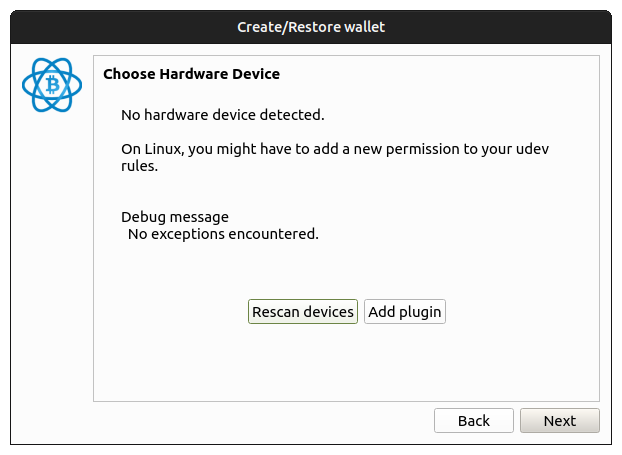
#### Keystore registration
```
// In manifest.json
"registers_keystore": ["hardware", "my_device", "My Device Name"]
```
This tells Electrum to include your device in the hardware wallet selection during wallet creation.
### Loading External Plugins
There are two ways to load external plugins:
#### 1. Import from .zip file
Go to **Tools → Plugins** and click **Add**. Select a `.zip` file produced by the `make_plugin` script.
#### 2. Symlink during development
When running Electrum from source, you can symlink your plugin directory into the plugins folder:
```
ln -s /path/to/my_plugin electrum/electrum/plugins/my_plugin
```
Electrum will detect and load the plugin on next startup.
## Contributing a plugin
External plugins are added by opening a pull request against the website repository. Summary of requirements:
1. **Working repository** — Your plugin must have a public Git repository with source code that builds and runs
2. **License** — Your plugin must have an open-source license (MIT, GPL, Apache, etc.)
3. **Description** — Provide a clear, concise description of what your plugin does
4. **Compatibility** — Your plugin must work with a recent version of Electrum (4.5+)
5. **manifest.json** — Your plugin repository must include a valid `manifest.json`
Full contribution guide: https://github.com/spesmilo/electrum-plugins-website/blob/master/CONTRIBUTING.md