Very important: The guide below is one path out of hundreds. It's just the path I personally took, and what made sense to me. It is very probable that you can think of a different way of going about things that make more sense to you. Please take those liberties and trust your intelligence.
Parser essentially takes in a phrase and outputs a multimap of strings that breaks the phrase down into its components.
For example:
Input:
make table student fields last, first, age, major, class
Output:
command : [make]
fields : [last, first, age, major, class]
table : [student]
Well, on a very fundamental level, all we're looking to do is to break down a sentence into words. And for each word, we're going to want to classify what type of word it is. Like, if we see the word make, we'll know, "oh ok, the next word should then be table. And then the word after table should be the table name! This is valuable information. How can we keep track of it?
Well, first, let's start with breaking down sentences into individual words - that sounds familiar! String tokenizer sounds like it can do exactly that.
So if we input select age, lname, fname from student where fname = "Mary Ann" and lname = Yao, what our String Tokenizer as is would give back is something like:
select          | WORD  |
                | SPACE |
age             | WORD  |
                | SPACE |
,               | PUNC  |
                | SPACE |
lname           | WORD  |
                | SPACE |
,               | PUNC  |
                | SPACE |
fname           | WORD  |
                | SPACE |
from            | WORD  |
                | SPACE |
student         | WORD  |
                | SPACE |
where           | WORD  |
                | SPACE |
fname           | WORD  |
                | SPACE |
=               | PUNC  |
                | SPACE |
"               | PUNC  |
Mary            | WORD  |
                | SPACE |
Ann             | WORD  |
"               | PUNC  |
                | SPACE |
and             | WORD  |
                | SPACE |
lname           | WORD  |
                | SPACE |
=               | PUNC  |
                | SPACE |
Yao             | WORD  |
Hm, but that's not what we exactly want is it? There's two main changes we'll need to make:
-
Our string tokenizer right now is meant for very general purposes. SQL language will be a bit different. For example, we'll want the string
"Mary Ann"to register as a token ofMary Ann- not four tokens of",Mary,Ann,"or anything else (actually this is possible to implement, though not personally very intuitive to me. but if you feel comfortable doing so, go ahead and try out this method by yourself!). Also, when it comes to punctuation, we no longer want to distinguish a word likeMs.Bellinto three different tokens ofMs,., andBell. We also want punctuation characters like<=to take on a very specific meaning. Punctuation in SQL becomes very different - especially for some select characters, like(,*, or,. -
We want the computer to know that
makeis make and not just some random word. Same withselect, andfrom, andtable.
Let's tackle #1 changes first. Implementation is very much up to you, in terms of what's intuitive and what makes sense. For me, I created five main token types:
-
QUOTE: this means if I receive "Mary Ann", I want to handle it in a very specific way, different from symbol and requiring a separate state machine. If I see a quotation mark, I know immediately that I'll accept all characters moving forward until I reach the second quotation mark. Then, as the token, I'll set it as
Mary Ann- without any of the puncutation. Hint: This makes parsing easier later on! -
SPACE: same as string tokenizer.
-
UNARY: This was a stylistic choice on my part that somewhat simplified things. Within unaries, I include symbols like
(,),[,],*, and,. -
RELATIONAL: I decided to keep relationals separated because some relationals will have two characters (hence, the above being named
unaries)! Keep in mind you'll want to include<,>,<=,>=,=, etc all underneath this umbrella. -
SYMBOL: this is just any word/string that doesnt fit the rest of the token types.
Draw out state machines for each one of the above and implement them in your string tokenizer. If you rerun the tokenizer on select age, lname, fname from student where fname = "Mary Ann" and lname = Yao, you should probably get something like:
    SYMBOL         |select|
     SPACE         | |
    SYMBOL         |age|
     COMMA         |,|
     SPACE         | |
    SYMBOL         |lname|
     COMMA         |,|
     SPACE         | |
    SYMBOL         |fname|
     SPACE         | |
    SYMBOL         |from|
     SPACE         | |
    SYMBOL         |student|
     SPACE         | |
    SYMBOL         |where|
     SPACE         | |
    SYMBOL         |fname|
     SPACE         | |
RELATIONAL         |=|
     SPACE         | |
     QUOTE         |Mary Ann|
     SPACE         | |
    SYMBOL         |and|
     SPACE         | |
    SYMBOL         |lname|
     SPACE         | |
RELATIONAL         |=|
     SPACE         | |
    SYMBOL         |Yao|
It might look a little different. That doesn't mean it's wrong. Just make sure you understand what's going on, and why you've implemented what you've implemented.
Now for the number two change. We want the computer to know that make is make and not just some random word. Same with select, and from, and table.
So instead of what we have now, we'd rather have an output like:
    SELECT         |select|
     SPACE         | |
    SYMBOL         |age|
     COMMA         |,|
     SPACE         | |
    SYMBOL         |lname|
     COMMA         |,|
     SPACE         | |
    SYMBOL         |fname|
     SPACE         | |
      FROM         |from|
     SPACE         | |
    SYMBOL         |student|
     SPACE         | |
     WHERE         |where|
     SPACE         | |
    SYMBOL         |fname|
     SPACE         | |
RELATIONAL         |=|
     SPACE         | |
    SYMBOL         |Mary Ann|
     SPACE         | |
       AND         |and|
     SPACE         | |
    SYMBOL         |lname|
     SPACE         | |
RELATIONAL         |=|
     SPACE         | |
    SYMBOL         |Yao|
How do we do that? Well, all we'll really want to do is, once STokenizer gets its next token, we just want to classify it somehow. We'll want to be able to say make is MAKE. Think about how you would implement this before reading on :)
What I personally did (though not necessarily what you need to do) is:
- Create an ENUM of all of the possible token types, like the ones below:
CREATE, MAKE, TABLE, FIELDS, INSERT, VALUES, SELECT, STAR, FROM, WHERE, DROP, COMMA, INTO, SYMBOL, SPACE, QUOTE, RELATIONAL, AND, OR, UNARY, START_BRACKET, END_BRACKET, UNKNOWN, END
- Create a MAP that maps each string to the correct symbol. For example, "create" maps to CREATE, "*" to STAR, etc. Note: you probably won't need to map some of these token types - for example,
QUOTEwill not require a mapping, nor willEND. - Then, within your
operator>>method, as you're checking for what type of token something is, you can just use your map to let you know if there's a corresponding symbol for your token. If your map says that you have a token match, set the token's type to that type.
For #3, an example of your operator>> function could be:
string tk = "";

// .......................

else if (stk.get_token(START_SYMBOL, tk))
{
    int type = SYMBOL;
    if (keywords.contains(tk))
        type = keywords[tk];
    token = Token(tk, type);
}

// .......................
See how you want to check if a symbol is a keyword? You can think of it as classifying your tokens "generally" first, before getting more specific.
Once you manage to get an output similar to
    SELECT         |select|
     SPACE         | |
    SYMBOL         |age|
     COMMA         |,|
     SPACE         | |
    SYMBOL         |lname|
     COMMA         |,|
     SPACE         | |
    SYMBOL         |fname|
     SPACE         | |
      FROM         |from|
     SPACE         | |
    SYMBOL         |student|
     SPACE         | |
     WHERE         |where|
     SPACE         | |
    SYMBOL         |fname|
     SPACE         | |
RELATIONAL         |=|
     SPACE         | |
    SYMBOL         |Mary Ann|
     SPACE         | |
       AND         |and|
     SPACE         | |
    SYMBOL         |lname|
     SPACE         | |
RELATIONAL         |=|
     SPACE         | |
    SYMBOL         |Yao|
that's when string tokenizer has done it's job, and now parser needs to step in. Remember our final output goal:
   command : [select]
conditions : [fname, =, Mary Ann, and, lname, =, Yao]
    fields : [age, lname, fname]
     table : [student]
     where : [yes]
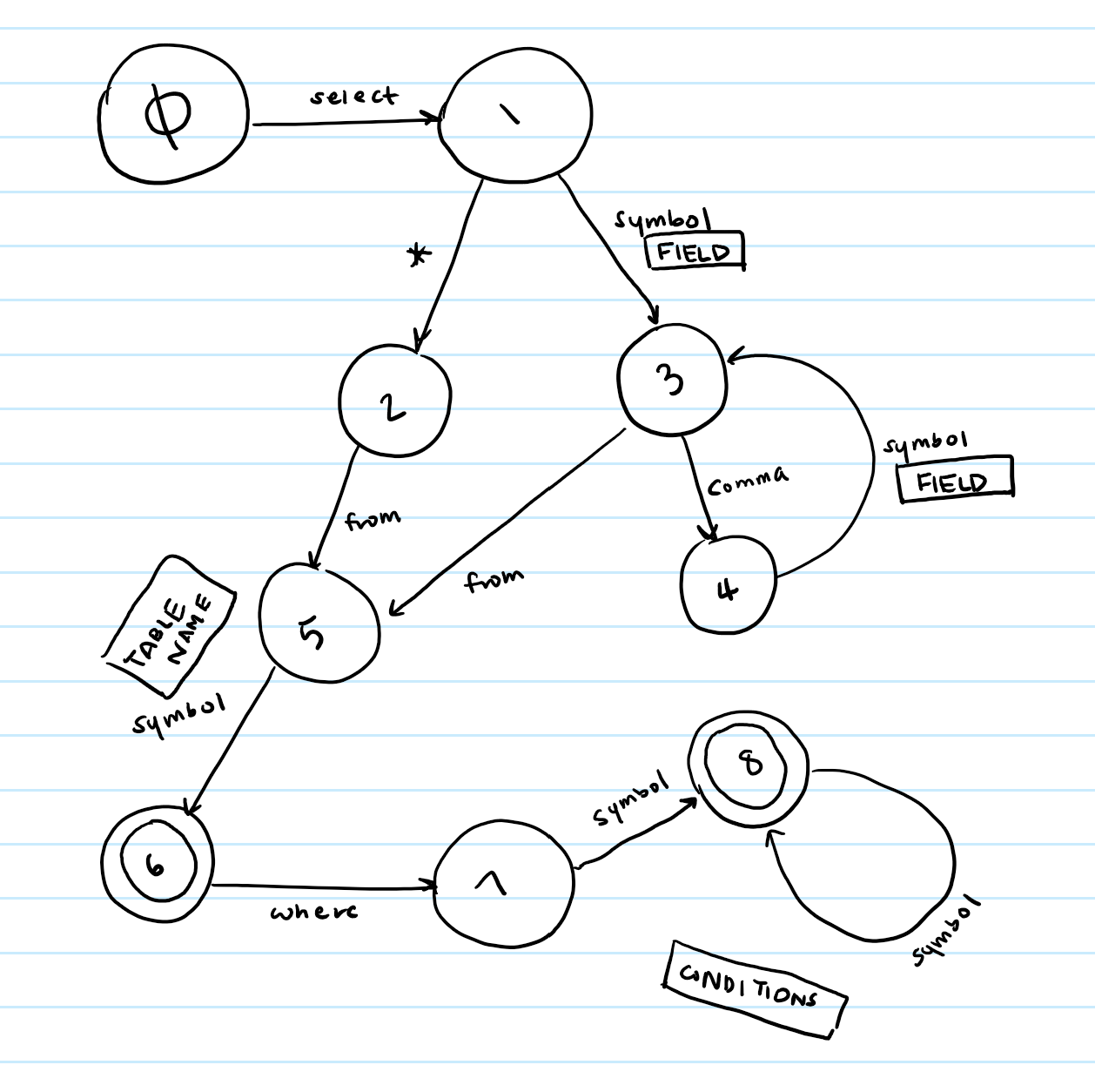
How do we even begin to do that? We use a state machine. Here's my state machine for the select command - please take the time to draw one out on your own. It will make a lot more sense if you do.
Here are some rough drafts of create and insert- again, please draw them out yourself.
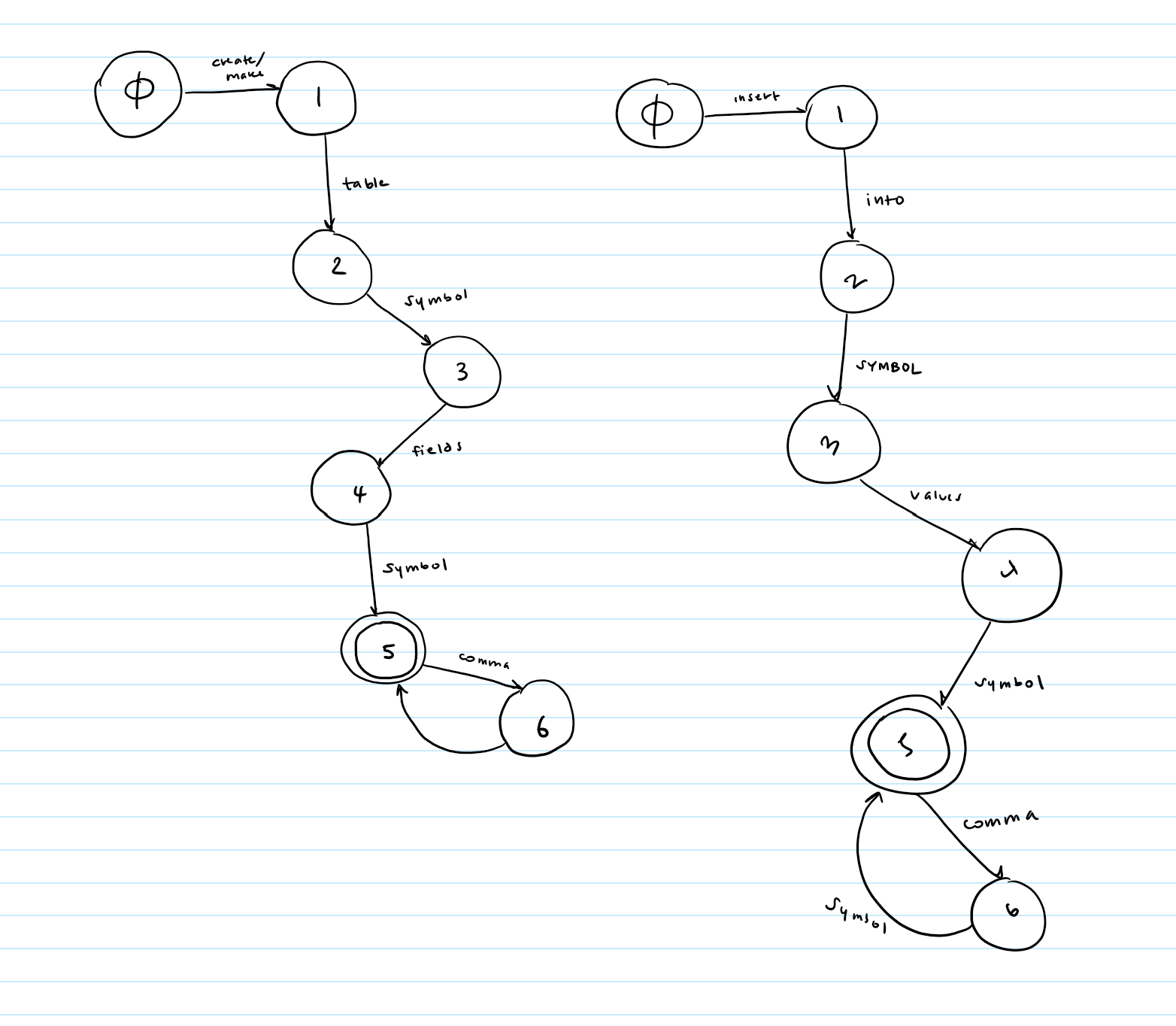
Once you have your state machines drawn, all you'll need to do is implement them into table form, just like you did with string tokenizer. But wait- for string tokenizer, we had each character represent a column. How do have one word represent one column? Ah ha! The ENUM we created before just so happens to have integers associated with each one... what a coincidence. Those integers can act as our columns. But remember to keep the zeroth column free to store success states.
Ok, now that our state machines have been implemented in table form, how on Earth does that help us again? It helps us because being at a state gives us a very specific and important piece of information. For example, take our select state machine:
Say we have just received a token of type SELECT. Ok great. We're now at state 1.
Now, we receive some token of type SYMBOL. What the heck? What does that tell us? Well, let's think about the syntax rules of SQL. What comes after the word select in a SQL command? Fields! Fields come after the word select. Ok, so we now that the token we just received has to be a field name. So we can just add it to our multimap under the key of fields.
So what does the example above tell us? It tells us that our current state lets us know where to insert our token.
That's it. Once you figure out what each state tells you about a token, you know where to insert it, and then just return the final mmap.
Ok, that was a lot. Let's summarize it:
- Use your string tokenizer to break down a sentence into individual words.
- Use an ENUM and a MAP to classify each token type as your sentence is being tokenized.
- String Tokenizer passes each classified token to Parser.
- Parser (which should have its state machine table set up already) takes each token and adjusts its state accordingly.
- As Parser changes states, it checks the current state to see if a token should be inserted into the final mmap output, or just discarded.
- If Parser decides the word is important, it uses the state number to decide where to insert the token in the mmap.
Here's a possible header file. Emphasis on POSSIBLE. Not mandatory.
class Parser
{
public:
    // PURPOSE: constructs parser. set up state machine table.
    Parser();
    // PURPOSE: does what first ctor does, except it also sets the char array c to the buffer
    Parser(char c[]);
    // PURPOSE: tokenizes the buffer string, parses it, and returns the proper mmap
    mmap_ss parse_tree();
    // PURPOSE: sets the buffer to the given string s
    void set_string(string s);
private:
    // all of the below functions are from string tokenizer
    void make_table();
    void init_table();
    void mark_success(int state);
    void mark(int current_state, int col, int next_state);
    void print(int row1, int row2, int c1, int c2);

    // PURPOSE: capacity of the buffer
    const static int CAPACITY = 300;
    // PURPOSE: the string that will be parsed
    char buffer[CAPACITY];
    // the state machine table
    int _table[PARSER_NUM_ROWS][PARSER_NUM_COLS];
};I also created a separate Keywords.h file that contained my ENUM and Keywords struct to have all my keywords accessible to me easily. Here's kind of what it looks like:
enum TOKEN_TYPES { ZERO, CREATE, MAKE, TABLE, FIELDS, INSERT, VALUES, SELECT, STAR,
FROM, WHERE, DROP, COMMA, INTO, SYMBOL, SPACE, QUOTE, RELATIONAL, AND,
OR, UNARY, START_BRACKET, END_BRACKET, UNKNOWN, END };
struct Keywords
{
// PURPOSE: CTOR that "builds" your keyword_map
Keywords()
{
keyword_map["create"] = CREATE;
keyword_map["make"] = MAKE;
keyword_map["="] = RELATIONAL;
keyword_map["<"] = RELATIONAL;
...
}
// PURPOSE: returns true if keyword_map contains key
bool contains(string key) const;
// PURPOSE: returns the value at key in keyword_map
TOKEN_TYPES& operator[](const string& key);
// PURPOSE: the map of keywords to their token types
Map<string, TOKEN_TYPES> keyword_map;
};