Content Type
Article
Article Description
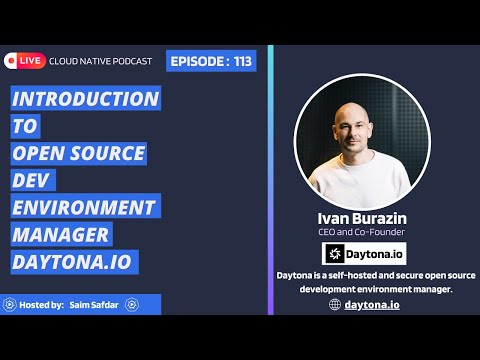
Going through daytona for a long while now, I was unable to really find a content talking about the core of daytona. Finally I landed on this video.
Table of Contents (Sample AI Generated, to be adjusted)
1. Introduction
- Overview of Daytona
- Why development environment management matters
- Key benefits of using Daytona
2. Understanding Daytona’s Core Concept
- What is Daytona?
- How it differs from traditional dev environments
- Open-source and self-hosted advantages
3. Daytona’s Architecture
- Overview of Daytona’s architecture
- Components of a Daytona setup
- How it interacts with cloud/local infrastructure
4. Setting Up Daytona
- Prerequisites for installation
- Installation process (Self-hosted and Cloud-based)
- Basic configuration and initial setup
5. Creating and Managing Development Environments
- Using
daytona create to spin up environments
- Managing multiple development instances
- Prebuilds and instant startup features
6. Integration with IDEs and Git Providers
- Supported IDEs (VS Code, JetBrains, Vim, Web IDE)
- Connecting Daytona to GitHub, GitLab, and Bitbucket
- How Daytona streamlines code collaboration
7. Security and Access Control
- VPN connection and secure access
- Reverse proxy and firewall considerations
- Managing authentication and authorization
8. Scaling with Daytona
- How Daytona supports large-scale development teams
- Running multiple environments simultaneously
- Eliminating configuration drift and ensuring consistency
9. Performance Optimization and Troubleshooting
- Optimizing resource usage
- Debugging common issues in Daytona
- Logging and monitoring Daytona environments
10. Comparison with Other Dev Environment Managers
- How Daytona compares with Gitpod, GitHub Codespaces, and Dev Containers
- Unique advantages of Daytona over competitors
11. Real-World Use Cases of Daytona
- Companies and teams using Daytona
- How it improves developer onboarding
- Case studies of Daytona in action
12. Conclusion
- Summary of key points
- Who should use Daytona?
- Future roadmap and community involvement
13. Additional Resources
- Official Daytona documentation
- Community and support channels
- Further reading and tutorials
I am currently running a Daytona local community here and it has been stressful not being able to have a "one to go" guide for dayton to give the community.
Target Audience
All
Search Intent Objective
What You’ll Learn
Your Goals:
- Understand how Daytona works – Learn its core design, how it’s built, and why it’s better than old-school setups.
- See how it’s used in real projects – Discover how teams use Daytona to simplify coding workflows and avoid “it works on my machine” issues.
- Compare it to other tools – See how Daytona stacks up against options like GitHub Codespaces or Gitpod.
By the End, You’ll Know How To:
- Explain why Daytona matters – What makes it different? Why do consistent setups save time?
- Set up Daytona – Create environments, link them to Git, and use features like Dev Containers.
- Use best practices – Speed up onboarding, keep environments secure, and scale smoothly.
- Test its performance – Measure startup speed, resource use, and workflow improvements.
- Plan next steps – Decide if Daytona fits your team and how to start using it.
Why Read This?
The article explains Daytona’s basics, real-world uses, and how it compares to similar tools. No fluff—just what you need to decide if it’s right for your team.
References/Resources
Examples
I started a sample content (draft on dev.to).
Special Instructions
No response

Content Type
Article
Article Description
Going through daytona for a long while now, I was unable to really find a content talking about the core of daytona. Finally I landed on this video.
Table of Contents (Sample AI Generated, to be adjusted)
1. Introduction
2. Understanding Daytona’s Core Concept
3. Daytona’s Architecture
4. Setting Up Daytona
5. Creating and Managing Development Environments
daytona createto spin up environments6. Integration with IDEs and Git Providers
7. Security and Access Control
8. Scaling with Daytona
9. Performance Optimization and Troubleshooting
10. Comparison with Other Dev Environment Managers
11. Real-World Use Cases of Daytona
12. Conclusion
13. Additional Resources
I am currently running a Daytona local community here and it has been stressful not being able to have a "one to go" guide for dayton to give the community.
Target Audience
All
Search Intent Objective
What You’ll Learn
Your Goals:
By the End, You’ll Know How To:
Why Read This?
The article explains Daytona’s basics, real-world uses, and how it compares to similar tools. No fluff—just what you need to decide if it’s right for your team.
References/Resources
Examples
I started a sample content (draft on dev.to).
Special Instructions
No response