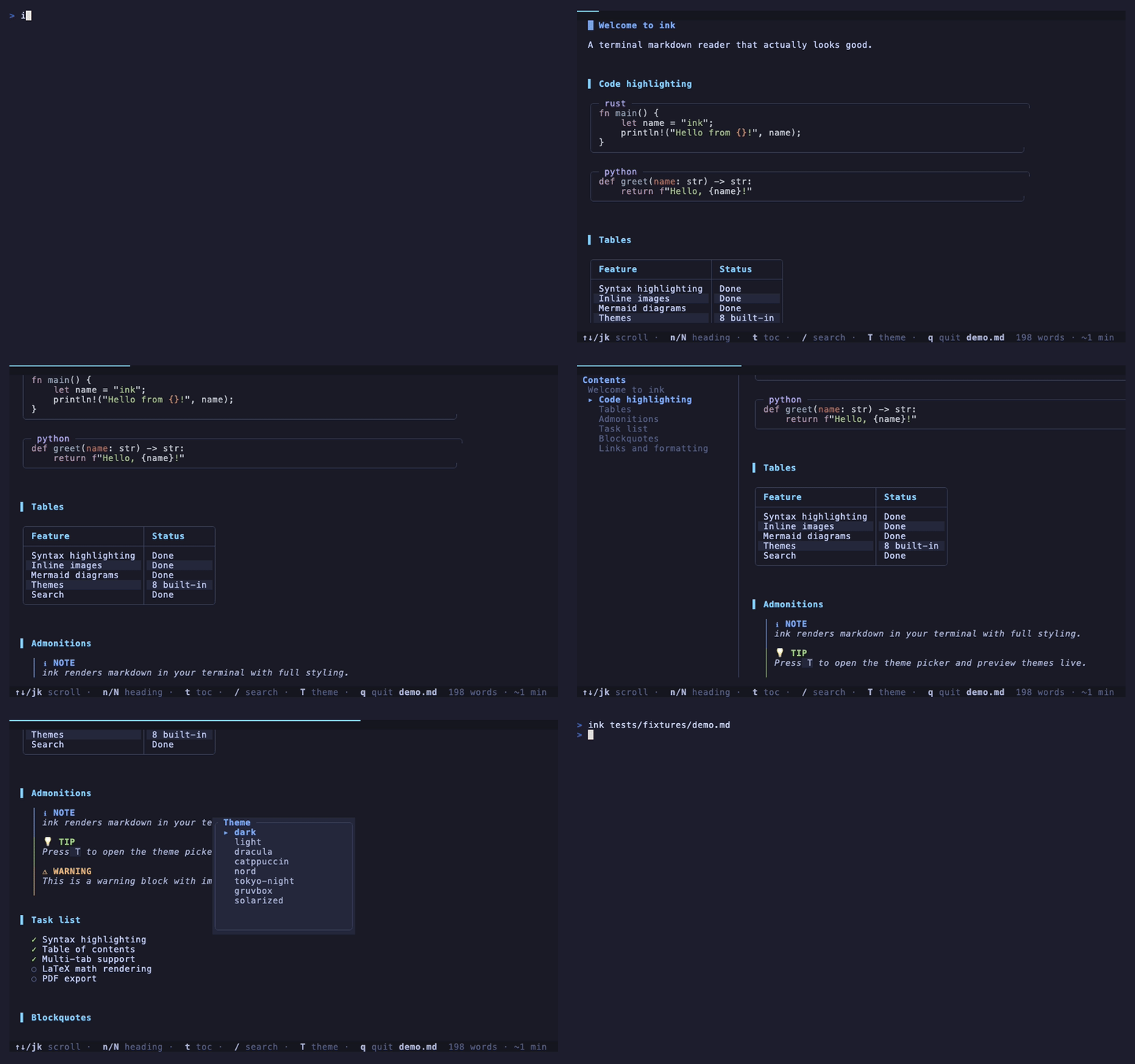
A terminal markdown reader that actually looks good.



ink renders markdown in your terminal with syntax highlighting, inline images, mermaid diagrams, themes, tabs, search, and a table of contents. It's fast on large documents, safe with untrusted files, and works as both an interactive reader and a bat-style pager. One binary. No dependencies. Built in Rust.
curl -fsSL https://raw.githubusercontent.com/borghei/ink/main/install.sh | shbrew tap borghei/tap
brew trust borghei/tap # recent Homebrew requires trusting third-party taps
brew install inkcargo install ink-mdscoop bucket add borghei https://github.com/borghei/scoop-bucket
scoop install inkGrab the latest binary for your platform from the releases page. Available for Linux (amd64, arm64), macOS (amd64, arm64), and Windows (amd64).
git clone https://github.com/borghei/ink.git
cd ink
cargo build --release
# binary is at ./target/release/ink# Read a file
ink README.md
# Browse all markdown files in a directory
ink .
# Read from a URL
ink https://raw.githubusercontent.com/borghei/ink/main/README.md
# Pipe from stdin
cat notes.md | ink
# Plain output (no TUI, pipe-friendly)
ink --plain README.mdHeadings, bold, italic, strikethrough, links, blockquotes, lists, task lists, tables, footnotes, horizontal rules — all rendered with proper styling and colors.
Language-aware highlighting for every major language. Code blocks get clean borders with the language label shown at the top.
Images in your markdown render directly in the terminal. On terminals with a graphics protocol (Kitty, iTerm2, WezTerm, Ghostty, or Sixel) ink draws real pixels — auto-detected at startup; everywhere else it falls back to Unicode half-blocks, which work in any true-color terminal. Images scroll with the document and clip cleanly at the edges. If an image can't load, ink shows a placeholder instead of crashing.
Pick a renderer explicitly with --image-protocol <auto|kitty|iterm2|sixel|halfblocks> (default auto).
Remote (http/https) images are not fetched by default — a document you didn't write shouldn't be able to phone home or probe your network. Pass --remote-images to enable them (private, loopback, and cloud-metadata addresses stay blocked even then).
Flowcharts, sequence diagrams, pie charts, and Gantt charts rendered as ASCII art. No external tools needed.
[!NOTE], [!TIP], [!IMPORTANT], [!WARNING], and [!CAUTION] blocks render with distinct colors and icons.
[[page]] and [[page|display text]] syntax works out of the box. Great for browsing Obsidian vaults and personal wikis.
Run ink with no arguments or point it at a directory. You'll get an interactive file picker that lists every .md file, with filtering and keyboard navigation.
Open multiple files at once:
ink README.md CHANGELOG.md docs/guide.mdSwitch between them with Tab and Shift+Tab.
Press / to search within a document. Matches highlight inline; press Enter to lock in the search, then n/N to cycle forward and backward through results. Esc clears the highlights.
Press f to label every link on screen with a letter. Press that letter to open web and mail links in your browser, or to follow a relative .md link right inside ink.
Press ? any time for a popup listing every active keybinding — including your own overrides.
Press t to toggle a sidebar showing every heading in the document. Tracks your position as you scroll.
Dark, Light, Dracula, Catppuccin, Nord, Tokyo Night, Gruvbox, and Solarized. Press T to open the theme picker and preview each one live.
Auto-detects your terminal background and picks dark or light mode by default.
Inline $E=mc^2$ and block $$...$$ math render in code style, and :emoji: shortcodes resolve to their glyph (:rocket: → 🚀).
Split any markdown file into slides on --- separators and navigate with ←/→/Space:
ink --slides deck.mdPoint ink --plain at a long document on an interactive terminal and it pages the output through $PAGER (default less -R) — a drop-in markdown replacement for cat/less. Piped or redirected output prints straight through, so it stays friendly for scripts, fzf previews, and git. Use --no-pager to always print directly.
Honors NO_COLOR, and automatically downgrades 24-bit colors to the 256-color palette on terminals that don't advertise truecolor.
Auto-reload when the file changes on disk. Edit in another terminal, see the rendered view update within ~100ms. Scroll position is preserved.
ink --watch draft.mdWorks with editors that save by replacing the inode (vim, IntelliJ) — ink watches the parent directory, not the file handle.
# Heading structure
ink outline README.md

# Word count, reading time, element counts
ink stats README.md

# Diff two markdown files
ink diff old.md new.md| Key | Action |
|---|---|
j / k / ↑ / ↓ |
Scroll up/down |
Space / Page Down |
Page down |
Page Up |
Page up |
G / End |
Jump to end |
Home |
Jump to start |
Ctrl+f / Ctrl+b |
Page down / up |
Ctrl+d / Ctrl+u |
Half-page down / up |
n / N |
Next / previous heading (cycles search matches after a search) |
/ |
Search |
f |
Link-hint mode (open/follow links by letter) |
t |
Toggle table of contents |
T |
Theme picker (choice is saved to config) |
? |
Help overlay |
Enter |
Follow first visible link |
[ / ] |
Navigation back / forward |
Tab / Shift+Tab |
Next / previous tab |
Shift+B |
Back to file browser (when launched via browser) |
q / Esc / Ctrl+C |
Quit ink (first press clears an active search) |
Pick a preset or override individual bindings in ~/.config/ink/config.toml:
[keybindings]
preset = "emacs"   # default | vim | emacs

[keybindings.bindings]
# Per-action overrides, applied on top of the preset.
toggle_toc = ["ctrl-t"]
The emacs preset binds Ctrl+N/Ctrl+P (line nav), Ctrl+V/Alt+V (page nav), Ctrl+A/Ctrl+E (home/end), Ctrl+S (search), Ctrl+F/Ctrl+B (next/prev heading), and Ctrl+X Ctrl+C (chord exit).
Two-key chord bindings work — write them with a space: "ctrl-x ctrl-c".
Run ink keybindings to print the active map. Run ink config init to drop a commented starter config in the right place for your platform.
Create ~/.config/ink/config.toml:
# Default theme (dark, light, dracula, catppuccin, nord, tokyo-night, gruvbox, solarized)
theme = "catppuccin"

# Max rendering width in columns
width = 90

# Line spacing: compact, normal, relaxed
spacing = "normal"

# Show table of contents on startup
toc = false

# Show YAML/TOML frontmatter
frontmatter = false

# Behavior
[behavior]
# Set true to restore the old "return to file browser after closing a doc" behavior
browser_loop = false

# Set false to let your terminal handle the mouse (click-to-open links, text
# selection) instead of ink capturing it for wheel-scroll. Default: true
mouse_capture = trueDrop a .toml file in ~/.config/ink/themes/ and use it by name:
ink --theme mytheme README.mdEvery color is customizable — headings, code, links, blockquotes, admonitions, status bar, and more. Check any built-in theme in src/theme/builtin.rs for the full list of color keys.
ink shell-setup bash # or zsh, fishPrints config snippets you can add to your shell profile — aliases, fzf preview, git pager setup.
ink completions zsh > ~/.zfunc/_ink        # bash | zsh | fish | powershell | elvish
ink man > /usr/local/share/man/man1/ink.1 # man page (troff)ink [OPTIONS] [FILE|URL]...
Options:
-t, --theme <THEME> Color theme [default: auto]
-w, --width <WIDTH> Max width (columns, or: narrow, wide, full)
-s, --slides Presentation mode
-p, --plain Plain output (no TUI)
--watch Watch file for changes
--toc Show table of contents on startup
--no-images Disable image rendering
--remote-images Allow fetching remote (http/https) images
--image-protocol <P> auto | kitty | iterm2 | sixel | halfblocks
--list-themes List available themes and exit
--no-pager Never page --plain output, even on a TTY
--frontmatter Show YAML/TOML frontmatter
--spacing <MODE> Line spacing: compact, normal, relaxed
Subcommands:
outline Show document heading structure
stats Show document statistics
diff Diff two markdown files
shell-setup Print shell integration snippets
completions Generate shell completions
man Generate a man page
config Config helpers (init, path)
keybindings Print the active keybinding map
| Feature | ink | glow | mdcat | frogmouth |
|---|---|---|---|---|
| Interactive TUI | Yes | Yes | No | Yes |
| Multi-tab | Yes | No | No | No |
| In-document search | Yes | No | No | No |
| Table of contents | Yes | No | No | Yes |
| Inline images (graphics protocols) | Yes | No | Yes | No |
| Inline images (half-block fallback) | Yes | No | No | No |
| Mermaid diagrams | Yes | No | No | No |
| Admonitions | Yes | No | No | No |
| Wikilinks | Yes | No | No | No |
| File browser | Yes | Yes | No | Yes |
| Watch mode | Yes | No | No | No |
| Presentation mode | Yes | No | No | No |
| Pager mode | Yes | Yes | No | No |
| Shell completions + man page | Yes | Yes | Yes | No |
| Math + emoji | Yes | No | No | No |
| Themes | 8 | 2 | 0 | 0 |
| Single binary | Yes | Yes | Yes | No |
Contributions are welcome. Check out CONTRIBUTING.md for guidelines.
Free to use, modify, and distribute. Cannot be sold — not the original, not forks, not derivatives. See LICENSE for the full text.
Made by borghei — who got tired of reading raw markdown like a caveman.