This project is currently in the early stages of development.
The development of visual novel engines has often been hampered by clunky interactive experiences and limited team collaboration capabilities; NarraLeaf Studio offers a more intuitive solution.
NarraLeaf Studio is an IDE designed for creating visual novels within the NarraLeaf ecosystem. It integrates story writing, UI editing, asset management, and team collaboration into a unified desktop workspace, moving the development process away from a reliance on scattered scripts, configuration files, and manual debugging workflows.
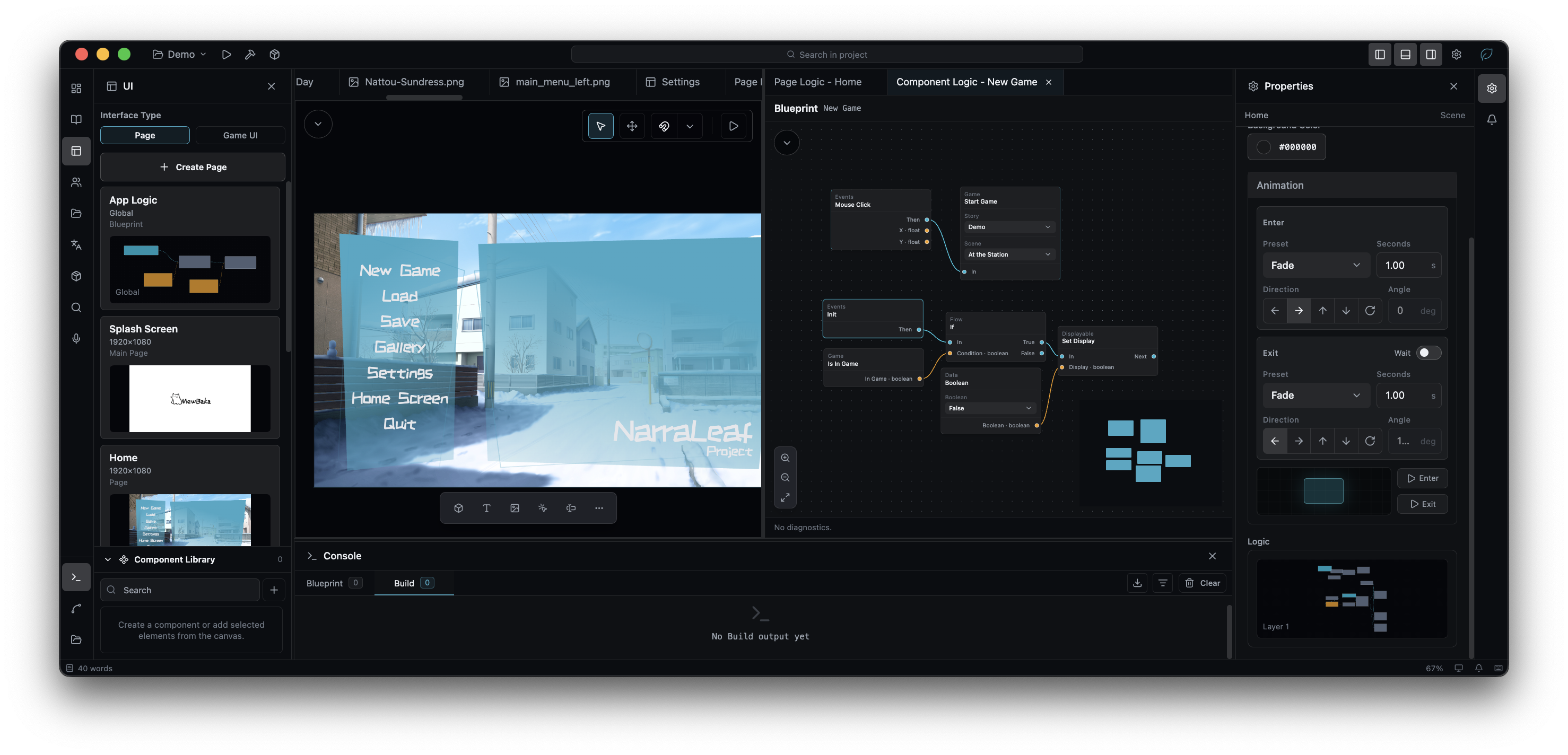
Unlike traditional lightweight editors, NarraLeaf Studio does not require users to write code or adhere to rigid interface templates to create a game. Instead, it features:
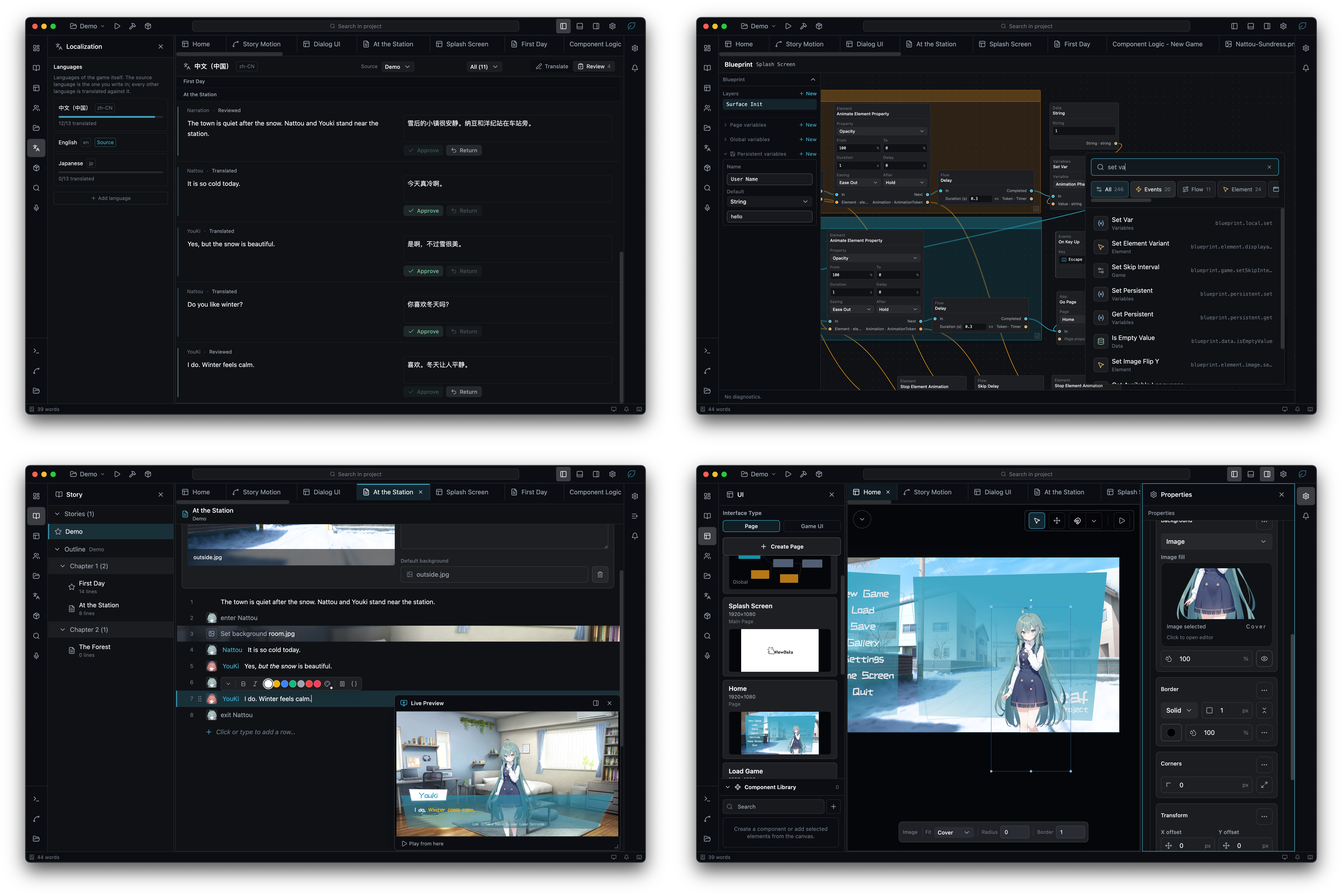
- An interface editor similar to prototyping tools, paired with a visual logic system
- An easy-to-learn, command-based story editing system that requires no knowledge of external programming languages
- WYSIWYG application previews, along with cross-platform production and packaging capabilities
- Story editor. A scene is a list of rows. Typing writes dialogue, a slash at the start of a row writes one of fifty-one commands, and every value is checked as the row is typed. The flow view draws the paths the story can take. Chinese spellings of every command parse.
- Screens and blueprints. The game's own screens are built by placing widgets on a surface, and over six hundred blueprint nodes decide what they do. Widgets can be saved as reusable components, and their properties bound to values that change while the game runs.
- Version control. History is kept inside the project folder, and differences are reported as content rather than as files: which scenes, rows, characters and assets changed. Built on Lore, with Studio's own difference view and conflict interface.
- NarraLeaf Team. A collaboration server deployed on your own network or a remote container, holding the projects a team works on together, with their versions and discussion. In a live session one author hosts a project and the others join it from the launcher; stories, characters, translations, voice lines, assets, screens and blueprints are edited together, and each line or node shows who is working on it. Whatever a session does not carry stays read-only until it ends.
- Asset sets. One library entry standing for several files that differ by language or by build variant. A story row names the set, and the game uses the file that matches.
- Build variants. One project, several editions. A cut point row ends a variant's story there, and everything written after it, including the assets only those rows used, is left out of that variant's package.
- Patches. Later changes to the story, the pages, the translations, the voice lines and the assets, delivered to an installed game without reinstalling it.
- Builds. Windows, macOS, Linux, Web, Android and iOS, in eight formats, with each platform's icons generated from one image. Studio also builds without an interface.
- Plugins. Story commands, blueprint nodes, widgets, tests and panels, appearing in the same places as the built-in equivalents. What a plugin needs is approved when it is installed.
For game compatibility, see docs/game-compatibility.md.
Studio builds a project without an interface, for a machine that has nobody at the keyboard:
narraleaf-studio --build <project> --build-variant main --build-target windows --build-format nsis --build-output ./out --build-report ./out/build-report.json--build takes a project folder, or a name from the recent list. One invocation produces one
variant for one platform, in one format. The window never appears and never takes focus.
| Flag | Default |
|---|---|
--build <project> |
required |
--build-variant <name> |
main, the release variant |
--build-target <platform> |
the host platform |
--build-format <format> |
the platform's first format |
--build-arch <arch> |
the host's architecture for a host build, x64 for a cross build |
--build-output <folder> |
<project>/dist |
--build-report <file> |
no report file |
--build-allow-unsigned |
off |
The exit code is the contract:
| Code | Meaning |
|---|---|
0 |
The build wrote its artifacts. |
1 |
The build failed. |
2 |
The command line could not be acted on. Nothing was opened. |
3 |
A check refused the project, so the build never started. |
4 |
Studio could not run the build. This says nothing about the project. |
Standard output carries the build console, in English. --build-report writes a JSON file holding
the outcome, the exit code, every finding, the artifacts and their sizes, and the whole log; its
values are fixed identifiers, so nothing that reads it depends on a language.
A target that can carry a code signature and has no signing credential configured is refused, and
--build-allow-unsigned is how a caller states that it accepts an unsigned artifact. The report's
signing block says whether the platform can carry a signature at all and whether this build did.
The report's experimental block answers the same way for experimental mode, which a development
launch enters with --experimental and one --x-<id> flag per condition. state is off, on or
refused, and conditions lists what the mode changed about this build — a build whose list holds
debuggable-build ships without asar integrity validation and is not one to distribute. Nothing
about the artifact records this, so the report is where a job finds out which kind it has.
A launch that asks for the mode and cannot have it is refused rather than built: a packaged Studio
never enters experimental mode, a --x- flag without --experimental applies to nothing, and a
--x- flag that names no condition asked for something that was never going to happen. All three
would otherwise hand back the opposite of what was asked for, with nobody there to read the warning.
The exit code is 2 and the report's experimental.refusal says which of the three it was.
NarraLeaf Studio is open source, with one exception: an optional asset-protection component that is not open source. For details, see docs/asset-protection.md.
yarn dev
yarn dev --cdp --cdp-port=9222
yarn stop
--cdp enables the Electron Chrome DevTools Protocol endpoint during development. --cdp-port is optional and defaults to 9222; the main process ignores CDP flags outside development mode.
yarn stop ends the session yarn dev started — the dev server on port 5588 and the Electron app it spawned. Only this checkout's processes are stopped; anything else holding those ports is reported instead of killed (--force overrides, --dry-run previews). Reach for it when yarn dev reports that another session owns the port, which it refuses to start alongside.
yarn lint          # typecheck, five projects
yarn lint:oxc      # oxlint, type-aware
yarn style:ratchet # design-system debt counter
yarn test
yarn lint:oxc runs the same type-check yarn lint does, through the TypeScript 7
preview oxlint type-checks with, and adds the lint rules on top. Everything in the
correctness category is a warning today and there are a few hundred of them, almost
all React effect and ref rules — so the step fails only on a type error. Raising them
to errors is a decision for when that backlog is worked down.
yarn format runs oxfmt over the whole repository, which currently rewrites nearly
every file: the style in .oxfmtrc.json is agreed but has never been applied. Do not
run it as part of ordinary work — the reformat is meant to land as one mechanical
commit, at a moment when little else is in flight, together with a
.git-blame-ignore-revs entry. yarn format:check reports the same thing without
writing.